Category: High Availability & DR

  • SP_Configure

    Sp_Configure procedure is used to display or change the SQL Server setting. Once you execute the SP_Configure procedure it will display the below columns in the output.

    name – Name of the configuration parameter
    minimum – Minimum value setting that is allowed
    maximum – Maximum value that is allowed
    config_value – value which currently configured
    run_value – value which currently running

    How to update the configuration value?
    Here I will show you how to enable the XP_CmdShell using SP_Configure. Please note don’t update configuration values until you are sure, otherwise it will affect the your SQL Server performance and behavioral.

    --XP_Cmdshell is an andvanced option, enbale the advanced option
    EXEC sp_configure 'show advanced options', 1
    GO
    --Enable the advance option
    RECONFIGURE
    GO
    --enable the xp_cmdshell
    EXEC sp_configure 'xp_cmdshell', 1
    GO
    --Reconfigure the xp_cmdshell value
    RECONFIGURE
    GO
    

    What is the difference between Config_Value and Run_Value?

    When we change the Configuration Parameter value as above it will update the Config_Value filed only, but wouldn’t be in effect until you run reconfigure command. Once the reconfigure command execute or SQL Server restarted, SQL Server will run as per the new configured value.

    You can get the description of the configuration parameters from books online or you can query sys.configurations and check for the description column.

    select
    *
    from
    sys.configurations

    Output of the Sp_Configure

    Name

    Minimum Maximum Value Run Value

    access check cache bucket count

    0

    16384

    0

    0

    access check cache quota

    0

    2147483647

    0

    0

    Ad Hoc Distributed Queries

    0

    1

    0

    0

    affinity I/O mask

    -2147483648

    2147483647

    0

    0

    affinity mask

    -2147483648

    2147483647

    0

    0

    Agent XPs

    0

    1

    1

    1

    allow updates

    0

    1

    0

    0

    awe enabled

    0

    1

    0

    0

    backup compression default

    0

    1

    0

    0

    blocked process threshold (s)

    0

    86400

    0

    0

    c2 audit mode

    0

    1

    0

    0

    clr enabled

    0

    1

    0

    0

    common criteria compliance enabled

    0

    1

    0

    0

    cost threshold for parallelism

    0

    32767

    5

    5

    cross db ownership chaining

    0

    1

    0

    0

    cursor threshold

    -1

    2147483647

    -1

    -1

    Database Mail XPs

    0

    1

    0

    0

    default full-text language

    0

    2147483647

    1033

    1033

    default language

    0

    9999

    0

    0

    default trace enabled

    0

    1

    1

    1

    disallow results from triggers

    0

    1

    0

    0

    EKM provider enabled

    0

    1

    0

    0

    filestream access level

    0

    2

    0

    0

    fill factor (%)

    0

    100

    0

    0

    ft crawl bandwidth (max)

    0

    32767

    100

    100

    ft crawl bandwidth (min)

    0

    32767

    0

    0

    ft notify bandwidth (max)

    0

    32767

    100

    100

    ft notify bandwidth (min)

    0

    32767

    0

    0

    index create memory (KB)

    704

    2147483647

    0

    0

    in-doubt xact resolution

    0

    2

    0

    0

    lightweight pooling

    0

    1

    0

    0

    locks

    5000

    2147483647

    0

    0

    max degree of parallelism

    0

    64

    0

    0

    max full-text crawl range

    0

    256

    4

    4

    max server memory (MB)

    16

    2147483647

    2147483647

    2147483647

    max text repl size (B)

    -1

    2147483647

    65536

    65536

    max worker threads

    128

    32767

    0

    0

    media retention

    0

    365

    0

    0

    min memory per query (KB)

    512

    2147483647

    1024

    1024

    min server memory (MB)

    0

    2147483647

    0

    0

    nested triggers

    0

    1

    1

    1

    network packet size (B)

    512

    32767

    4096

    4096

    Ole Automation Procedures

    0

    1

    0

    0

    open objects

    0

    2147483647

    0

    0

    optimize for ad hoc workloads

    0

    1

    0

    0

    PH timeout (s)

    1

    3600

    60

    60

    precompute rank

    0

    1

    0

    0

    priority boost

    0

    1

    0

    0

    query governor cost limit

    0

    2147483647

    0

    0

    query wait (s)

    -1

    2147483647

    -1

    -1

    recovery interval (min)

    0

    32767

    0

    0

    remote access

    0

    1

    1

    1

    remote admin connections

    0

    1

    0

    0

    remote login timeout (s)

    0

    2147483647

    20

    20

    remote proc trans

    0

    1

    0

    0

    remote query timeout (s)

    0

    2147483647

    600

    600

    Replication XPs

    0

    1

    0

    0

    scan for startup procs

    0

    1

    0

    0

    server trigger recursion

    0

    1

    1

    1

    set working set size

    0

    1

    0

    0

    show advanced options

    0

    1

    1

    1

    SMO and DMO XPs

    0

    1

    1

    1

    SQL Mail XPs

    0

    1

    0

    0

    transform noise words

    0

    1

    0

    0

    two digit year cutoff

    1753

    9999

    2049

    2049

    user connections

    0

    32767

    0

    0

    user options

    0

    32767

    0

    0

    xp_cmdshell

    0

    1

    1

    1

  • Basics of Replication Troubleshooting

    There are many scenarios where you have been alerted for the replication failure and you have to troubleshoot the issue. In this article I will guide you what should be your approach to get the detailed error message and transaction details in replication.

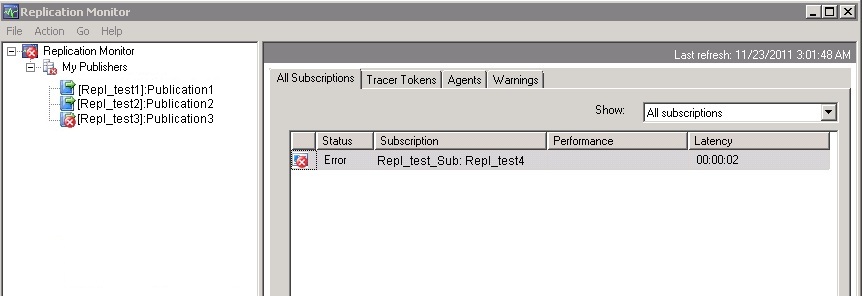
    First check the replication monitor and click on the failed publisher. Next step is double click on the failed subscriber from All Subscriptions list.

    Now next step is click on the error and check its description.
    Error :
    Command attempted:
    if @@trancount > 0 rollback tran
    (Transaction sequence number: 0x0000044100002D93000100000000, Command ID: 1)

    From the above error message we have to identify which command is failed to execute on the subscriber.

    To get the exact command, find out the distributer server and distribution database for the failed publisher.

    Once you get the distribution database server, execute the below query against the distribution DB.

    use distribution
    go
    SELECT * FROM msrepl_commands
    WHERE xact_seqno = 0x0000044100002D93000100000000
    AND command_id = 1
    

    Once you execute the above query against the distribution database, you will get the more information about the error, for example Publisher database ID, Article ID and much more…

    We have to use the above details, to get the exact command using either SP_BROWSEREPLCMDS (If CLR is enabled) or you can cast the command column in msrepl_commands table.

    We will check both the alternatives.

    Using SP_BROWSEREPLCMDS
    Please note CLR must be enabled for to use this procedure.

    EXEC SP_BROWSEREPLCMDS
    @xact_seqno_start = '0x0000044100002D930001',
    @xact_seqno_end = '0x0000044100002D930001',
    @publisher_database_id = 1033,
    @article_id = 12,
    @command_id= 1
    

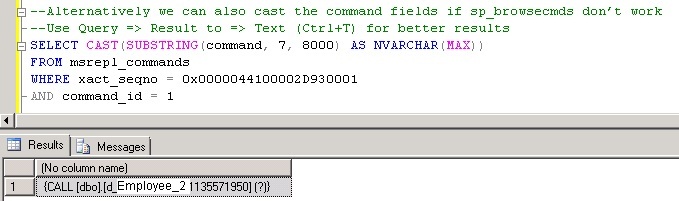
    By casting command column in msrepl_commands table

    Please note if you want to see the better output use the Result to Text as output in SSMS (CTRL + T)

    SELECT CAST(SUBSTRING(command, 7, 8000) AS NVARCHAR(MAX))
    FROM msrepl_commands
    WHERE xact_seqno = 0x0000044100002D930001
    AND command_id = 1
    

    Now you got the exact SQL Command. As a next step check the objects from both the publisher and the subscriber to see the violation of the keys or do the data comparisons etc.

  • Different ways to monitor Log Shipping for SQL Server databases

    Problem
    Log shipping has been an option for creating a fail over server for SQL Server for quite some time. In this tip, we look at different ways that you can monitor the status of your log shipped databases.

    Solution
    http://www.mssqltips.com/sqlservertip/2553/different-ways-to-monitor-log-shipping-for-sql-server-databases/

  • Script to Enable/Disable Database for Replication

    You can enable the database for replication using below script.

    use master
    exec sp_replicationdboption @dbname = 'sqldbpool',
    @optname = 'publish',
    @value = 'true'
    go
    

    If you have restore the database on test environment and you are getting the error that “Database is part of Replication”, you can clear/disable it by executing below query.

    use master
    exec sp_replicationdboption @dbname = 'sqldbpool',
    @optname = 'publish',
    @value = 'false'
    go
    
  • Useful queries while troubleshooting Database Mirroring

    Useful queries while troubleshooting Database Mirroring

    Query to check the associated ports with DB Mirroring

    SELECT type_desc, port FROM sys.tcp_endpoints;
    GO
    

    Query to check the state of the DB Mirroring

    SELECT state_desc FROM sys.database_mirroring_endpoints
    GO
    

    Query to check the service account connect permission on the DB Mirror endpoints

    SELECT 'Metadata Check';
    SELECT EndPnt.name, SvrPerm.STATE,
       CONVERT(nvarchar(38), suser_name(SvrPerm.grantor_principal_id))
        AS GRANTOR,
       SvrPerm.TYPE AS PERMISSION,
       CONVERT(nvarchar(46),suser_name(SvrPerm.grantee_principal_id))
        AS GRANTEE
       FROM sys.server_permissions SvrPerm, sys.endpoints EndPnt
       WHERE SvrPerm.major_id = EndPnt.endpoint_id
       ORDER BY Permission, grantor, grantee;
    GO
    

    Query to check the DB Mirror timeout and resetting the DB Mirror timeout

    SELECT mirroring_connection_timeout
    FROM
    sys.database_mirroring
    GO
    
    ALTER DATABASE SQLDBPOOL SET PARTNER TIMEOUT 15
    GO