Category: SQL Server 2008

  • SQLWB.exe (SQL2k5) and SSMS.exe(SQL2K8)

    SQLWB (sqlwb.exe) /SSMS(SSMS.exe) is the executable file that launches SQL Server Management Studio. I am usually using it to launch the SQL Server management studio instead of navigating through Start -> All Programs -> SQL Server 2005 -> SQL Server Management Studio.

    Above command will launch the SQL Server 2005 Management Studio. You can launch the SQL2k8 management studio using SSMS.exe

    You can also pass below list of argument with it, I am executing below command to see the list of parameters.

    c:\sqlwb.exe -?

  • Steps to Check SQL Server Services Status

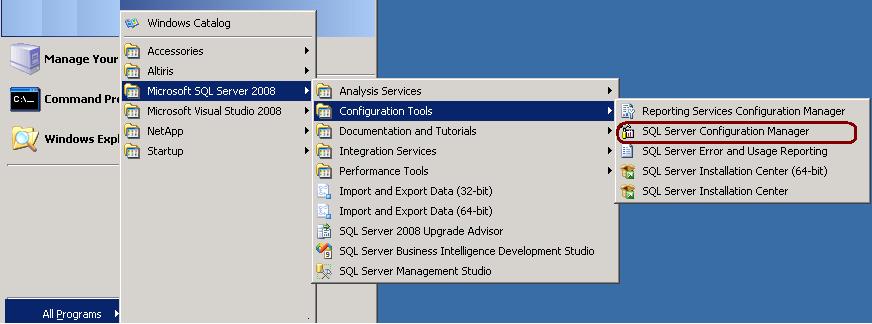
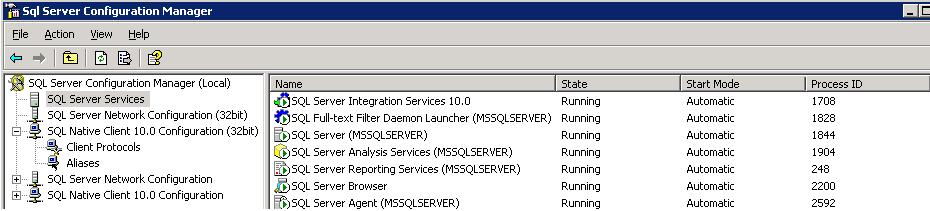
    Go to All Programs -> Microsoft SQL Server 2008 -> Configuration Tools -> SQL Server Configuration Manager -> SQL Server Services

  • DMVs for SQL Server Cluster

    sys.dm_os_cluster_nodes
    This view returns a row for each node in the failover cluster instance configuration. If the current instance is a failover clustered instance, it returns a list of nodes on which this failover cluster instance has been defined.

    sys.dm_io_cluster_shared_drives
    This view returns the drive name of each of the shared drives if the current server instance is a clustered server. If the current server instance is not a clustered instance it returns an empty rowset.

    Permission
    You must have VIEW SERVER STATE permission for the SQL Server instance.


    SELECT *
    FROM   sys.dm_os_cluster_nodes
    –OR
    SELECT *
    FROM   Fn_virtualservernodes()

    –Shared Drives
    SELECT *
    FROM   sys.dm_io_cluster_shared_drives 

  • Can we restore SQL Server 2008 database to SQL Server 2005?

    No we can’t restore it. SQL Server is not allowing the restore of higher version databases to a lower version. It is not possible to restore a database from a backup of a newer version to older version as database backups are not backward compatible.

    You can do below workaround to transfer higher version database to lower version.

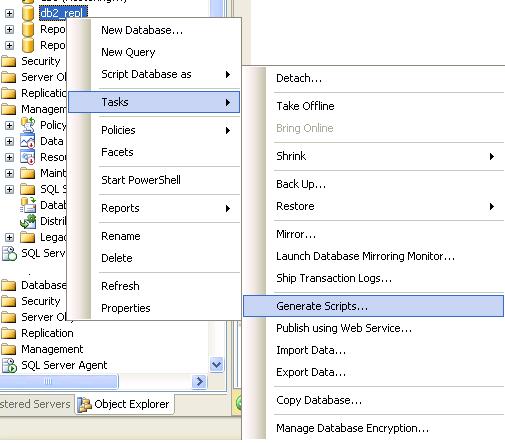
    1. Generate database script. Right Click database -> Tasks -> Generate Scripts

    2. Execute the script on the lower version server and it will create the database and its objects

    3. Transfer data between these two databases using DTS/SSIS

  • Enabling IntelliSense and Refreshing IntelliSense Data in SSMS 2008

    Dear Readers,

    You can check out IntelliSense Article on MSSQLTips.com.

    Click Me to read…

     
    Thanks,
    Jugal Shah