Category: SQL Server 2011 (Denali)

  • Different ways to check the SQL Server Instance Port number

    Problem: If there are multiple SQL instances running on the same computer, it is difficult to identify the instance port number. You can use the below solution to find the instance specific port numbers.

    Solution: You can check the list of port number used by the SQL Server instances using one of the below way.

    Soln 1# Using SQL Server Configuration Manager

    • Go to SQL Server Configuration Manager
    • Select Protocols for SQL2005/2008 under SQL server Network Configuration
    • Right click on TCP/IP and select Properties
    • Select the IP Addresses-tab
    • In the section IP ALL, you can see the ports

    Soln 2#From Registry Values
    SQL Server 2005
    Type the regedit command in Run window and check the below registry values.HKEY_LOCAL_MACHINE\SOFTWARE\Microsoft\Microsoft SQL Server\MSSQL.#

    HKEY_LOCAL_MACHINE\SOFTWARE\Microsoft\Microsoft SQL Server\ MSSQL.#\ MSSQLServer\ SuperSocketNetLib\TCP\IPAll

    SQL Server 2008
    Default instance
    HKEY_LOCAL_MACHINE\SOFTWARE\Microsoft\Microsoft SQL Server\MSSQL10.MSSQLSERVER\MSSQLServer\SuperSocketNetLib\TCP\IPAll

    Named instance
    HKEY_LOCAL_MACHINE\SOFTWARE\Microsoft\Microsoft SQL Server\MSSQL10.(InstanceName)\MSSQLServer\SuperSocketNetLib\TCP\IPAll

    Soln 3# Error Log
    Query the error log as below to get the port number.

    EXEC xp_readerrorlog 0,1,”Server is listening on”,Null

    Soln 4# Command Prompts
    Execute the below command from the command prompt.

    Netstat -abn
  • Steps to Attach a SQL Server database without transaction log file

    Problem: There could be situation where you missed the database transaction log file(.LDF) and you have only data file (.MDF). You can attach the database using below solution.

    Solution: In the below script I have created the database,dropped its log file and created the database with the .mdf file.

    --created database with .mdf and .ldf file
    CREATE DATABASE [singleFileDemo] ON  PRIMARY 
    ( NAME = N'singleFileDemo', FILENAME = N'L:\singleFileDemo.mdf' , SIZE = 2048KB , FILEGROWTH = 10240KB )
     LOG ON 
    ( NAME = N'singleFileDemo_log', FILENAME = N'F:\singleFileDemo_log.ldf' , SIZE = 1024KB , FILEGROWTH = 5120KB )
    GO
    
    --inserting data into database
    use singleFileDemo
    create table tb1 (name varchar(10))
    
    --inserting records
    insert into tb1 values('Jugal')
    go 10;
    
    --deleting the log file
    --detaching the database file
    USE [master]
    GO
    EXEC master.dbo.sp_detach_db @dbname = N'singleFileDemo'
    GO
    
    -- now next step is delete the file manually or you can do it from command prompt
    EXEC xp_cmdshell 'del F:\singleFileDemo_log.ldf'
    
    -- script to attach the database 
    USE [master]
    GO
    CREATE DATABASE [singleFileDemo] ON 
    ( FILENAME = N'L:\singleFileDemo.mdf' )
    FOR ATTACH
    GO 
    

    When you will execute the CREATE DATABASE FOR Attach script you will get the below warning message.

    File activation failure. The physical file name "F:\singleFileDemo_log.ldf" may be incorrect.
    New log file 'F:\singleFileDemo_log.LDF' was created.

    Once the database is ready execute the DBCC CHECKDB for any error.

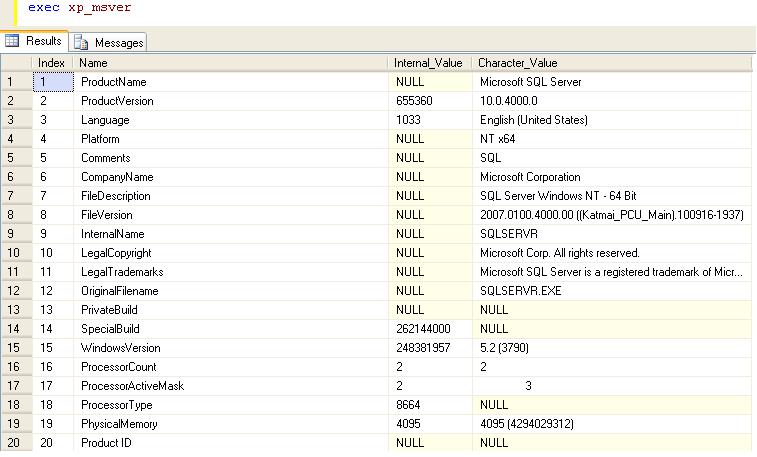
  • Extended Stored Procedure xp_msver

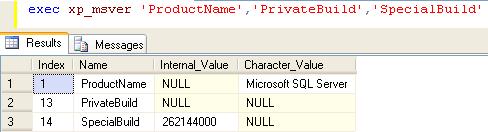
    xp_msver returns information about the SQL Server version, actual build number of the server and information about the server environment.

    You can also pass the parameter to get the specific information.

  • Script to Enable/Disable Database for Replication

    You can enable the database for replication using below script.

    use master
    exec sp_replicationdboption @dbname = 'sqldbpool',
    @optname = 'publish',
    @value = 'true'
    go
    

    If you have restore the database on test environment and you are getting the error that “Database is part of Replication”, you can clear/disable it by executing below query.

    use master
    exec sp_replicationdboption @dbname = 'sqldbpool',
    @optname = 'publish',
    @value = 'false'
    go
    
  • Steps to change the server name for a SQL Server machine

    ProblemIn this tip we look at the steps within SQL Server you need to follow if you change the physical server name for a standalone SQL Server.

    Solution
    http://www.mssqltips.com/sqlservertip/2525/steps-to-change-the-server-name-for-a-sql-server-machine/