Category: SQL Server 2011 (Denali)

  • Table Hints – NoLock vs ReadPast

    When any data in a database is read or modified, the database engine uses special type of mechanism, called locks, to maintain integrity in the database. Locks will be used to make sure the transaction consistency.

    NoLock Table Hint
    – Will allow you to read the uncommited data
    – Only used with SELECT statement
    – Blocking will not occur
    – Will reduce the concurrency and improve the performance at some extent
    – Risk of doing Phantom reads

    Let’s create table for the NOLOCK and READPAST hint demo

    create table tranDemo
    (
    			id int identity(1,1),
    			name varchar(10)
    )
    
    insert into tranDemo values ('Jugal')
    insert into tranDemo values ('Nehal')
    

    –Now let’s update the values by specifying the explicit transaction and don’t commit/rollback the transaction

    begin transaction
       update tranDemo
       set name = 'DJ'
       where name = 'Jugal'
    

    Now open new query window and execute the below query and you will notice query will not return data and will continue running as it is blocked

    select * from trandemo
    

    Now open new query window and execute the below query to check the blocking, you can see the blocking SPID in the result set

    sp_who2 active
    

    Now open new query window and execute the below query using NOLOCK hint and it will return data, yet transaction is not committed but it will return the updated value.

    select * from trandemo(NOLOCK)
    

    READPast Table Hint: Less commonly used table hint than NOLOCK. This hint specifies that the database engine not consider any locked rows or data pages when returning results.
    – Will only read the commited rows which are not locked
    – Blocking will not occur
    – Only used with SELECT statement
    – Will reduce the concurrency and improve the performance at some extent
    – Result set returned by this hint is not perfect as it will not retun the locked rows or pages, so you can not make any decision based on data

    Now open new query window and run the below query it will return only one record (“Nehal”) which is not locked or modified

    select * from trandemo(ReadPast)
    
  • How to find out the SQL Server installation date?

    Problem
    How to find out the SQL Server installation date?

    Solution:
    To get the exact SQL Server installation date we have to check for the object which is created at the time of installation. NT Authority\System login is getting created at the time of SQL Server installation. You can check the SQL Server installation date by querying the sys.syslogins or sys.server_principals view against the login NT Authority\System name.

    NT Authority\System login which has unrestricted access to all local system resources and it is a member of the Windows Administrators group on the local computer with the sysadmin fixed SQL Server role.NT Authority\System login get created at the time of installation of SQL Server.

    First we will check the sys.syslogins or sys.server_principals views
    sys.syslogins
    This SQL Server 2000 system table is included as a view for backward compatibility which shows all logins, its metadata and access.

    sys.server_principals
    Contains a row for every server-level principal

    We can query one of the views to get the installation date. If your SQL Server is English Language compatible you can directly query by login name or for the other languages we will use the neutral language (hexadecimal code) which is same on every instance.

    -- work with only English language installations
    SELECT  createdate as 'SQL Server Installation Date'
    FROM    sys.syslogins 
    where   name = 'NT AUTHORITY\SYSTEM'
    
    --neutral language 
    SELECT  createdate as 'SQL Server Installation Date'
    FROM    sys.syslogins 
    where   sid = 0x010100000000000512000000
    
    --Using sys.server_principals 
    SELECT create_date as 'SQL Server Installation Date'
    FROM sys.server_principals 
    WHERE name='NT AUTHORITY\SYSTEM'
    
    --Sample CMDB Query
    SELECT SERVERPROPERTY('productversion') as ProductVersion
          ,SERVERPROPERTY ('productlevel') as ProductLevel
          ,SERVERPROPERTY ('edition') as Edition
          ,SERVERPROPERTY ('MachineName') as MachineName
          ,SERVERPROPERTY ('LicenseType') as LicenseType
          ,SERVERPROPERTY ('NumLicenses') as NumLicenses
          ,create_date as 'SQL Server Installation Date'
    FROM sys.server_principals 
    WHERE name='NT AUTHORITY\SYSTEM'
    

    Query to check the SQL Evaluation Version Expire Date
    You can check the SQL Server evaluation version expire date as well using below query and enter the product key to activate the SQL Server license.

    -- Evaluation version expire date
    SELECT create_date as 'SQL Server Installation Date',
    DATEADD(dd,180,create_date) as 'Expiration Date'
    FROM sys.server_principals WHERE name='NT AUTHORITY\SYSTEM'
    
  • What is “Null”? How much space “Null” value takes in SQL Server?

    Null is neither zero nor empty string. Null is not a value at all. Most importantly for our discussion, one null value does not equal any other null value. In the RDBMS, Null simply means a value that is not known.

    NULL value can occupy in the database based on the coulumn data type and width.

    Fixed length data type NULL value takes the space as width of filed. (Char (5) – NULL value take 5 bytes)
    Variable length data type NULL value takes 2 bytes. (varChar (5) – NULL value take 2 bytes)
    Integer data type null value takes 4 bytes space

    You can use the sparse columns to save the space of NULL values. http://technet.microsoft.com/en-us/library/cc280604.aspx

  • T-SQL Script to find out the database file size, space used and available free space

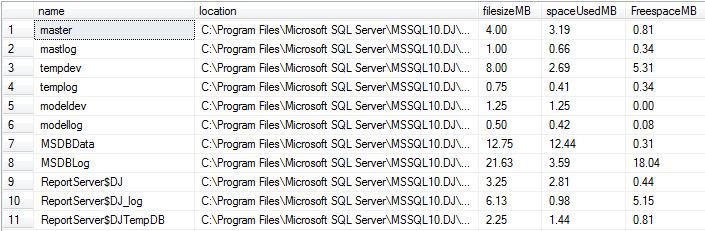
    While troubleshooting disk space issue, it is essential to know about the database file size statistics. You can execute below script to get database file size information.

    set nocount on
    
    create table #dbfileInfo(
    name varchar(300),
    location varchar(300),
    filesizeMB decimal(9,2),
    spaceUsedMB decimal(9,2),
    FreespaceMB decimal(9,2))
    
    declare @mySQL nvarchar(2000)
    DECLARE @dbName varchar(MAX)
    DECLARE @cur_DBName CURSOR
    
    SET @cur_DBName = CURSOR FOR
    select name from sys.databases
    
    OPEN @cur_DBName
    FETCH NEXT
    FROM @cur_DBName INTO @dbName
    WHILE @@FETCH_STATUS = 0
    BEGIN
    PRINT @dbName
    if DATABASEPROPERTYEX(@dbName, 'status') = 'ONLINE'
    begin
    select @mySQL = 
        '
            use ' + @dbname + '
            INSERT INTO #dbfileInfo
            select
          name
        , filename
        , convert(decimal(12,2),round(a.size/128.000,2)) as FileSizeMB
        , convert(decimal(12,2),round(fileproperty(a.name,''SpaceUsed'')/128.000,2)) as SpaceUsedMB
        , convert(decimal(12,2),round((a.size-fileproperty(a.name,''SpaceUsed''))/128.000,2)) as FreeSpaceMB
        from dbo.sysfiles a
        '
        exec sp_executesql @mySQL
    end
    FETCH NEXT
    FROM @cur_DBName INTO @dbName
    
    END
    CLOSE @cur_DBName
    DEALLOCATE @cur_DBName
    GO
    
    select * from #dbfileInfo
    drop table #dbfileInfo
    

    FileOutput