Problem
While troubleshooting a SQL Server cluster failover issue, it is essential to know the time needed for the cluster failover and the node name where SQL Server was running before the failover occurred. In this tip, I will show you the different options to find the failover time and node name where SQL Server was running before the failover over.
Category: SQL Server 2011 (Denali)
-
Steps to Check the Host Name for a Clustered SQL Server Instance
-
T-SQL Script to identify tables without Primary Key
When designing tables, It is a good practice of having one column that is unique and can be a primary key. You can include one of the below type column as Primary Key
– Add Auto Increment Column
– Identify the column which unique for all the rowsMake sure Primary keys should be as small as necessary. Prefer a numeric data type because numeric types are stored in a much more compact format than character formats. Most primary keys will be foreign keys in another table as well as used in multiple indexes. The smaller your key, the smaller the index, the less pages in the cache.
You can execute below script to identify the tables without Primary Key and add the Primary Key into tables as per the above suggestions..
Use <Database Name>

SELECT SCHEMA_NAME(schema_id) AS [Schema Name], name AS [Table Name]
FROM sys.tables
WHERE OBJECTPROPERTY(OBJECT_ID,'TableHasPrimaryKey') = 0
Order by name
GO
-
The CHECK_POLICY and CHECK_EXPIRATION options cannot be turned OFF when MUST_CHANGE is ON. (Microsoft SQL Server, Error: 15128)
Problem: Recently one of my user reported the issue that, He is getting password change message while login to SQL Server. But he does not want to change the password as he has already configured at the many places. While turning off the Password Expiration message, I got the below error.
The CHECK_POLICY and CHECK_EXPIRATION options cannot be turned OFF when MUST_CHANGE is ON. (Microsoft SQL Server, Error: 15128)
Solution:
To fix the issue you MUST have to change the password first without changing in password policy options. The good thing it that you can change the password to be the same as the existing one. -:)But still you have to change the password -:) what a logic!!! You can do it from SSMS GUI as well, but I always prefer to use the scripts as it is giving me flexibility of customization.
That was the another reason I am in the support of open source software you have flexibility to add your ideas. Let’s go to fix the issue.
In the below step I am giving the same password, to fix “User Must Change Password” flag.
USE Master
GO
ALTER LOGIN [Login Name] WITH PASSWORD = 'Same Password'
GO
Now let’s turn off the passowrd policy.
ALTER LOGIN [Login Name] WITH CHECK_POLICY = OFF, CHECK_EXPIRATION = OFF; -
Saving changes is not permitted while modifying table design
Problem: There may be scenario while modifying the table design which needs to re-create the table. Even with the full permission while modifying it from SSMS, you get the below message and your table changes will be rolled back.
Saving changes is not permitted. The changes you have made require the following tables to be dropped and re-created. You have either made changes to a table that can’t be re-created or enabled the option Prevent saving changes that require the table to be re-created.
Solution:
Below are the few scenarios where changes in table design will re-create the table.Changing the column data type
Changing the NULL property
Changing the order of the columns
Adding column before the last column
Changing the identity column property
Changing the computed column expressionLet’s see how can we fix the “Saving Changes is not permitted …”
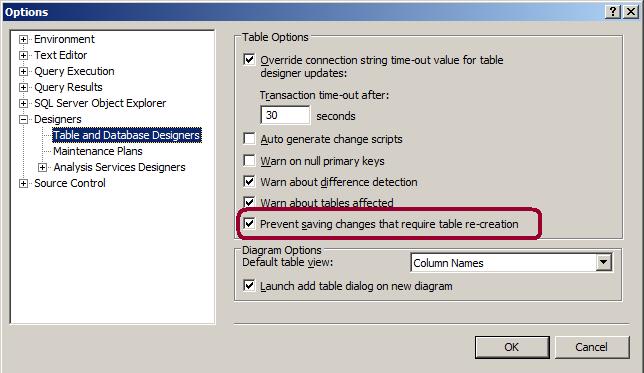
Go to SSMS – Select Tools menu -> click on Options -> Go to Designers tab page -> Click on “table and database designers” page -> Un-check “Prevent Saving changes that require table re-creation” check box.
-
Update Statistics Useful Scripts
Script to find out the statistics update date for all the indexes in the current database
sp_MSforeachtable 'sp_autostats "?"'
Script to update the statistics of all the indexes
EXEC sp_MSforeachtable 'UPDATE STATISTICS ? WITH FULLSCAN'

