Tag: SQL Error Messages

  • Error: Database diagram support objects cannot be installed

    There will be situation while creating the database diagram, you got the below error message.

    Database diagram support objects cannot be installed because this database does not have a valid owner. To continue, first use the Files page of the Database Properties dialog box or the ALTER AUTHORIZATION statement to set the database owner to a valid login, then add the database diagram support objects.
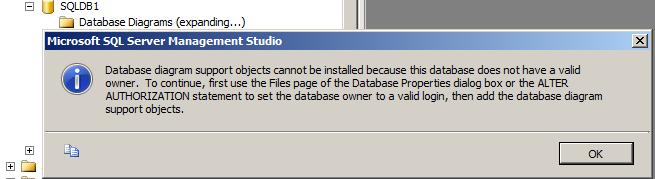
    Above error is self explanatory where it is stating that the “set the database owner to valid login” To fix the issue please follow below one of the solution.

    Solution 1:
    Execute the below script by mentioning the database name.

    ALTER AUTHORIZATION ON DATABASE::MentionDatabaseName TO sa
    GO
    

    OR, you can change the owner by executing the below query.

    EXEC sp_changedbowner 'sa'
    

    Solution 2:
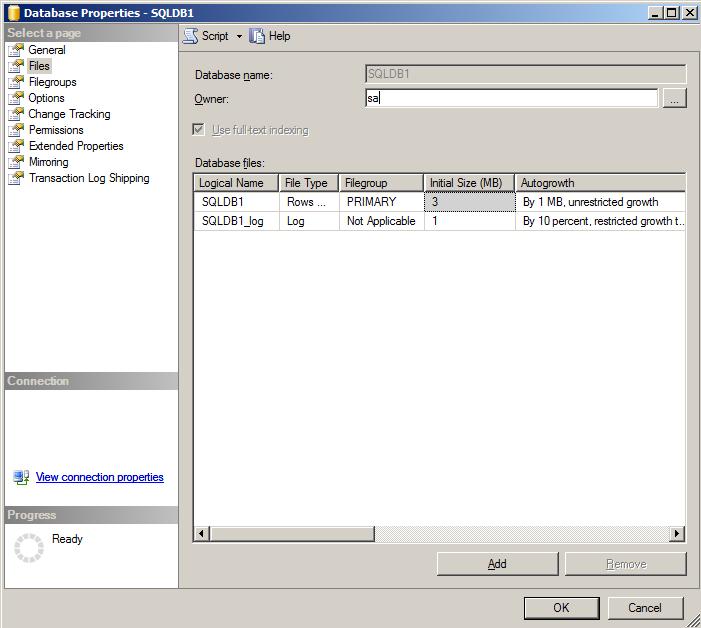
    Right Click on the database -> Database Properties -> click on files page -> change the owner to SA
  • Primary Key, Unique Key Constraints – Clustered Index and Non Clustered Index

    You can use the below script to create the Primary Key on the already existing tables. Primary key enforces a uniqueness in the column and created the clustered index as default.

    Primary key will not allow NULL values.

    -- Adding the NON NULL constraint
    ALTER TABLE [TableName]	 
    ALTER COLUMN PK_ColumnName int NOT NULL
    
    --Script to add the primary key on the existing table
    ALTER TABLE [TableName]
    ADD CONSTRAINT pk_ConstraintName PRIMARY KEY (PK_ColumnName)
    

    If you want to define or create the non-clustered index on the existing table, you can use the below script. If the data in the column is unique, you can create the Unique Constraint as well.

    Unique Key enforces uniqueness of the column on which they are defined. Unique Key creates a non-clustered index on the column. Unique Key allows only one NULL Value.

    --script to create non-clustered Index
    create index IX_ColumName on TableName(ColumnName)
    --script to create Unique constraint on the existing table
    ALTER TABLE TableName ADD CONSTRAINT ConstraintName UNIQUE(ColumnName)
    
  • How to insert value into IDENTITY column?

    If you will try to insert the value into Identity column you will get the one of the below error.

    Error 1:
    Msg 544, Level 16, State 1, Line 1
    Cannot insert explicit value for identity column in table ‘Employee’ when IDENTITY_INSERT is set to OFF.

    Error 2:
    Error 8101 An explicit value for the identity column in table can only be specified when a column list is used and IDENTITY_INSERT is ON

    Solution:
    Write SET IDENTITY_INSERT table name ON before the insert script and SET IDENTITY_INSERT table name Off after insert script.

    Example,

    use db1
    
    create table Employee
    (
    	myID int identity(100,1),
    	name varchar(20)
    )
    
    insert into Employee(name) values('Jugal')
    
    --if i will try to insert the value into Identity column it will fail
    insert into Employee(myID,name) values (101,'DJ')
    
    --you can add the data into identiy column by turning on the IDENTITY_INSERT ON
    
    SET IDENTITY_INSERT Employee ON
    	insert into Employee(myID,name) values (101,'DJ')
    SET IDENTITY_INSERT Employee OFF