Tag: SQL Script

  • Get the List Of DBCC Commands & Syntax

    If you don’t remember all the DBCC commands “NO Issue” execute the DBCC HELP command to get the list of all the DBCC.

    DBCC HELP('?')
    

    checkalloc
    checkcatalog
    checkconstraints
    checkdb
    checkfilegroup
    checkident
    checktable
    cleantable
    dbreindex
    dropcleanbuffers
    free
    freeproccache
    freesessioncache
    freesystemcache
    help
    indexdefrag
    inputbuffer
    opentran
    outputbuffer
    pintable
    proccache
    show_statistics
    showcontig
    shrinkdatabase
    shrinkfile
    sqlperf
    traceoff
    traceon
    tracestatus
    unpintable
    updateusage
    useroptions

    DBCC execution completed. If DBCC printed error messages, contact your system administrator.

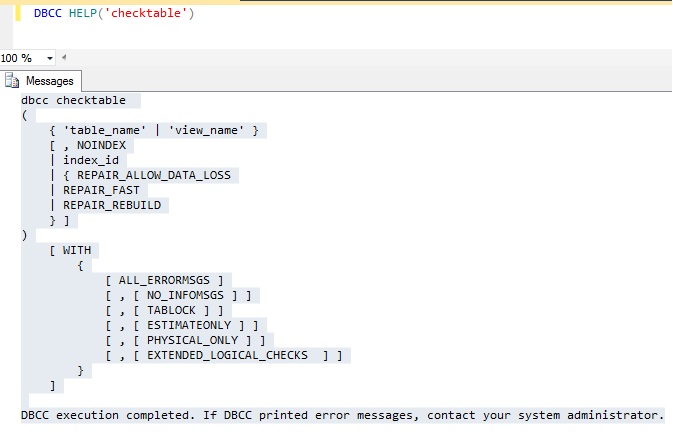
    Don’t remember syntax, execute below command to get the syntax.

    DBCC HELP('checktable')
    

    DBCC

  • Script to get the SQL Agent Properties

    You can use the sp_get_sqlagent_properties undocumented stored procedure to retrieve the SQL Agent properties of a SQL Instance. It is available in SQL Server MSDB database. This procedure only works if the SQL Agetn Service is started.

    SQLAgent

  • T-SQL Script to identify the data, log and backup drive

    You can use the below script to identify the data, log and backup file drive.

    select 
    @@SERVERNAME as svrName,
    drivename, 
    drivedescription
    from
    (
    select distinct  SUBSTRING(filename,1,3) as drivename, 'data Drive' as drivedescription from master..sysaltfiles where filename like '%.mdf'
    union
    select distinct  SUBSTRING(filename,1,3) as drivename, 'Log Drive' as drivedescription from master..sysaltfiles where filename like '%.ldf'
    union 
    select distinct  SUBSTRING(physical_device_name,1,3) as drivename, 'Backup Drive' as drivedescription from msdb.dbo.backupmediafamily where physical_device_name like '%.bak'
    ) tab1
    
    
  • How to check waits in SQL Server 2000?

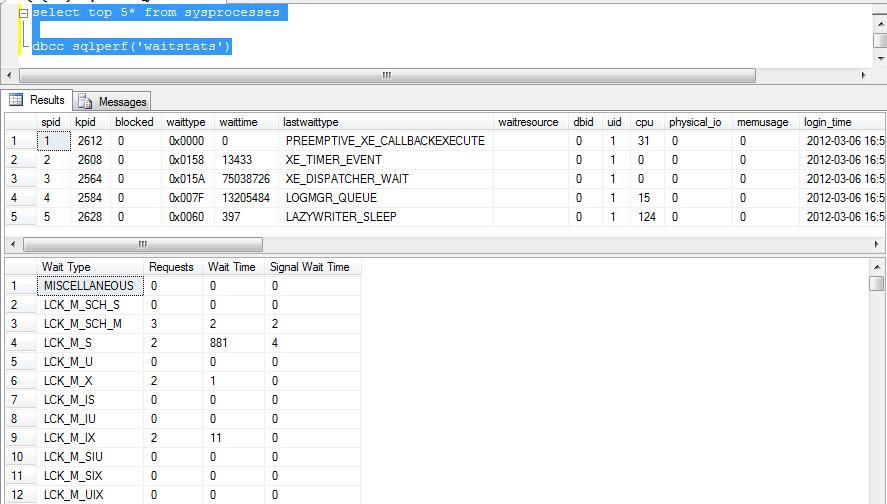
    Today I got a comment, how to check the wait statistics in SQL Server 2000. You can query sysprocesses table and use the DBCC SQLPERF to get the wait statistics in SQL Server 2000.

    select top 5* from sysprocesses
    dbcc sqlperf(‘waitstats’)

    Wait Statistics Image

  • Steps to Save/Store file into Database

    You can use the below scripts to store/save the file into SQL Server database table. Please note it is not recommended to store file into database. You can store the file on file system and path in the database.

    use sqlDBPool
    --documents table will store files into varbinary field
    --drop table documents
    create table documents
    (
    	documentID int identity(1,1),
    	doctype char(5),
    	document varbinary(max)
    )
    
    
    --script to store/save document into table
    insert into documents 
     Select 'xls', (SELECT * FROM OPENROWSET(BULK N'C:\JSpace\book1.xls', SINGLE_BLOB) AS document) document
    go
    
    select * from documents