Tag: SQL Server

  • Primary Key, Unique Key Constraints – Clustered Index and Non Clustered Index

    You can use the below script to create the Primary Key on the already existing tables. Primary key enforces a uniqueness in the column and created the clustered index as default.

    Primary key will not allow NULL values.

    -- Adding the NON NULL constraint
    ALTER TABLE [TableName]	 
    ALTER COLUMN PK_ColumnName int NOT NULL
    
    --Script to add the primary key on the existing table
    ALTER TABLE [TableName]
    ADD CONSTRAINT pk_ConstraintName PRIMARY KEY (PK_ColumnName)
    

    If you want to define or create the non-clustered index on the existing table, you can use the below script. If the data in the column is unique, you can create the Unique Constraint as well.

    Unique Key enforces uniqueness of the column on which they are defined. Unique Key creates a non-clustered index on the column. Unique Key allows only one NULL Value.

    --script to create non-clustered Index
    create index IX_ColumName on TableName(ColumnName)
    --script to create Unique constraint on the existing table
    ALTER TABLE TableName ADD CONSTRAINT ConstraintName UNIQUE(ColumnName)
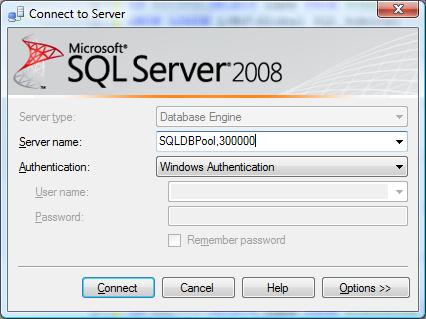
    
  • How to connect the SQL Server running on the different TCP/IP port?

    In case you have configured SQL Instance to use the static TCP/IP port number. You can connect SQL Server as below using SSMS.

  • How to insert value into IDENTITY column?

    If you will try to insert the value into Identity column you will get the one of the below error.

    Error 1:
    Msg 544, Level 16, State 1, Line 1
    Cannot insert explicit value for identity column in table ‘Employee’ when IDENTITY_INSERT is set to OFF.

    Error 2:
    Error 8101 An explicit value for the identity column in table can only be specified when a column list is used and IDENTITY_INSERT is ON

    Solution:
    Write SET IDENTITY_INSERT table name ON before the insert script and SET IDENTITY_INSERT table name Off after insert script.

    Example,

    use db1
    
    create table Employee
    (
    	myID int identity(100,1),
    	name varchar(20)
    )
    
    insert into Employee(name) values('Jugal')
    
    --if i will try to insert the value into Identity column it will fail
    insert into Employee(myID,name) values (101,'DJ')
    
    --you can add the data into identiy column by turning on the IDENTITY_INSERT ON
    
    SET IDENTITY_INSERT Employee ON
    	insert into Employee(myID,name) values (101,'DJ')
    SET IDENTITY_INSERT Employee OFF
    
    
  • XP_cmdshell extended stored procedure (Execute Winows commands)

    xp_cmdshell

    Executes a given command string or batch file as an operating-system command shell and returns any output as rows of text.

    Permission/Rights: Only SysAdmin fixed role can execute it.

    Syntax

    xp_cmdshell {‘command_string‘} [, no_output]

    Arguments

    ‘command_string‘

    Is the command string to execute at the operating-system command shell or from DOS prompt. command_string is varchar(255) or nvarchar(4000), with no default.

    command_string cannot contain more than one set of double quotation marks.

    A single pair of quotation marks is necessary if any spaces are present in the file paths or program names referenced by command_string.

    If you have trouble with embedded spaces, consider using FAT 8.3 file names as a workaround.

    no_output

    Is an optional parameter executing the given command_string, and does not return any output to the client.

    Examples
    xp_cmdshell 'dir *.jpg'

    Executing this xp_cmdshell statement returns the following result set:

    xp_cmdshell 'dir *.exe', NO_OUTPUT

    Here is the result:

    The command(s) completed successfully.

    <!–[if gte vml 1]&gt; &lt;![endif]–><!–[if !vml]–><!–[endif]–>

    Examples
    Copy File
    EXEC xp_cmdshell 'copy c:\sqldumps\jshah143.bak \\server2\backups\jshah143.bak',  NO_OUTPUT
     
    Use return status

    In this example, the xp_cmdshell extended stored procedure also suggests return status. The return code value is stored in the variable @result.

    DECLARE @result int
    EXEC @result = xp_cmdshell 'dir *.exe'
    IF (@result = 0)
       PRINT 'Success'
    ELSE
       PRINT 'Failure'


    Pass the parameter to batch file

    DECLARE @sourcepath VARCHAR(100)
    DECLARE @destinationpath VARCHAR(1000)
    SET @sourcepath = ' c:\sqldumps\jshah143.bak '
    SET @destinationpath = '\\server2\backups\jshah143.bak'
     
    SET @CMDSQL = 'c:copyfile.bat' + @sourcepath + @destinationpath
    EXEC master..XP_CMDShell @CMDSQL