Tag: SQL

  • Script to find out the traces running on SQL Server instance

    You can execute the below script on SQL Server instance to find out the traces, trace type, trace file path and trace status.

    select
          TraceType =
           case trace.is_default
                when 1 THEN 'Default/System Trace'
                when 0 THEN 'User Trace'
           end,
          Trace_Status =
          case trace.status
                when 1 THEN 'Running'
                when 0 THEN 'Stopped'
          end,
           ssion.session_id as SessionID,
           [loginName] = coalesce(ssion.login_name,ssion.login_name,'Reader SPID Not mentioned'),
           [Trace_File_Path] = coalesce(trace.[Path],trace.[Path],'OLEDB Client Trace')
          from sys.traces trace
                left join sys.dm_exec_sessions ssion on trace.reader_spid = ssion.session_id
    
  • Error: Database diagram support objects cannot be installed

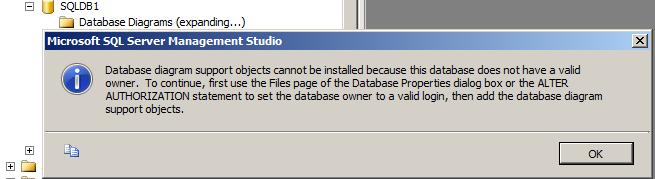
    There will be situation while creating the database diagram, you got the below error message.

    Database diagram support objects cannot be installed because this database does not have a valid owner. To continue, first use the Files page of the Database Properties dialog box or the ALTER AUTHORIZATION statement to set the database owner to a valid login, then add the database diagram support objects.

    Above error is self explanatory where it is stating that the “set the database owner to valid login” To fix the issue please follow below one of the solution.

    Solution 1:
    Execute the below script by mentioning the database name.

    ALTER AUTHORIZATION ON DATABASE::MentionDatabaseName TO sa
    GO
    

    OR, you can change the owner by executing the below query.

    EXEC sp_changedbowner 'sa'
    

    Solution 2:
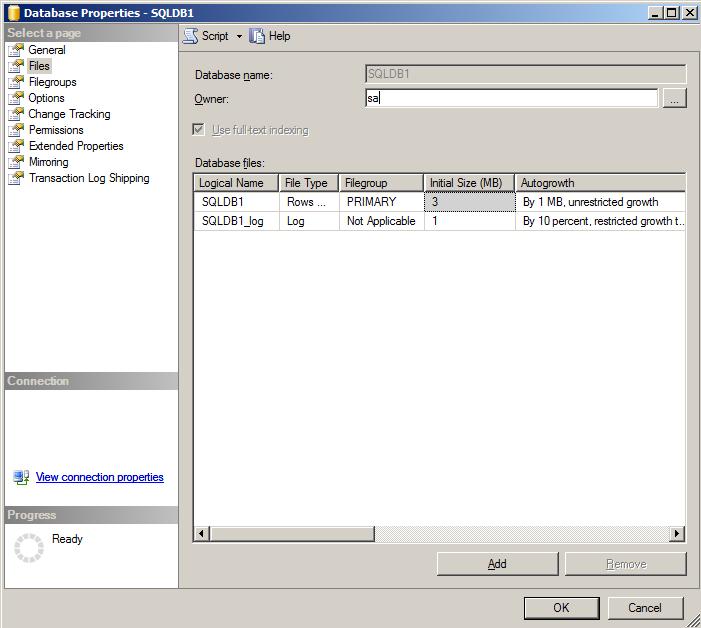
    Right Click on the database -> Database Properties -> click on files page -> change the owner to SA

  • How to check Lock Pages In Memory is enabled?

    You can use below simple technique to check whether lock pages in memory is enabled or not. If lock pages in memory is enabled you can see the “Using locked pages for buffer pool” message in the SQL Server error log.

    exec xp_readerrorlog 0, 1, 'locked pages' 
    

    To check if it is disabled. You have to check for the “Address Windowing Extensions (AWE) requires the ‘lock pages in memory’ privilege which is not currently present in the access token of the process.” message.

    exec xp_readerrorlog 0, 1, 'lock pages in memory' 
    
  • Different ways to make a table read only in a SQL Server database

    Problem

    In some cases there may be a need to make a SQL Server table read only. There are several different options for doing this and in this tip we cover various ways that you can make a table read only in a SQL Server database.

    Solution

    http://www.mssqltips.com/sqlservertip/2711/different-ways-to-make-a-table-read-only-in-a-sql-server-database/#comments

  • Script to Create Foreign Key on the Compound Primary Key

    Compound Primary key is a primary key which is created on more than one column. Now the questions is how to create the foreign key for the compound primary key where it references more than one column.

    Check the below example.

    create table employee
    (
    	empID int not null,
    	SSN int not null,
    	name varchar(20)
    )
    
    
    ALTER TABLE [employee]
    ADD CONSTRAINT pk_employee PRIMARY KEY (empID, SSN)
    
    
    create table EmpDetail
    (
    		empID int,
    		SSN int,
    		address varchar(20),
    		city varchar(20),
    		pin varchar(20)
    )
    
    ALTER TABLE dbo.empDetail
       ADD CONSTRAINT FK_Employee
       FOREIGN KEY(empID, SSN)
       REFERENCES dbo.employee(empID, SSN)
    
    
    SELECT
        tc.TABLE_NAME,
        tc.CONSTRAINT_NAME, 
        ccu.COLUMN_NAME
    FROM 
        INFORMATION_SCHEMA.TABLE_CONSTRAINTS tc
    INNER JOIN 
        INFORMATION_SCHEMA.CONSTRAINT_COLUMN_USAGE ccu 
          ON ccu.TABLE_NAME = tc.TABLE_NAME AND ccu.CONSTRAINT_NAME = tc.CONSTRAINT_NAME
    WHERE
        tc.TABLE_NAME IN ('employee','employeeDetail')