Tag: System Design

  • SQL vs NoSQL: Two Ways to Store Data, One Decision to Get Right

    One database choice, made in week one, quietly shapes a system for years. SQL and NoSQL are not rivals and neither is “newer and better” — they are two different answers to one question: how is your data shaped, and how will it be asked for?
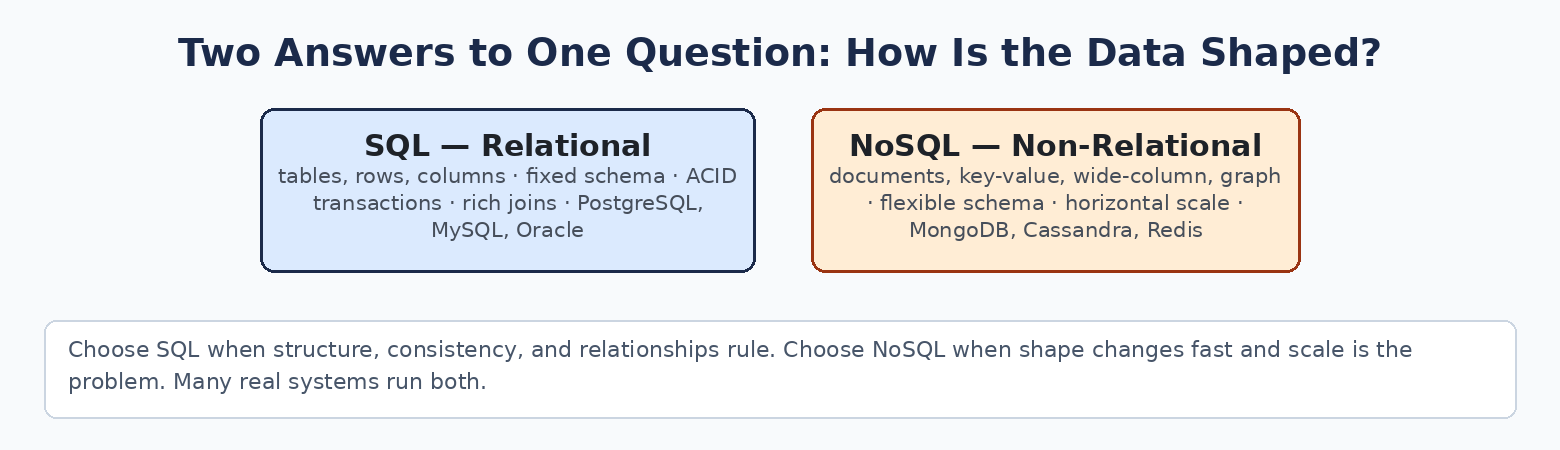
    SQL vs NoSQL comparison

    The two shapes

    SQL (relational). Data in tables of rows and columns, with a fixed schema defined up front and relationships enforced by the database itself — a Users table, an Orders table pointing at it, a Payments table pointing at orders. Strong consistency and ACID transactions are the native language. Examples: PostgreSQL, MySQL, Oracle.

    NoSQL (non-relational). Data in flexible forms — documents (JSON-like records), key-value pairs, wide columns, or graphs. The schema can evolve as the product does, and the systems are designed for horizontal scaling from the start. Examples: MongoDB, Cassandra, Redis.

    Side by side

    Feature SQL NoSQL
    Data model Tables and relations Documents, key-value, wide-column, graph
    Schema Fixed, predefined Dynamic, flexible
    Scaling Vertical first, scale-out possible Horizontal by design
    Consistency Strong Often eventual / tunable
    Transactions Strong ACID support Varies by system
    Queries Rich joins and a full query language Optimized for known access patterns
    Flexibility Lower High
    Best for Structured transactional systems Large-scale, distributed, fast-changing apps

    The same question in both worlds

    SQL joins at query time:

    SELECT users.name, orders.total
    FROM users
    JOIN orders ON users.id = orders.user_id;

    NoSQL fetches the record shaped for the question:

    db.orders.find({ status: "paid"})

    That contrast is the decision. SQL stores data normalized and assembles answers on demand — any question, answered by joins. NoSQL stores data pre-assembled for the questions you already know — blindingly fast for those, awkward for new ones.

    The analogy

    SQL is a spreadsheet with strict columns and rules: every row fits the structure, and the structure guarantees the truth. NoSQL is a box of index cards: each card holds whatever that record needs, in whatever shape — perfect for millions of different records, as long as you know how you will look them up.

    When to use what

    SQL — financial systems, order management, reporting and BI, anything where data integrity, complex relationships, and “the numbers must agree” rule. Banking runs on SQL for a reason.

    NoSQL — rapidly evolving products, high-traffic systems, large distributed workloads, semi-structured data: social feeds, content platforms, IoT streams, real-time analytics.

    And the grown-up answer: many real systems run both — SQL for the transactional core where correctness is law, NoSQL beside it where scale and flexibility matter more. The choice is per workload, not per company.

    The bottom line

    Choose SQL when structure, consistency, and relationships matter most. Choose NoSQL when the shape changes fast and scale is the problem actually in front of you. Get the data shape right, and the rest of the architecture gets easier.

    Data decisions are the deepest layer of every system — the free toolkits map what sits on top of them.
  • The System Design Staircase: What to Learn, In What Order

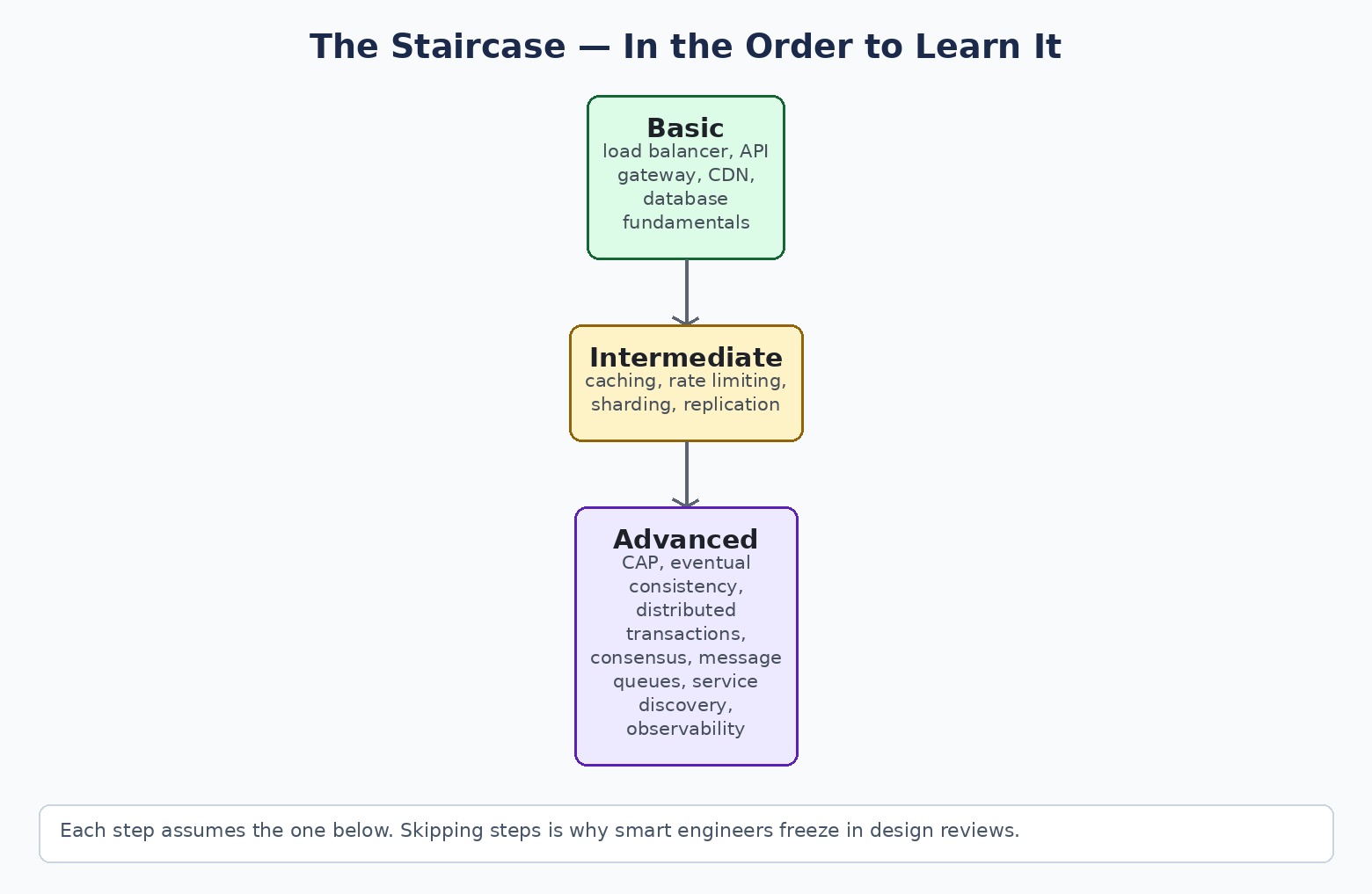
    System design feels overwhelming for one reason: people try to learn it from the top step. Consensus algorithms before load balancers. Distributed transactions before databases. The knowledge is a staircase, not a pile — each step assumes the one below it, and climbing in order turns a scary subject into a sequence of small, obvious ones.

    The system design staircase: basic, intermediate, advanced

    Step 1: Basic — how one system serves users

    Load Balancer. One front door that distributes incoming traffic across servers, so no single machine is the ceiling. (NGINX, AWS ELB.)

    API Gateway. The single entry point for client requests: routing, authentication, and rate limiting handled in one place instead of inside every service. (Kong, AWS API Gateway.)

    Content Delivery Network (CDN). Static assets copied to servers near the user, so a page in Texas does not wait on a disk in Virginia. (Cloudflare, Akamai.)

    Database Fundamentals. Where structured data lives — SQL (MySQL, PostgreSQL) and NoSQL (MongoDB) — and how it is queried. Everything above this step exists to protect or feed the database.

    Master these four and you can design a system that serves real users. Most internal tools never need more.

    Step 2: Intermediate — how a system grows

    Caching. Keep hot data in memory so the database stops answering the same question a million times a day. (Redis, Memcached.)

    Rate Limiting. Cap requests per user or app, so growth — or abuse — cannot take the system down with enthusiasm.

    Database Sharding. Split a dataset across machines, by user ID or region, when one database honestly cannot hold or serve it all.

    Replication. Copy data across servers for high availability and disaster recovery — the master–slave setups that keep reads fast and data alive.

    This step is where most production systems live. If Step 1 is “working,” Step 2 is “working at ten times the traffic.”

    Step 3: Advanced — how systems agree, survive, and stay honest

    CAP Theorem. During a network partition, choose consistency or availability. The trade-off that defines distributed systems.

    Eventual Consistency. The relaxation of CAP: all nodes will agree eventually, just not instantly. (DynamoDB and most planet-scale systems.)

    Distributed Transactions. Keeping an operation atomic across services and databases — coordination protocols like 2PC, and patterns like SAGA when 2PC does not fit.

    Consensus Algorithms. How distributed nodes agree on anything — leader, value, state — when some of them are lying dead. (Paxos, Raft; inside etcd and ZooKeeper.)

    Message Queues. Decoupling services with asynchronous communication, so a slow consumer never blocks a fast producer. (RabbitMQ, Kafka.)

    Service Discovery. In environments where services appear, disappear, and move, something must keep the phone book. (Consul, Eureka.)

    System Observability. Monitoring, logging, and tracing — knowing the system’s health from the outside before your users tell you from the inside. (Prometheus, Grafana, Jaeger.)

    The bottom line

    Basic serves users, intermediate survives growth, advanced survives failure and disagreement. Learn — and interview, and design — in that order, and you will never freeze in a design review again.

    Climbing the staircase? The free toolkits collect the reference posters for each step.

  • The Full System Design + AI Stack for 2026–27, Layer by Layer

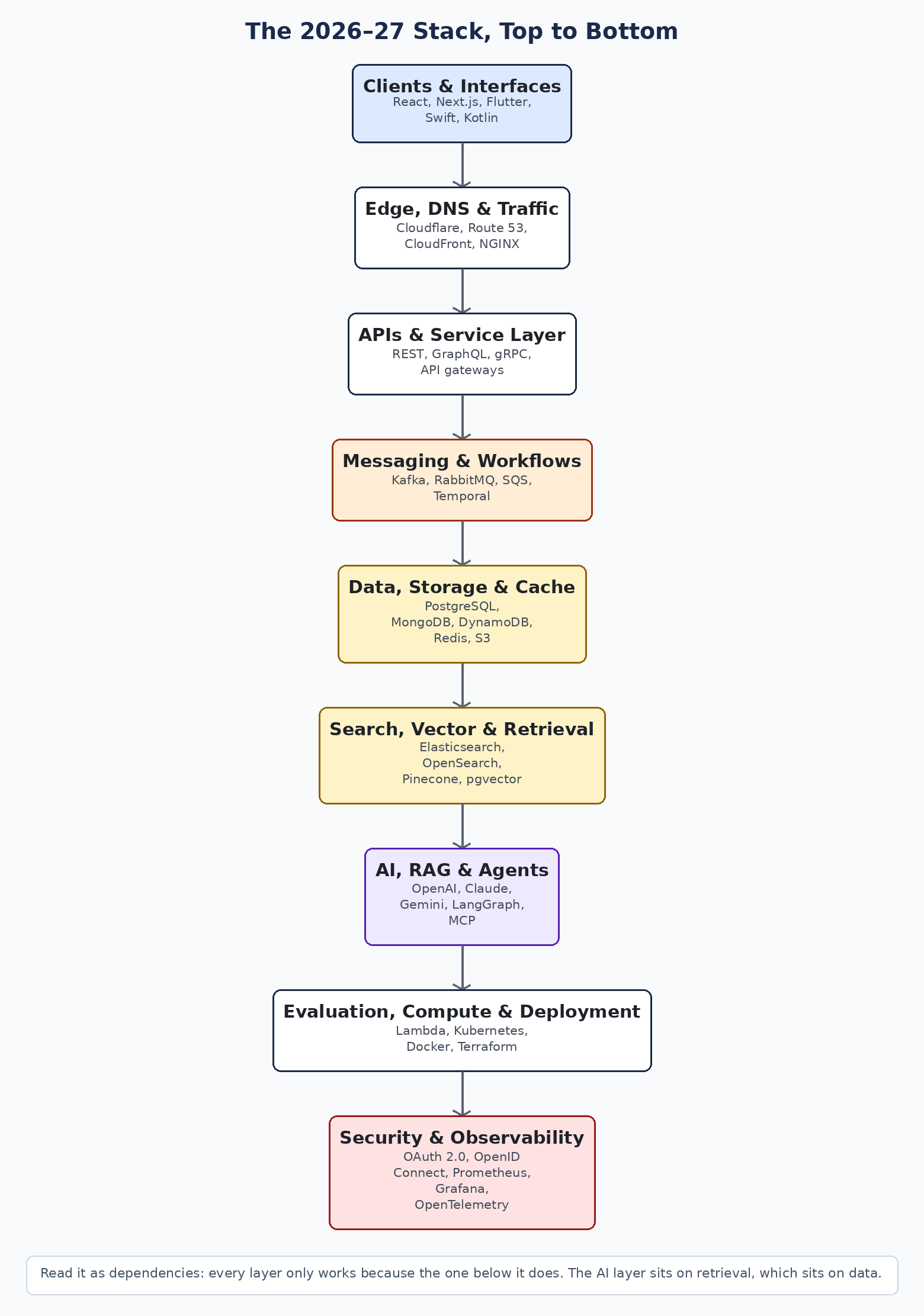
    Every modern system — and every AI product built on one — is a stack of nine layers. Tools change every year; the layers barely do. Learn the layers and you can walk into any architecture diagram, any vendor pitch, any design review, and know exactly where you are standing.

    The 2026-27 system design and AI stack, layer by layer

    1. Clients & Interfaces. What the user touches: web apps (React, Next.js), mobile (Flutter, Swift, Kotlin, React Native). This layer decides nothing about scale — but everything about perceived speed.

    2. Edge, DNS & Traffic. How requests find you and get close to the user: DNS (Route 53), CDNs and edge networks (Cloudflare, CloudFront), and the proxies (NGINX, HAProxy, Envoy) that terminate and route traffic. Geography is latency; this layer is where you cheat geography.

    3. APIs & Service Layer. The contracts everything speaks: REST, GraphQL, gRPC — fronted by API gateways (Kong, Apigee, AWS API Gateway) that own authentication, rate limiting, and routing once, for every service behind them.

    4. Messaging & Workflows. How services talk without waiting on each other: Kafka, RabbitMQ, SQS, NATS, Pulsar for events and queues; Temporal for long-running workflows that must survive failures. This is the layer that turns a fragile chain of calls into a resilient flow.

    5. Data, Storage & Cache. The ground everything stands on: relational (PostgreSQL, MySQL), document and NoSQL (MongoDB, DynamoDB), object storage (S3), and cache (Redis) for the reads that cannot afford a database trip. Choose by access pattern, not by habit.

    6. Search, Vector & Retrieval. Finding things by meaning, not just by key: Elasticsearch and OpenSearch for text search; Milvus, Pinecone, Weaviate, and pgvector for embeddings. This layer did not exist in most stacks five years ago; it is now where AI systems live or die, because retrieval quality is answer quality.

    7. AI, RAG & Agents. The models (OpenAI, Claude, Gemini) and the frameworks that wire them to your data and tools: LangGraph, LlamaIndex, and MCP — the protocol becoming the standard way agents connect to tools. Notice where this layer sits: seventh, not first. It is powerful precisely because the six layers beneath it are solid.

    8. Evaluation, Compute & Deployment. Where everything runs and how you know it works: Lambda and Cloud Run for serverless, Kubernetes and Docker for containers, Terraform and GitHub Actions for the pipeline. For AI systems this layer also carries evaluation — the checks that prove a model change helped instead of quietly hurting.

    9. Security & Observability. The layer that wraps all the others: OAuth 2.0 and OpenID Connect for identity, Vault for secrets, and Prometheus, Grafana, Datadog, and OpenTelemetry so you can see what the system is actually doing. If you cannot observe it, you do not operate it — you hope.

    How to use this map

    When a system misbehaves, locate the layer before reaching for a fix — most “AI problems” are retrieval problems (layer 6) or data problems (layer 5) wearing a model costume. When a vendor pitches you, ask which layer they replace and which layers they assume you already have. And when you design something new, walk the stack top to bottom and make one deliberate choice per layer.

    The bottom line

    Products are built from tools, but architectures are built from layers. Master the nine layers and the tool names — which will keep changing — become the easy part.

    The free toolkits include the AI Engineering Iceberg Poster — the same idea, drawn for the AI stack specifically.

  • Monolith vs Microservices: The Honest Comparison

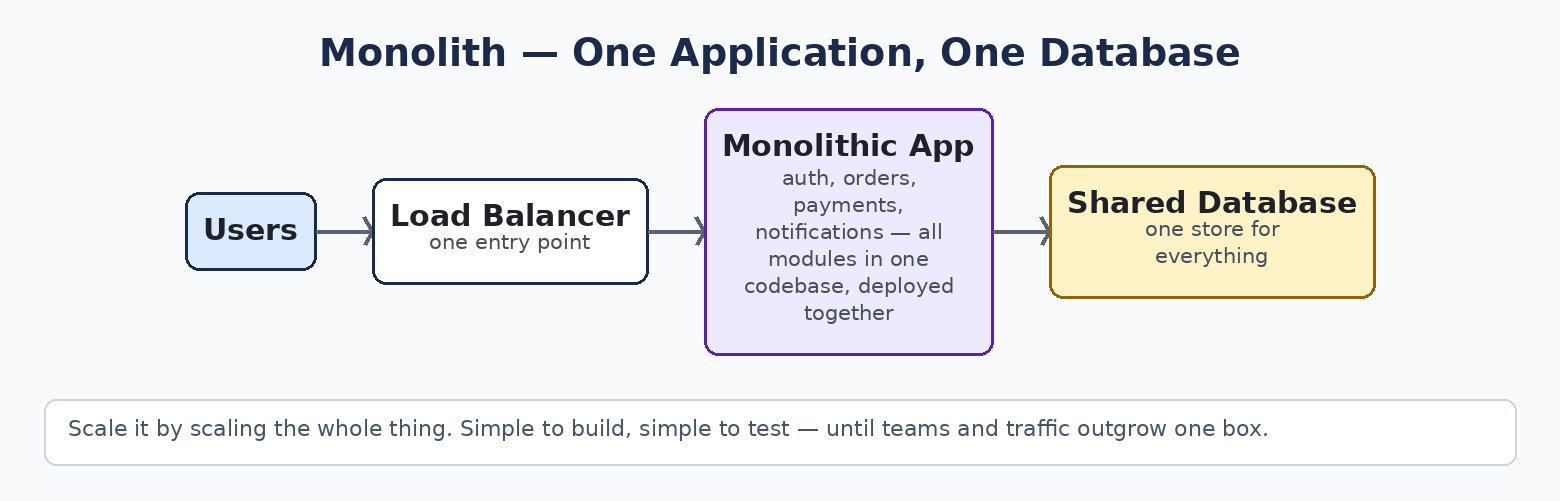
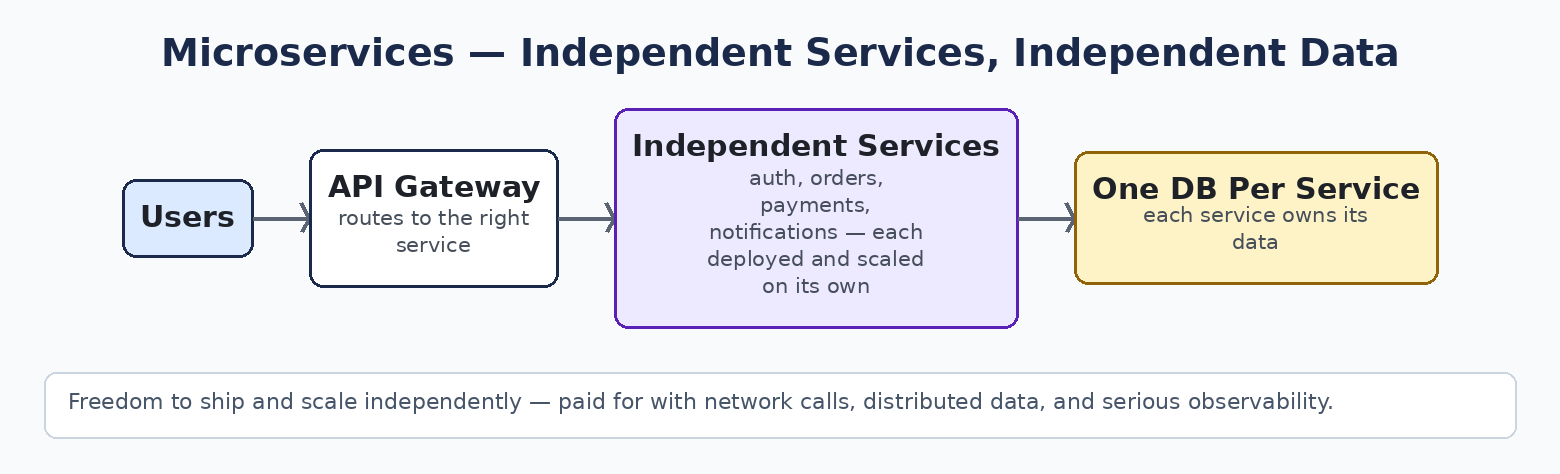
    This is the most argued decision in software architecture, and most teams make it for the wrong reason — fashion, a conference talk, or a resume. The honest version is simpler: a monolith is one application that deploys together; microservices are many small applications that deploy independently. Everything else follows from that.

    Monolith request flow

    Microservices request flow

    The two shapes

    Monolith. All modules — auth, orders, payments, notifications — live in one codebase, deploy as one unit, and usually share one database. A request travels inside a single process: function calls, not network calls.

    Microservices. The application is split by business capability. Each service owns one job, its own codebase, its own deployment pipeline, and its own database. Services talk through APIs and events.

    Side by side

    Feature Monolith Microservices
    Codebase One One per service
    Deployment Everything together Each service independently
    Scaling Scale the whole app Scale only the hot service
    Coupling Tight — modules touch directly Loose — contracts between services
    Data Usually one shared database Decentralized, per service
    Fault isolation One failure can take the app down Failures can be contained
    Development speed Fast early Faster for many large teams
    Testing Simpler end-to-end Complex integration testing
    Operations Easy to run Demands automation + observability
    Best for Small/medium apps, early products Large, complex platforms

    When each one wins

    Choose a monolith when the team is small, the domain is still being discovered, and speed of change matters more than independent scale. Most products should start here: you can refactor a working monolith; you cannot refactor a distributed system you did not need into existence.

    Choose microservices when the pain is real and named: teams stepping on each other’s releases, one module needing 50× the scale of the rest, or independent deployment becoming a business requirement. Microservices trade code complexity for organizational scalability — that is the actual product you are buying.

    The analogy that settles it

    A monolith is a department store: everything under one roof, one management, easy to run — and a fire anywhere can close the whole store. Microservices are a shopping complex: specialized stores, each opening, closing, and expanding on its own — and now somebody has to run the mall: security, utilities, parking, signs. Neither is “better.” They are answers to different sizes of problem.

    The bottom line

    Start simple. Earn the complexity. Move to microservices when scale, team autonomy, and independent deployment become real needs with names and numbers — not when a blog post says monoliths are dead. The best architecture is the one your team can actually operate at 2 AM.

    More architecture decisions, made the same honest way: the free toolkits and posters collect them.

  • 12 API Design Concepts Every Architect Should Know Cold

    APIs are contracts. Once clients depend on one, every careless choice becomes permanent — you can add almost anything, but you can remove almost nothing. These twelve concepts are the difference between an API that scales gracefully and one that becomes the bottleneck in every meeting.

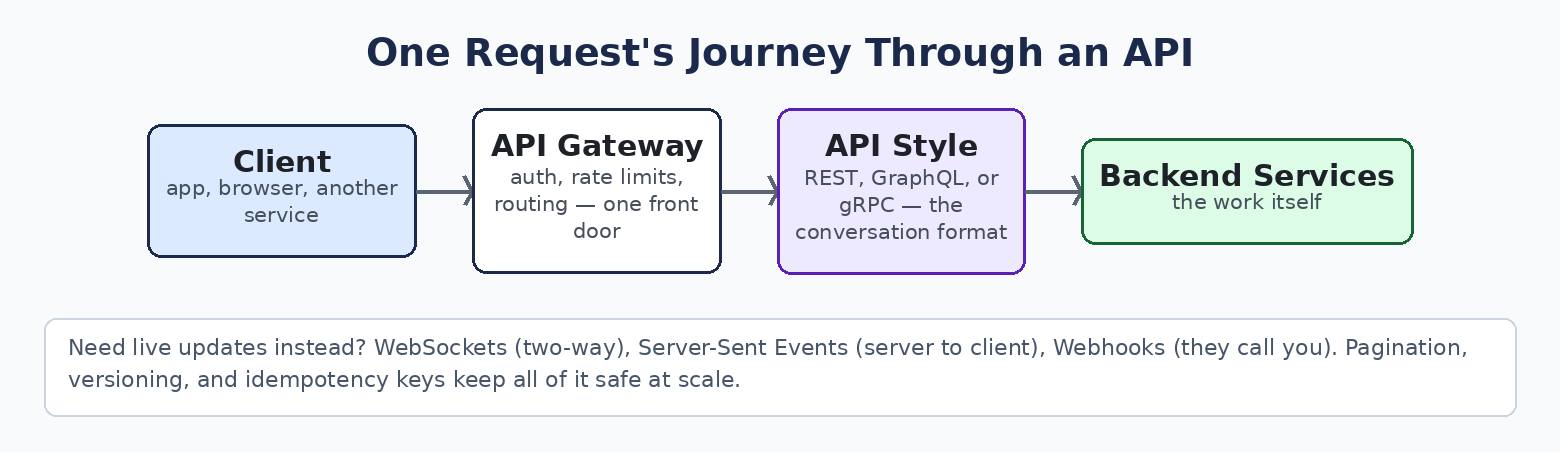
    One request's journey through an API

    The three conversation styles

    1. REST. Resources as URLs, acted on with HTTP verbs: GET /orders/42 reads one, POST /orders creates one, PUT replaces, DELETE removes. It is the default because it is simple, cacheable, and every developer alive already speaks it.

    2. GraphQL. One endpoint; the client sends a query naming exactly the fields it wants, and gets exactly those back — no more, no less. It ends over-fetching and under-fetching, and it shines when many different clients (web, iOS, Android) need different shapes of the same data.

    3. gRPC. Remote function calls over HTTP/2 using Protobuf — a compact binary format with a strict contract. Faster and smaller than JSON, made for service-to-service traffic inside your system, where browsers are not involved.

    Rule of thumb: REST for public APIs, GraphQL for client-driven data needs, gRPC between your own services.

    The three ways to push

    4. WebSockets. One connection, upgraded from HTTP, kept open for messages in both directions. Chat, live dashboards, games — anything where the client also talks back constantly.

    5. Webhooks. The provider calls your URL when something happens: payment completed, build finished, shipment moved. They call you, so you never poll. If your design has a loop asking “is it ready yet?”, a webhook probably deletes it.

    6. Server-Sent Events (SSE). A one-way stream from server to client over plain HTTP. Simpler than WebSockets when the client only listens — notifications, feeds, and the token-by-token streaming of LLM responses, which is exactly how most AI chat products work under the hood.

    The five that keep you safe at scale

    7. Pagination. Never return a list unbounded. Return a page (say 20 items) plus a cursor pointing at the next page. Cursors beat page numbers because they stay correct while data changes underneath.

    8. Rate Limiting. A cap per client per window — 100 requests a minute, say. Under the limit, requests pass; over it, a 429 and a “retry later.” It protects the service from abuse, accidents, and any single customer becoming everyone’s outage.

    9. Idempotency Keys. The client attaches a unique key to a request. First arrival: do the work (charge the card), save the result against the key. A retry with the same key: skip the work, return the saved result. This one header is what makes retries — and payments — safe.

    10. Versioning. Ship breaking changes as /v2/ while /v1/ keeps running, retire v1 only when clients have migrated. Versioning is how an API evolves without breaking the people who trusted it.

    11. OAuth / JWT. OAuth handles permission (a user lets an app act on their behalf); the JWT is the signed token that proves who is calling and what they may do, checked by the API on every request without a database lookup.

    12. API Gateway. One entry point in front of many services: authentication, rate limits, routing, and logging in a single place, so every service behind it does not reinvent them. Clients see one door; you operate a building.

    The bottom line

    Pick the conversation style by who is talking (public, client-driven, or internal), the push mechanism by direction (both ways, event-driven, or listen-only), and treat pagination, rate limiting, idempotency, versioning, and the gateway as non-negotiable from day one. Retrofitting any of them costs ten times what designing them in does.

    Building APIs or AI platforms that have to survive production? The free architecture toolkits go one layer deeper.