Tag: T-SQL Script

  • Script to Monitor the Running Job Status

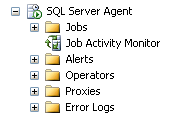
    Think of environment where multiple jobs are running at the same time and you want to monitor the current status of each job. One option is to use the job activity monitor.


    And another way is you can use the below system stored procedures by running it against the MSDB database.


    exec msdb..sp_get_composite_job_info
    @execution_status=1

    exec msdb.dbo.sp_help_job
    @execution_status = 1


    You can check the job execution status parameter values as below.

    0 = Not idle or suspended

    1 = Executing

    2 = Waiting For Thread

    3 = Between Retries

    4 = Idle

    5 = Suspended

    6 = Waiting For Step To Finish

    7 = Performing Completion Actions


  • Different ways to monitor Log Shipping for SQL Server databases

    Problem
    Log shipping has been an option for creating a fail over server for SQL Server for quite some time. In this tip, we look at different ways that you can monitor the status of your log shipped databases.

    Solution
    http://www.mssqltips.com/sqlservertip/2553/different-ways-to-monitor-log-shipping-for-sql-server-databases/

  • Steps to Attach a SQL Server database without transaction log file

    Problem: There could be situation where you missed the database transaction log file(.LDF) and you have only data file (.MDF). You can attach the database using below solution.

    Solution: In the below script I have created the database,dropped its log file and created the database with the .mdf file.

    --created database with .mdf and .ldf file
    CREATE DATABASE [singleFileDemo] ON  PRIMARY 
    ( NAME = N'singleFileDemo', FILENAME = N'L:\singleFileDemo.mdf' , SIZE = 2048KB , FILEGROWTH = 10240KB )
     LOG ON 
    ( NAME = N'singleFileDemo_log', FILENAME = N'F:\singleFileDemo_log.ldf' , SIZE = 1024KB , FILEGROWTH = 5120KB )
    GO
    
    --inserting data into database
    use singleFileDemo
    create table tb1 (name varchar(10))
    
    --inserting records
    insert into tb1 values('Jugal')
    go 10;
    
    --deleting the log file
    --detaching the database file
    USE [master]
    GO
    EXEC master.dbo.sp_detach_db @dbname = N'singleFileDemo'
    GO
    
    -- now next step is delete the file manually or you can do it from command prompt
    EXEC xp_cmdshell 'del F:\singleFileDemo_log.ldf'
    
    -- script to attach the database 
    USE [master]
    GO
    CREATE DATABASE [singleFileDemo] ON 
    ( FILENAME = N'L:\singleFileDemo.mdf' )
    FOR ATTACH
    GO 
    

    When you will execute the CREATE DATABASE FOR Attach script you will get the below warning message.

    File activation failure. The physical file name "F:\singleFileDemo_log.ldf" may be incorrect.
    New log file 'F:\singleFileDemo_log.LDF' was created.

    Once the database is ready execute the DBCC CHECKDB for any error.

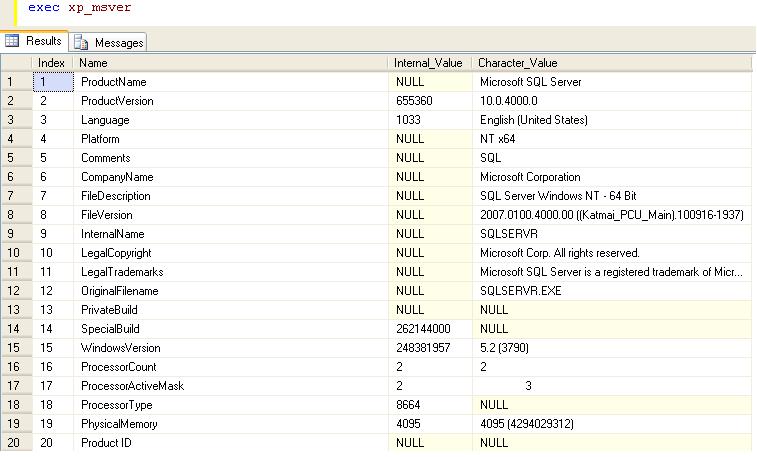
  • Extended Stored Procedure xp_msver

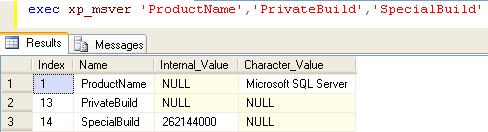
    xp_msver returns information about the SQL Server version, actual build number of the server and information about the server environment.

    You can also pass the parameter to get the specific information.

  • Script to get the last update statistics date

    Below script will execute against the sys.Objects,sys.indexes and sys.stats. Script will return last statistics update date and meta data of  statistics. Script will return the result for table and view level statistics.

    In this script I have used the function STATS_DATE which will return last updated statistics date.

    Syntax
    STATS_DATE ( table_id , index_id )

    SELECT sysobj.name AS objectname,
    sysindex.name AS indexname,
    Stats_date(sysindex.[object_id], sysindex.index_id) AS
    [Statistics Update Date],
    CASE sysstats.auto_created
    WHEN 0 THEN ‘No’
    WHEN 1 THEN ‘Yes’
    END AS
    isstatscreatedbyqueryprocessor,
    CASE sysstats.user_created
    WHEN 0 THEN ‘No’
    WHEN 1 THEN ‘Yes’
    END AS
    isstatscreatedbyuser,
    CASE sysstats.no_recompute
    WHEN 0 THEN ‘No’
    WHEN 1 THEN ‘Yes’
    END AS
    isstatscreatedwithnorecomputeoption
    FROM sys.objects AS sysobj WITH (nolock)
    INNER JOIN sys.indexes AS sysindex WITH (nolock)
    ON sysobj.[object_id] = sysindex.[object_id]
    INNER JOIN sys.stats AS sysstats WITH (nolock)
    ON sysindex.[object_id] = sysstats.[object_id]
    AND sysindex.index_id = sysstats.stats_id
    WHERE sysobj.[type] IN ( ‘U’, ‘V’ )
    ORDER BY Stats_date(sysindex.[object_id], sysindex.index_id);