Tag: T-SQL

  • ORIGINAL_LOGIN() and SUSER_SNAME() functions

    ORIGINAL_LOGIN() function returns the name of the original login that connected to the instance of SQL Server and is used to identify original login in all sessions. Even though you will do the security context switch it will return the original login name.

    SUSER_SNAME returns the name of user in the current security context.

    --connect SQL Using LoginDEMO account
    SELECT ORIGINAL_LOGIN() Original_Login_func, SUSER_SNAME() Suser_Name_Login_Func
    
    --Executing query using LoginTest account
    execute as login = 'LoginTest'
    SELECT ORIGINAL_LOGIN() Original_Login_func, SUSER_SNAME() Suser_Name_Login_Func
    revert
    
    --Again executing query be reverting the change
    SELECT ORIGINAL_LOGIN() Original_Login_func, SUSER_SNAME() Suser_Name_Login_Func
    

    Check below output image for more information. I connected SQL Server using LoginDemo account.
    New

  • Script to get the database backup history

    For the point time recovery or in case of failure it is essential that you should have the backup history of the database. You can execute the below query against the database to get the backup history.

    SELECT  
       CONVERT(CHAR(100), SERVERPROPERTY('Servername')) AS Server, 
       msdb.dbo.backupset.database_name,  
       msdb.dbo.backupset.backup_start_date,  
       msdb.dbo.backupset.backup_finish_date, 
       msdb.dbo.backupset.expiration_date, 
       CASE msdb..backupset.type  
           WHEN 'D' THEN 'Database'  
           WHEN 'L' THEN 'Log'  
       END AS backup_type,  
       msdb.dbo.backupmediafamily.logical_device_name,  
       msdb.dbo.backupmediafamily.physical_device_name,   
       msdb.dbo.backupset.name AS backupset_name, 
       msdb.dbo.backupset.description 
    FROM   msdb.dbo.backupmediafamily  
       INNER JOIN msdb.dbo.backupset ON msdb.dbo.backupmediafamily.media_set_id = msdb.dbo.backupset.media_set_id 
    WHERE 
    (CONVERT(datetime, msdb.dbo.backupset.backup_start_date, 102) >= '2013-01-08 00:04:49.000')  and (CONVERT(datetime, msdb.dbo.backupset.backup_start_date, 102) <= '2013-01-08 23:59:59')  
    and  msdb.dbo.backupset.database_name = 'Mention the database name'
    ORDER BY  
       msdb.dbo.backupset.backup_finish_date desc
    
  • Script to get the SQL Agent Properties

    You can use the sp_get_sqlagent_properties undocumented stored procedure to retrieve the SQL Agent properties of a SQL Instance. It is available in SQL Server MSDB database. This procedure only works if the SQL Agetn Service is started.

    SQLAgent

  • sys.dm_server_registry

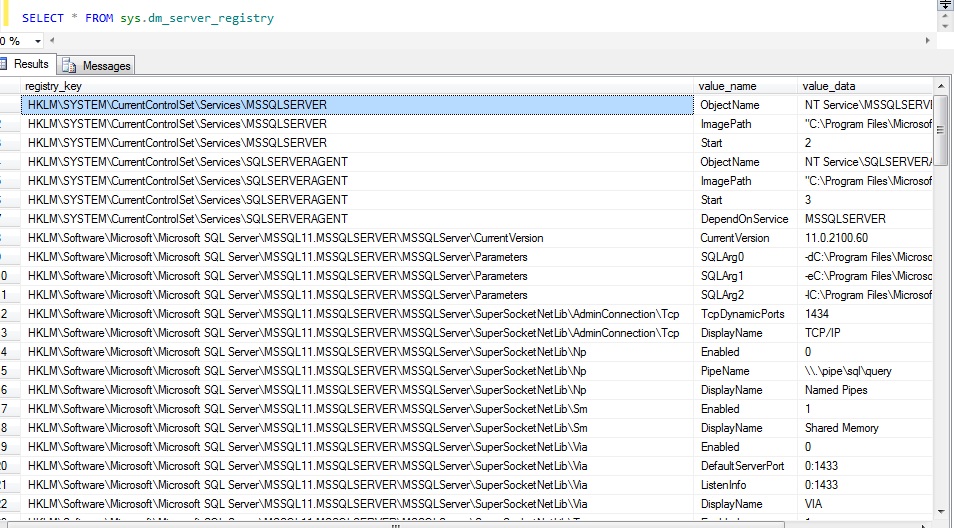
    sys.dm_server_registry DMV gives information about installation and configuration data that is stored in the windows registry for the current instance of SQL server.

    You can use to check the start up parameters, protocols, error log configuration, agent log configuration and IP Addresses.

    SQLReg