Author: Jugal Shah

  • Error: Database diagram support objects cannot be installed

    There will be situation while creating the database diagram, you got the below error message.

    Database diagram support objects cannot be installed because this database does not have a valid owner. To continue, first use the Files page of the Database Properties dialog box or the ALTER AUTHORIZATION statement to set the database owner to a valid login, then add the database diagram support objects.
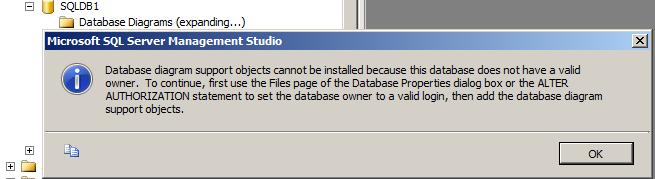
    Above error is self explanatory where it is stating that the “set the database owner to valid login” To fix the issue please follow below one of the solution.

    Solution 1:
    Execute the below script by mentioning the database name.

    ALTER AUTHORIZATION ON DATABASE::MentionDatabaseName TO sa
    GO
    

    OR, you can change the owner by executing the below query.

    EXEC sp_changedbowner 'sa'
    

    Solution 2:
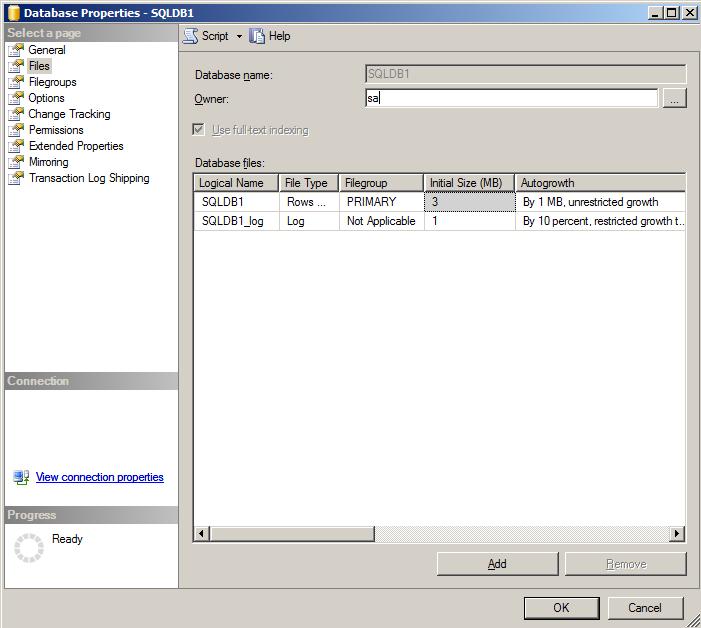
    Right Click on the database -> Database Properties -> click on files page -> change the owner to SA
  • T-SQL Script to identify tables without Primary Key

    When designing tables, It is a good practice of having one column that is unique and can be a primary key. You can include one of the below type column as Primary Key

    – Add Auto Increment Column
    – Identify the column which unique for all the rows

    Make sure Primary keys should be as small as necessary. Prefer a numeric data type because numeric types are stored in a much more compact format than character formats. Most primary keys will be foreign keys in another table as well as used in multiple indexes. The smaller your key, the smaller the index, the less pages in the cache.

    You can execute below script to identify the tables without Primary Key and add the Primary Key into tables as per the above suggestions..

    
    Use <Database Name>
    
    SELECT SCHEMA_NAME(schema_id) AS [Schema Name], name AS [Table Name]
    FROM sys.tables
    WHERE OBJECTPROPERTY(OBJECT_ID,'TableHasPrimaryKey') = 0
    Order by name
    GO
    
  • Script to determine identity table and identity column

    Script to determine the identity tables and columns in the databases.

    USE <DBNAME>
    --script to determine the table with the identity column
    select name, OBJECTPROPERTY(id, 'TableHasIdentity') AS TableHasIdentityCol
    from sysobjects
    where xtype = 'U'
    
    --script to determine the table and columne with the identity on
    SELECT OBJECT_NAME(id) as TblName, name as ColName
    FROM syscolumns
    WHERE status = 0x80
    
    --script to determine the table and columne with the identity on using ColumnProperty
    SELECT OBJECT_NAME(id) as TblName, name as ColName
    FROM syscolumns
    WHERE COLUMNPROPERTY(id, name, 'IsIdentity') = 1
    
  • Lock Windows/Desktop with a Single Keystroke

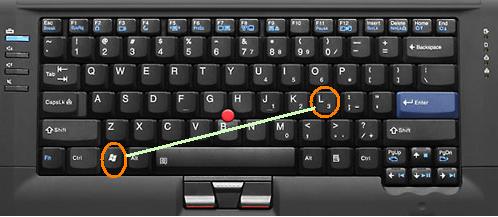
    You can lock the windows/desktop using single keystroke “Windows” + “L”, instead of CTRL + ALT + DEL + ENTER