Author: Jugal Shah

  • How to enable Dedicated Administrator Connection Feature in SQL Server 2008?

    DAC feature added from the SQL Server 2005 version. Using DAC feature a Database Administrator can connect to a SQL Server Instance when the database engine is not responding to regular connections and troubleshoot the issue.

    Advantage of using DAC is DBA can connect to a SQL Server Instance and execute T-SQL commands to troubleshoot and fix issues rather than rebooting the SQL Server which could lead to database corruption or other problems.

    By default DAC is disable, it is a best practice to enable the DAC.
    We can enable the DAC using below T-SQL command.

    Use master
    GO
    sp_configure 'show advanced options' , 1
    GO
    sp_configure 'remote admin connections', 1
    GO
    RECONFIGURE
    GO
    

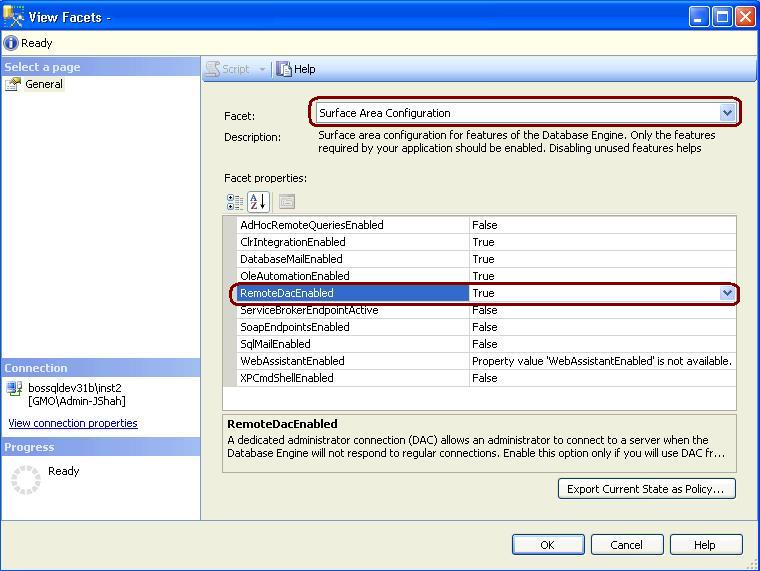
    In SQL Server 2008 to enable the DAC, right click on SQL Server and Select facets and from facets drop down Select Surface Area Configuration.

  • How to Turn Off SSMS Auto Recovery Feature

    Problem
    By default the Auto Recovery feature is enabled for SSMS and because of this when opening SSMS it may hang or become unresponsive for some time if the previous session was closed unexpectedly. There is not a way to turn this feature off from within SSMS, but we will look at how this can be done by modifying some registry entries.

    Solution
    http://www.mssqltips.com/tip.asp?tip=2352

  • Steps to Learn Basic SQL

    Problem: I have been often posted with a question that, I want to learn T-SQL and I don’t know any basics of T-SQL.

    Solution:
    To start with the Basic T-SQL and practice, there is very good site W3Schools.com You can learn and practice SQL there.

    http://www.w3schools.com/sql/default.asp

  • Again Awarded as SQL Server MVP

    Dear All,

    I am again awarded as SQL Server MVP. Keep reading!!! Post Comments!! and give me your suggestion.

    Thanks,

    Jugal Shah