Author: Jugal Shah

  • Backup Start Date Time and Finish Date Time

    As best practice it is recommended that you have to backup date time with the backup file name so anyone can get the idea of Backup creation.

    Sometimes due some issue we took backup without specifying the datetime with the backup file name so during restore we are unsure that how much data backed up in the backup file, type of backup, Is it Copy only and more.

    SQL Server stores the Backup Metadata into backup header. You can restore header only command to get the required information.

    RESTORE headeronly FROM disk = ‘c:\jshah.bak’ 

    Column Name Values Description
    BackupName NULL  
    BackupDescription NULL  
    BackupType 1 Backup type:
    1 = Database
    2 = Transaction log
    4 = File
    5 = Differential database
    6 = Differential file
    7 = Partial
    8 = Differential partial
    ExpirationDate NULL  
    Compressed 0 0 = Un-Compressed Backup
    1 = Compressed Backup
    Position 1  
    DeviceType 2  
    UserName JShah  
    ServerName SQLDBPool  
    DatabaseName jshah  
    DatabaseVersion 655  
    DatabaseCreationDate 12/31/10 9:55 AM  
    BackupSize 1453056  
    FirstLSN 28000000006000100  
    LastLSN 28000000013000000  
    CheckpointLSN 28000000006000100  
    DatabaseBackupLSN 0  
    BackupStartDate 12/31/10 10:06 AM  
    BackupFinishDate 12/31/10 10:06 AM  
    SortOrder 52  
    CodePage 0  
    UnicodeLocaleId 1033  
    UnicodeComparisonStyle 196609  
    CompatibilityLevel 100  
    SoftwareVendorId 4608  
    SoftwareVersionMajor 10  
    SoftwareVersionMinor 0  
    SoftwareVersionBuild 2757  
    MachineName SQLDBPool  
    Flags 512 1 = Log backup contains bulk-logged operations.
    2 = Snapshot backup.
    4 = Database was read-only when backed up.
    8 = Database was in single-user mode when backed up.
    16 = Backup contains backup checksums.
    32 = Database was damaged when backed up, but the backup operation was requested to continue despite errors.
    64 = Tail log backup.
    128 = Tail log backup with incomplete metadata.
    256 = Tail log backup with NORECOVERY.
    BindingID 85A5505D-ADB1-4B33-A181-549DC520A0F8  
    RecoveryForkID 03DE5437-1E27-4885-9011-91CFED12338A  
    Collation SQL_Latin1_General_CP1_CI_AS  
    FamilyGUID 03DE5437-1E27-4885-9011-91CFED12338A  
    HasBulkLoggedData 0 1 = Yes
    0 = No
    IsSnapshot 0 1 = Yes
    0 = No
    IsReadOnly 0 1 = Yes
    0 = No
    IsSingleUser 0 1 = Yes
    0 = No
    HasBackupChecksums 0 1 = Yes
    0 = No
    IsDamaged 0 1 = Yes
    0 = No
    BeginsLogChain 0 1 = Yes
    0 = No
    HasIncompleteMetaData 0 1 = Yes
    0 = No
    IsForceOffline 0 1 = Yes
    0 = No
    IsCopyOnly 0 1 = Yes
    0 = No
    FirstRecoveryForkID 03DE5437-1E27-4885-9011-91CFED12338A  
    ForkPointLSN NULL  
    RecoveryModel FULL  
    DifferentialBaseLSN NULL  
    DifferentialBaseGUID NULL  
    BackupTypeDescription Database  
    BackupSetGUID 62EB4399-C119-42C2-91F1-BF0FF19CB896  
    CompressedBackupSize 1453056  
  • How many databases can be mirrored on a single instance of Microsoft SQL Server?

    It is frequently asked by the DBAs or SystemAdmins or Customer that how many databases can be mirrored on a single instance of Microsoft SQL Server?

    Answer of the above question is you can configure 10 databases for 32-bit operating system.On a 32-bit system, database mirroring can support a maximum of about 10 databases per server instance because of the numbers of worker threads that are consumed by each database mirroring session.

    For 64-Bit Operating system you can mirror more than 10 databases depending on the number of processors and worker threads. Many company has deployed more that 10 Databases as mirrored.

  • 2010 in review

    Summary of how we did in year 2010

    Healthy blog!

    The Blog-Health-o-Meter™ reads Wow.

    Crunchy numbers

    Featured image

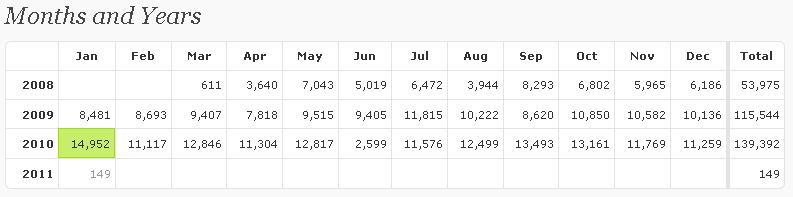
    The Louvre Museum has 8.5 million visitors per year. This blog was viewed about 140,000 times in 2010. If it were an exhibit at The Louvre Museum, it would take 6 days for that many people to see it.

    In 2010, there were 81 new posts, growing the total archive of this blog to 220 posts. There were 46 pictures uploaded, taking up a total of 5mb. That’s about 4 pictures per month.

    The busiest day of the year was January 25th with 1709 views. The most popular post that day was Happy Republic Day.

    Where did they come from?

    The top referring sites in 2010 were google.co.in, google.com, en.wordpress.com, stackoverflow.com, and yandex.ru.

    Some visitors came searching, mostly for sql server 2005 interview questions, republic day, dba responsibilities, error 18456, and system databases in sql server 2005.

    Attractions in 2010

    These are the posts and pages that got the most views in 2010.

    1

    Happy Republic Day January 2009
    6 comments

    2

    How to change SQL Server Instance Name? September 2008
    4 comments

    3

    SQL Server 2005 Interview Questions May 2008
    62 comments

    4

    SQL Server 2008 Active-Passive/Active-Active Cluster Installation October 2009
    14 comments

    5

    DBA Roles and Responsibilities December 2008
    46 comments

    Articles Posted on MSSQLTips.com

    Database Administration
    Dynamic Management Views\Functions
    Monitoring
    Security
    SQL Server Management Studio
    Tools
  • KILL SQL Server 2000 Blocking SPID and Records it details

    Problem
    Today I got an email from one of my blog reader; they have an application developed with VB6.0 and SQL Server 2000. Application was developed long back and now their database size is increased as well. Due un-efficient coding they are getting blocking issue and stuck all their application transactions. He asked for writing a query which will execute by SQL Server Agent at every 1 minute and will KILL the culprit SPID. He also wants me to store the KILL transaction history as well.

    As a solution I have written below query for him and which working fine now.

    -- Create below table in master database
     create table blkHistory
    (
    	SPID int,
    	blocked int,
    	killedSPID int,
    	date datetime default getdate(),
    	querytext varchar(8000)
    )
    
    
    -- add below code in to job command text box
    declare @SPID as int,
            @blocked as int,
            @KilledSPID as int
    
    declare @querytext as varchar(8000), @sql nvarchar(400)
    
    select @SPID = spid,@blocked = blocked from sysprocesses where blocked <> 0
    
    --select spid,blocked from sysprocesses where blocked <> 0
    
    select @sql = 'KILL ' + cast (@blocked as nvarchar(100))
    
    DECLARE @Handle binary(20)
    SELECT @Handle = sql_handle FROM sysprocesses WHERE spid = @blocked
    
    SELECT @querytext = text FROM ::fn_get_sql(@Handle)
    
    EXECUTE sp_executesql @SQL
    
    If @SPID > 0
    begin
    insert into blkHistory(SPID,blocked,KilledSPID,querytext)
    values (@SPID,@blocked,@blocked,@querytext)
    end
    
    --you can use below query to retrieve datafrom blocking history
    select * from master..blkHistory
    
  • Steps to insert error log records into temporary table

    You can follow the below steps to enter error log records into temporary table and query it.

    -- Command will create the temporary table in tempdb
    CREATE TABLE [dbo].[#TmpErrorLog]
    ([LogDate] DATETIME NULL,
     [ProcessInfo] VARCHAR(20) NULL,
     [Text] VARCHAR(MAX) NULL ) ;
    
    -- Command will insert the errorlog data into temporary table
    INSERT INTO #TmpErrorLog ([LogDate], [ProcessInfo], [Text])
    EXEC [master].[dbo].[xp_readerrorlog] 0 ;
    
    -- retrieves the data from temporary table
    SELECT * FROM #TmpErrorLog