| DB Levek Fixed Roles | Rights and Description |
| db_accessadmin | Members can manage Windows groups and SQL Server logins. |
| db_backupoperator | Issue DBCC, CHECKPOINT, and BACKUP statements. |
| db_datareader | Select all data from any user table in the database |
| db_datawriter | Modify any data in any user table in the database |
| db_ddladmin | Issue all Data Definition Language (DDL) statements |
| db_denydatareader | Cannot select any data from any user table in the database |
| db_denydatawriter | Cannot modify any data in any user table in the database |
| db_owner | Has full permissions to the database |
| db_securityadmin | Members can modify role membership and manage permissions. |
Category: Backup & Recovery
-
Database Level Fixed Roles
-
How to fix Orphan User in absense of login
Error
Msg 15291, Level 16, State 1, Procedure sp_change_users_login, Line 131
Terminating this procedure. The Login name ‘DJ’ is absent or invalidWhat is Orphaned User?
An Orphaned User in SQL Server is a database user for which a valid SQL Server Login is not available or it is wrongly defined with the different SID in the SQL Server instance, thereby not allowing the user to get connect to the database to perform activities.Below scenarios are mostly responsible for Orphan Users
1. A SQL Server Login was accidentally dropped
2. A database is restored with a copy of database from another SQL Server Instance
3. SID of the login is different in sys.server_principals and sys.sysusersSteps to re-produce issue
Step 1: Creating database SQLDBPool
USE [master]

GO
CREATE DATABASE [sqldbpool] ON PRIMARY
( NAME = N’sqldbpool’, FILENAME = N’C:\sqldbpool.mdf’ , SIZE = 2048KB , MAXSIZE = UNLIMITED, FILEGROWTH = 1024KB )
LOG ON
( NAME = N’sqldbpool_log’, FILENAME = N’C:\sqldbpool_log.ldf’ , SIZE = 1024KB , MAXSIZE = 2048GB , FILEGROWTH = 10%)
COLLATE SQL_Latin1_General_CP1_CI_AS
GOStep 2:
In this example I am creating user DJ using below script. You can also create user from GUI as well
Using GUI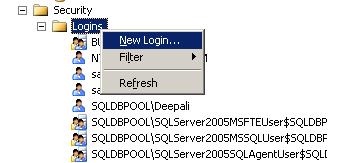
Right Click On Security Node and Select New Login Using Script
USE [master]

GO

CREATE LOGIN [DJ] WITH PASSWORD=N'pune@123',

DEFAULT_DATABASE=[master],

CHECK_EXPIRATION=OFF,

CHECK_POLICY=OFF

GO
Step 3: I am assigning Data Reader and writer permission to Login DJ to database SQLDBPool
USE [sqldbpool]

GO

CREATE USER [DJ] FOR LOGIN [DJ]

GO

USE [sqldbpool]

GO

EXEC sp_addrolemember N'db_datawriter', N'DJ'

GO

USE [sqldbpool]

GO

EXEC sp_addrolemember N'db_denydatareader', N'DJ'

GO
Step 4: Dropping the login DJ and it will make the user DJ as orphan in SQLDBPool database
USE [master]

GO

DROP LOGIN [DJ]

GO
Steps to fix the issue
Step 1: You can useSP_CHANGE_USERS_LOGINstored procedure to fix the Orphan user issue, for that you need the Database Owner permission on that database.Syntax
sp_change_users_login [ @Action= ] 'action'

[ , [ @UserNamePattern= ] 'user' ]

[ , [ @LoginName= ] 'login' ]

[ , [ @Password= ] 'password' ]

[;]
Examples
EXEC sp_change_users_login 'Report' --Reports orphaned user

EXEC sp_change_users_login 'Auto_Fix', 'user' -- auto fix when SID mis-match issue

EXEC sp_change_users_login 'Auto_Fix', 'user', 'login', 'password'
The stored procedureSP_CHANGE_USERS_LOGINaccepts arguments AUTO_FIX, REPORT or UPDATE_ONE as @Action parameter.AUTO_FIX: If this value is used for @Action parameter, it will create a SQL Server Login if it was not present earlier and will synchronize the SQL Server Login with that of the Database User.We have to also provide the password here.
REPORT: It will display the list of all the Orphaned Users along with the SID (Security Identifiers) value within the current database which are not linked to a SQL Server Login.
UPDATE_ONE:will synchronize the specified database user with an existing SQL Server Login.
Step 2: As first step I am checking orphan user using Report parameter, it will show me the SID and orphan user name.
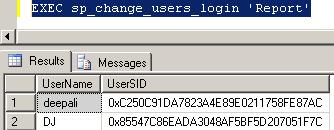
List of Orphaned User Step 3: In this scenario we have dropped the SQL Login so it is required to create the login. We can create the login using below query specifying password and mapped it to orphan user
EXEC sp_change_users_login 'Auto_Fix', 'DJ', NULL, 'pune@123'
Step 4: Executing again the report query to list out orphan users.
EXEC sp_change_users_login 'Report'Use below link to list out and fix the Orphan User issue for all the databases.
Script to fix and list out Orphan Users on all the databases on server
-
MSQL_XP Wait type
MSQL_XP
This kind of wait type occurs when a task is waiting for an extended stored procedure to end. SQL Server uses this wait state to detect potential MARS application deadlocks. The wait stops when the extended stored procedure call ends. In simple word SQL Server lost the control of extended stored procedure.Few days back LiteSpeed backup job are running longer than normal, when I checked the process status using Activity Monitor, it shows processes are running but in MSQL_XIP wait state.
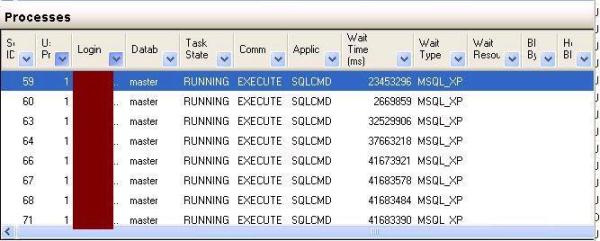
Activity Monitor I tried to KILL the backup sessions and it gone into KILLED\RollBack state forever.
You can either reboot the server to free/terminate all the session or there is another way that you can find the SQL Server Backup Process associated Operating System Id.
You can follow the below steps to find out SPID related KPID
Step 1: Execute SP_WHO2 active command, you will SPID related KPID which is OS Process ID.
OR
Step 1: Check for DMVs to get the OS Process IDStep 2: To get the more information regarding the OS Process download the Process Explorer from the below link.
http://technet.microsoft.com/en-us/sysinternals/bb896653.aspx
Step 3: Once confirmed you can kill OS process using Task Manager.
-
SQL Server Full Backup Internally
Q. What are the steps SQL Server performs internally at the time of FULL backup?
Ans. SQL Server follow the below steps once you execute the BACKUP command
1.Backup Process will lock the database and block all the transaction
2.Place a mark in the transaction log
3.Release the database lock
4.Extract all the pages in the data files and write them to the backup device
5.Lock the database and block all the transactions
6.Place a mark in the transaction log
7.Release the database lock
8.Extract the portion of the log between the marks and append it to backupQ. Which operations do not allowed during the full backup?
1.Adding and removing database files
2.Shrinking the database