Category: Backup & Recovery

  • Bug Fix:The I/O operation has been aborted because of either a thread exit or an application request

    Error

    Read on “VDI_FCA0B3E9” failed: 995(The I/O operation has been aborted because of either a thread exit or an application request.)

    The media family on device LiteSpeed for SQL Server backup file is incorrectly formed. SQL Server cannot process this media family.

    Solution
    In recent times I came across the above error, while restoring the database. We are using the Quest LiteSpeed for the backup/restore. As per the request from the user we have started the restore of the database from the production box to development box.

    Restore Query is failing with the above error. I have follow the below checklist to fix the error.

    1. Check for the LiteSpeed version on both the boxes
    2. Verified the backup file
    3. Verified the backup file path

    I got the positive result on all the above tests but still the restore is failing. At last I checked the one day old emails and found that, production box was migrated from SQL Server 2005 to SQL Server 2008. As you may know that we can’t restore the database from higher version to lower version because of that restore was failed.

    Finally I have restore the database on the different SQL Server 2008 development box and up-grade the SQL Server 2005 box with SQL Server 2008

    If you come across such kind of error, make sure you are checking the SQL Server version and LiteSpeed version on both source and destination machine.
  • What is .TUF file in Log Shipping?

    TUF file is a Microsoft SQL Server Transaction Undo file. .TUF File contains the information regarding any modifications that were made as part of incomplete transactions at the time the backup was performed.

    A transaction undo(.TUF) file is required if a database is loaded in read-only state. In this state, further transaction log backups may be applied.

  • Script to Monitor the progress of ALTER, Backup, Restore, DBCC, Rollback and TDE commands

    We often like to check the progess or completed percentage of time consuming command. You can query the sys.dm_exec_requests DMV to check the status of the command.

    You must have atleast view state permission to execute the below query.
    ALTER INDEX REORGANIZE
    AUTO_SHRINK option with ALTER DATABASE
    BACKUP DATABASE
    DBCC CHECKDB
    DBCC CHECKFILEGROUP
    DBCC CHECKTABLE
    DBCC INDEXDEFRAG
    DBCC SHRINKDATABASE
    DBCC SHRINKFILE
    RECOVERY
    RESTORE DATABASE
    ROLLBACK
    TDE ENCRYPTION

    SELECT dmr.session_id,
           dmr.status,
           dmr.start_time,
           dmr.command,
           dmt.TEXT,
           dmr.percent_complete
    FROM sys.dm_exec_requests dmr  CROSS APPLY sys.Dm_exec_sql_text(dmr.sql_handle) dmt WHERE dmr.command IN (‘ALTER’, ‘Backup’, ‘Restore’, ‘DBCC’, ‘Rollback’,  ‘TDE’)
    
  • Can we restore SQL Server 2008 database to SQL Server 2005?

    No we can’t restore it. SQL Server is not allowing the restore of higher version databases to a lower version. It is not possible to restore a database from a backup of a newer version to older version as database backups are not backward compatible.

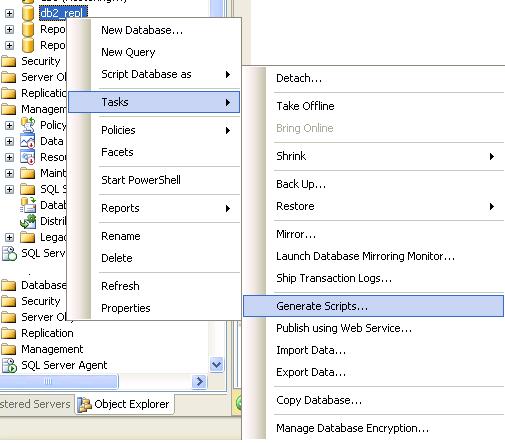
    You can do below workaround to transfer higher version database to lower version.

    1. Generate database script. Right Click database -> Tasks -> Generate Scripts

    2. Execute the script on the lower version server and it will create the database and its objects

    3. Transfer data between these two databases using DTS/SSIS

  • Disconnect Users

    Many times we want to restore the existing database or do DDL operation and often we are getting error Database is in use.


    ALTER DATABASE databasename SET single_user WITH ROLLBACK IMMEDIATE 

    You required only DBO rights on the target database, even you don’t have sysAdmin rights it will work for that particular database.