
Category: Database

  • Legacy to Cloud-Native: A Database Modernization Playbook

    Database modernization is where cloud migrations go to get hard. Applications can be containerized, rehosted, refactored — but databases carry the data, the transactions, and the business’s tolerance for downtime, which is usually near zero. I have worked on massive database migration programs, including estates of tens of thousands of SQL Server and Oracle databases, and I have seen the same patterns decide success or failure every time.

    This is the playbook I wish someone had handed me at the start: four phases, in order, with the pitfalls marked.

    Phase 1: Assess — Know Your Estate

    You cannot modernize what you have not inventoried. This sounds obvious, and it is the phase most often rushed — which is why it causes the most damage when skipped.

    Build a real inventory. Not the spreadsheet from three years ago. Automated discovery of every database instance: version, edition, size, workload type, owner (or “owner unknown,” which is itself data). In large estates, expect to find databases nobody knew existed. I have seen discovery phases surface a meaningful percentage of previously unknown instances. Each one is a migration you didn’t plan for — or worse, a database you would have left behind.

    Map dependencies. Databases are never standalone. Applications connect to them, ETL jobs feed them, reports read from them, linked servers chain them together. Dependency mapping is tedious, unglamorous work, and skipping it is the number one cause of cutover surprises. For each database, you need to know: what connects to it, what breaks if it moves, and what breaks if its connection string changes.

    Profile the workloads. Not all databases want the same future. Profile each workload on the dimensions that drive the modernization decision: transaction volume and patterns, availability requirements, data size and growth, latency sensitivity, compliance constraints, and how much the application can change. A reporting database and a core transactional system will modernize differently, and the assessment phase is where you learn which is which.

    Grade your data quality going in. Modernization is the worst possible time to discover that the data is a mess — duplicate records, inconsistent formats, orphaned rows. You don’t have to fix everything before migrating, but you need to know what you’re carrying, because every data quality issue gets harder to fix after it has been moved, transformed, and loaded into a new platform.

    The output of this phase is not a document. It is a decision-ready inventory: every database classified, dependencies mapped, workloads profiled. Everything downstream depends on this being right. Spend the time here; it is the cheapest place to find problems.

    Phase 2: Decide — One Strategy Per Workload, Not Per Project

    The classic mistake is picking one modernization strategy for the whole program — “we’re replatforming everything” — and then discovering that workloads have opinions. The right approach is one strategy per workload, chosen deliberately. The industry’s “6 Rs” framework, applied specifically to databases:

    Strategy What it means for databases Best when…
    Retain Leave it where it is The database is stable, cheap to run, and tied to systems you aren’t touching. Not everything needs to move.
    Rehost Lift-and-shift to cloud VMs You need speed, the database version is supportable, and you’ll optimize later. Fastest path, highest running cost.
    Replatform Move to a managed cloud database service You want to shed operational burden (patching, failover) without changing the engine. The sweet spot for many workloads.
    Repurchase Replace with SaaS The database supports a commodity function (and the business agrees). Rare for core systems, common at the edges.
    Rearchitect Redesign for cloud-native (distributed, serverless, new data model) The workload needs elasticity or scale the old architecture can’t give. Highest effort, highest payoff.
    Retire Decommission Discovery found it and nobody can explain what it’s for. Celebrate these — every retirement is budget recovered.

    A few practical notes on choosing. Replatform (managed database services) is underused by teams who overestimate how different it is — for most standard workloads, it removes entire categories of operational work with minimal application change. Rearchitect is overused by teams who underestimate it — changing data models and consistency guarantees under a running business is the hardest kind of engineering; reserve it for workloads where the payoff justifies the risk. And Retain is a legitimate strategy, not a failure — a stable, cheap database that isn’t in the way doesn’t need a migration story.

    Document the decision per workload with the reasoning. Six months later, when someone asks “why did we replatform this instead of rearchitecting?”, the answer should be written down, not reconstructed from memory.

    Phase 3: Execute — Waves, Not Big Bangs

    Nobody modernizes thousands of databases at once. You do it in waves — and how you design the waves determines whether the program feels controlled or chaotic.

    Sequence by risk, not by enthusiasm. The first wave should be meaningful but forgiving: real production workloads, but not the ones where downtime makes the news. Early waves build the team’s muscle memory and prove the patterns. Save the hardest, most critical databases for when the team has done it twenty times, not twice.

    Standardize the wave pattern. Every wave should follow the same motion: pre-migration validation (backups verified, rollback plan tested), the migration itself (using the same tooling and runbooks every time), post-migration validation (data integrity checks, application smoke tests, performance baselines compared), and a defined bake-in period before the wave is declared done. The runbook gets better every wave. By wave five, the team is fast because the process is proven, not because they’re rushing.

    Validate like you don’t trust yourself. Data integrity checks after migration are non-negotiable: row counts, checksums on critical tables, application-level reconciliation for financial data. Performance baselines matter too — capture before-and-after metrics for key queries, because “it works” is not the same as “it works as well as before,” and users will notice the difference before you do.

    Plan the cutover, then plan the rollback. Every migration needs a cutover plan with a defined window, a communication plan, and success criteria — and a rollback plan that has been tested, not just written. The rollback plan you haven’t tested is a hope, not a plan. Most rollbacks never happen. The ones that do happen save careers.

    Mind the data transfer. Moving terabytes between on-premises and cloud (or between regions) takes longer than the project plan assumes, every time. Model transfer time realistically, including the final delta sync during cutover. For very large databases, physical transfer or dedicated connectivity beats the public internet by enough to change the schedule.

    Phase 4: Operate — The Migration Isn’t Over at Cutover

    Here is where programs quietly fail: the migration “succeeds,” everyone celebrates, and then nobody does the unglamorous work that makes the new estate actually better than the old one.

    Decommission the old estate. This is the step most often skipped and the most expensive to skip. Every old database left running “just in case” is infrastructure, licensing, and operational attention you’re still paying for. Set decommission dates during planning, and treat missed decommission dates as the budget issue they are.

    Rewrite the runbooks. The new estate has different failure modes, different tooling, different escalation paths. Runbooks written for the old world are worse than useless — they’re misleading. This is also the moment to build in the automation you wished you’d had: the fleet-scale lesson is that anything manual at scale doesn’t happen.

    Optimize — the second migration. Remember the lift-and-shift waste problem: workloads moved as-is are carrying their on-premises sizing into per-hour billing. The post-migration optimization pass (right-sizing, storage tiering, reserved capacity for stable workloads) is where a large share of the migration’s economic value is actually captured. Schedule it as part of the program, not as a someday-maybe.

    Transfer the knowledge. The migration team knows things the operations team doesn’t. Structured handover — not a document dump, but walkthroughs of the new architecture, the known quirks, and the decisions made along the way — is what prevents the new estate from becoming the next legacy estate.

    Pitfalls I’ve Seen (So You Don’t Have To)

    A short list, earned the hard way:

    Skipping dependency mapping. The cutover that broke a reporting chain nobody knew existed. Map first, migrate second.

    Big-bang cutovers. Migrating everything in one weekend because the plan looked cleaner. Waves exist for a reason.

    Untested rollback plans. The plan said “restore from backup.” Nobody had timed the restore. It took longer than the cutover window.

    Declaring victory at cutover. The migration succeeded; the optimization, decommissioning, and runbook work never happened. Two years later, they’re paying for two estates.

    Letting perfect be the enemy of moved. Some teams spend years designing the ideal target architecture while the legacy estate decays. A good migration executed beats a perfect migration planned.

    Forgetting the people. DBAs whose identity is tied to the old platform need a path to the new one — training, involvement, ownership. Technology migrations fail on people more often than on technology.

    The Bottom Line

    Database modernization is a program, not a project: assess honestly, decide per workload, execute in waves, and operate deliberately afterward. The technology choices matter less than the discipline — the teams that inventory carefully, validate relentlessly, and finish the unglamorous last 10% are the ones whose migrations actually pay off.

    If you’re staring at a legacy estate and wondering where to start — or you’re mid-migration and something feels off — reach out through the contact page. I’ve been through this at scales most teams never see, and I’m happy to help you think through yours.

    Related: case studies on enterprise migration modernization.
  • The Real Cost of Cloud Migration — and How to Control It

    Every cloud migration I have ever seen has two budgets: the one in the business case, and the real one. The gap between them is where careers get uncomfortable. It is rarely caused by one big mistake. It is caused by a dozen small leaks that nobody owned — over-provisioned instances, architectures chosen for speed instead of cost, license traps, and the quiet sprawl of resources nobody remembers spinning up.

    I have spent 10 years at a global cloud provider working on massive application and data migrations, and I have led migration programs from both sides of the table. This post is about where migration money actually goes, and how to keep control of it.

    Where Migration Budgets Actually Leak

    Let me walk through the leaks I see most often, roughly in order of how much damage they do.

    Lift-and-shift waste. The fastest way to migrate is to move workloads as-is. It is also the most expensive way to run them. An on-premises server sized for peak-plus-headroom becomes a cloud instance billed by the hour at that same generous size — except now the headroom costs real money every month, forever. Lift-and-shift is a valid migration strategy; it is a terrible operating strategy. The mistake is treating the migration as finished at cutover instead of as step one of optimization.

    Over-provisioning by default. Engineers size for safety. Without cost feedback, “safe” means the next size up. Multiply that instinct across hundreds of workloads and you are paying a meaningful premium for comfort. I have seen estates where the majority of instances averaged a small fraction of their provisioned capacity. That gap is pure waste, and it is invisible until someone measures it.

    Idle and forgotten resources. Dev and test environments that never shut down. Proof-of-concept infrastructure from a project that ended two years ago. Snapshots nobody will ever restore. Storage volumes detached from deleted instances, billing quietly in the background. At enterprise scale, this category alone can fund a team.

    Data transfer. Everyone models compute and storage. Far fewer model data transfer — between regions, between availability zones, and out to the internet. For data-heavy workloads, transfer costs can rival compute. Architecture decisions made without transfer pricing in mind (chatty cross-region replication, for example) create bills that surprise everyone.

    The long tail of “temporary.” Migration tooling, jump hosts, temporary databases for validation, dual-running old and new environments “just until we’re sure.” Each is justified individually. Collectively, they extend the period where you are paying for two estates instead of one. The old estate must have a decommission date, or “temporary” becomes permanent.

    Architecture Decisions Are Cost Decisions

    Here is the uncomfortable truth: by the time the FinOps team sees the bill, the costs were already decided — months earlier, in architecture reviews where nobody asked about money. Cost is not a billing problem. It is a design problem.

    Every major architecture choice has a cost dimension. Managed database services versus self-managed on compute instances: the managed service looks more expensive per hour until you count the engineering time, the patching, the failover testing, and the 3 AM pages. Sometimes self-managed wins; sometimes it loses badly. The point is that the comparison has to happen before the decision, not after the invoice.

    Compute architecture is one of the biggest levers available. I have led complete migrations from traditional x86-based estates to ARM-based processor architectures — the kind of fleet-wide architecture change that sounds terrifying and turns out to be methodical work: assess workload compatibility, migrate in waves, validate performance at each step. The economics are compelling because processor choice affects every workload, every hour. It is the rare optimization that compounds across the entire estate instead of applying to one application.

    Storage tiering is another. Production databases on high-performance storage, fine — but backups, logs, and infrequently accessed data on the same tier is money left on the table. Lifecycle policies that move data to cheaper tiers automatically are the difference between a policy and a wish.

    The principle: put a cost line on every architecture decision document. Not a precise forecast — a directional one. “This choice costs roughly X relative to the alternative, because Y.” It takes ten minutes and changes the conversation permanently.

    The License Trap

    Licensing deserves its own section because it ruins more migration business cases than any technical issue.

    Enterprise software licensed per core, per processor, or per user was priced for a world of fixed on-premises hardware. In the cloud, where cores are elastic and instances come and go, the old licensing math breaks — usually against you. I have seen organizations discover mid-migration that their database licenses, perfectly economical on owned hardware, became punitive when mapped to cloud instance sizing.

    The traps to watch: licenses that don’t transfer to the cloud the way you assumed (read the actual terms, not the sales deck); “license-included” managed services that look expensive until you price the alternative honestly; and the worst one — migrating first and doing license analysis second, when your negotiating leverage is gone.

    Do the license analysis during the assessment phase, workload by workload. For each one, the question is simple: what does this license cost here versus there, including every alternative (bring-your-own-license, license-included services, open-source substitution, rearchitecting away from the licensed product)? This analysis has saved programs I have worked on from genuinely painful surprises. It is unglamorous work. Do it anyway.

    Building Cost Accountability Into the Program

    Knowing where money leaks is not enough. Someone has to own stopping the leaks, continuously. That is what a working FinOps practice looks like inside a migration program — not a dashboard, but accountability.

    Tag everything, enforce it technically. A tagging policy that lives in a wiki is decoration. Enforcement means provisioning fails when required tags are missing. A minimal starting point:

    {
      "required_tags": ["owner", "cost-center", "migration-wave", "environment"],
      "enforcement": "deny-provisioning-if-missing",
      "review_cadence": "weekly"
    }

    Four tags. With them, you can answer “who spent what on which wave” — without them, you are guessing.

    Review cost per migration wave. Don’t wait for quarterly business reviews. After each wave of workloads migrates, review its actual cost against the estimate within weeks. Variances found early are corrections; variances found at year-end are explanations.

    Showback before chargeback. Start by showing teams what they spend. Most engineers have never seen the bill for their architecture choices, and the first time they do, behavior changes without any mandate. Chargeback (actually billing internal teams) is stronger medicine — use it where showback doesn’t move the needle.

    Assign a cost owner per workstream. Not a committee. A named person whose job includes the cost outcome of their migration wave, with cost as an explicit success criterion alongside timeline and functionality. What gets owned gets managed.

    Right-size on a schedule, not on courage. Build a recurring right-sizing review into the operating model — monthly for the first six months post-migration, quarterly after. Right-sizing is not a one-time event; workloads change, and the estate drifts back toward waste without it.

    Don’t Buy Discounts Before You Know Your Shape

    One more lever deserves attention because the timing matters: committed-use discounts and reserved capacity. Cloud providers will sell you significant discounts in exchange for committing to a level of usage — and for stable, well-understood workloads, this is straightforward savings.

    The trap is committing too early. Teams fresh off a migration, still running oversized lift-and-shift instances, lock in discounts on a footprint they haven’t optimized yet — and then spend the next one to three years getting a great price on waste. The right sequence is: migrate, optimize (right-size, tier storage, kill the idle), then commit on the stable remainder. The discount applies to whatever you commit to, so make sure you’re committing to the efficient version of your estate, not the just-migrated version.

    Related: savings plans and reservations are a finance decision as much as a technical one. They need someone tracking utilization of the commitment itself — an underutilized reservation is just waste with a discount label. Review commitment coverage quarterly, same cadence as right-sizing. The two practices belong together.

    What Good Looks Like

    A migration program with cost under control doesn’t look dramatic. It looks boring: estimates that hold, waves that land near their cost targets, a decommissioned old estate, and a FinOps review that takes thirty minutes because there are no surprises.

    Getting there requires treating cost as a first-class migration metric from day one — alongside timeline, scope, and risk. It requires architecture reviews that ask about money. And it requires the discipline to optimize after cutover instead of declaring victory and moving on.

    The organizations that do this well share one trait: someone senior decided that the migration’s success would be measured in part by its economics, and said so out loud, early. Everything else — the tagging, the wave reviews, the right-sizing — follows from that decision.

    The Bottom Line

    Cloud migration costs are controllable, but only if cost is designed in, not bolted on. Audit your licenses before you migrate, put cost on every architecture decision, enforce tagging technically, review each wave’s spend while you can still correct it, and never let “temporary” infrastructure become permanent.

    If your migration budget is leaking — or you’re planning a migration and want the business case to survive contact with reality — reach out through the contact page. This is the part of migrations I’ve spent years getting right, and I’m glad to help you think through yours.

    Related: case studies, including a fleet-wide compute cost migration.

  • What Operating 17,000 Databases Taught Me About Data Architecture

    Nobody ever sat down and designed a 17,000-database architecture. You don’t arrive at that number through planning. You arrive at it one acquisition, one new application, one “temporary” database at a time — until one morning you realize the fleet has quietly become the largest thing in the building, and every shortcut anyone ever took is now your problem, multiplied seventeen thousand times.

    I have operated a relational database fleet of 17,000 to 18,000 databases, alongside large-scale Hadoop environments. Before that, I led a 130-person engineering and operations organization managing 35,000 on-premises SQL Server and 20,000 Oracle databases. I am not writing about database architecture from a whiteboard. I am writing about what survives contact with a fleet.

    Here is what I learned.

    Snowflakes Will Kill You

    Every database administrator has a favorite custom configuration. A special trace flag here, a hand-tuned memory setting there, a one-off collation because one application in 2009 needed it. At the scale of fifty databases, these are charming. At the scale of seventeen thousand, each snowflake is a future incident with your name on it.

    The math is unforgiving. If a non-standard configuration has even a 0.1% chance of causing a problem during any given change window, then across 17,000 databases, that is 17 problems. Every time. You cannot staff your way out of this. You cannot “be careful” your way out of this. The only thing that works is ruthless standardization: a small number of approved configurations, enforced everywhere, with exceptions that expire.

    I learned to treat every exception as technical debt with interest. When someone asked for a custom setup, the question was never “can we do it?” It was “are we willing to operate it 17,000 times?” Almost always, the answer was no — and the workload got redesigned to fit the standard instead.

    Standardization is not the enemy of flexibility. It is the thing that makes flexibility affordable. You standardize the 95% so your best engineers have time for the 5% that genuinely needs thought.

    Automation Isn’t a Nice-to-Have. It’s Survival.

    There is a threshold — somewhere around a few hundred databases — past which anything done manually simply does not happen. Not “happens slowly.” Does not happen. Backups get skipped. Patches get deferred. Documentation goes stale. It is not a discipline problem; it is arithmetic. There are not enough hours.

    So the real job of operating a fleet is not operating databases. It is building the machine that operates the databases. Patching pipelines. Automated provisioning from approved templates. Backup verification that pages someone when a backup fails to verify, not when someone remembers to check. Compliance scanning that runs continuously against the inventory, not quarterly against a spreadsheet.

    A simple example of the mindset shift — a fleet-wide compliance check that runs on a schedule instead of relying on anyone’s memory:

    # Fleet-wide version compliance check against the CMDB inventory
    while read -r host version; do
      if [[ "$version" != "$APPROVED_VERSION" ]]; then
        echo "NON-COMPLIANT: $host running $version"
      fi
    done < fleet_inventory.csv

    Trivial script. But the principle behind it is everything: the fleet tells you its state; you never go looking. Every manual check you perform is a check that will be skipped the week you are busiest — which is exactly the week you need it most.

    The teams that thrive at fleet scale are the ones that treat toil as a bug. If an engineer does the same task three times, the fourth time should be a script. If a script runs weekly, it should be a pipeline. This compounds. After a few years, the difference between a team that automated and a team that didn’t is not efficiency — it is whether they are still standing.

    Observability Before Heroics

    Every operations organization loves its heroes — the engineer who diagnosed the outage at 3 AM from memory and instinct. Heroes are wonderful. They are also a sign of failure. If your fleet requires heroics to operate, your fleet is not observable enough.

    At 17,000 databases, you cannot rely on anyone’s mental model of the system, because no human holds a mental model of 17,000 databases. You need centralized telemetry: every instance reporting health, performance counters, backup status, patch level, and configuration drift into one place, with alerting tuned so that pages mean something.

    The tuning part matters more than people think. An alerting system that pages for everything trains engineers to ignore pages. We invested real effort in alert hygiene — every alert had to have a runbook, an owner, and a reason to wake someone up. Alerts that fired without action got fixed or deleted. Within a year, when a page went off, people moved fast, because pages had earned their trust.

    The metrics that mattered most were not the exotic ones. They were the boring ones: Is it up? Is it backed up? Is the backup restorable? Is it patched? Is it drifting from standard? Boring questions, asked continuously, about everything. That is observability at fleet scale — not a fancy dashboard, but relentless coverage of the fundamentals.

    Why Architectures That Work for 10 Databases Fail at 10,000

    Here is a pattern I have seen repeatedly: an architecture that is perfectly sound for a department gets adopted as the enterprise standard, and then it collapses under fleet-scale realities nobody modeled.

    Connection storms are a classic. Ten application servers opening pools to one database is fine. Ten thousand application instances across a fleet, each holding idle connections “just in case,” will exhaust connection limits in ways no load test predicted — because nobody load-tested the fleet, only the workload.

    Backup windows are another. A backup strategy designed per-database becomes a fleet-wide I/O storm when thousands of instances back up on the same schedule. You end up redesigning backup topology around the fleet: staggered windows, tiered retention, backup infrastructure sized for aggregate throughput, not per-instance throughput.

    Change management breaks too. A change process that requires a review board meeting works for ten changes a month. At fleet scale, you are making thousands of changes a month, and the review board becomes either a rubber stamp or a bottleneck. The answer is policy-as-code and automated guardrails: the review happens in the pipeline, against rules, in seconds — not in a meeting room.

    The lesson: always ask “what breaks when we multiply by a thousand?” If the answer is “the process,” redesign the process before you scale, not after.

    The Team Shapes the Fleet

    There is an organizational lesson hiding inside all of this, and it took me years to see it: the structure of your team determines the shape of your fleet. Embed database engineers inside application teams with no central standards, and you get thousands of snowflakes — each one locally rational, globally unmanageable. Centralize everything into one DBA group, and you get standards without context — engineers who enforce rules they don’t understand the reason for.

    What worked was a hybrid: a small platform team owning the standards, the automation, and the guardrails, with database engineers embedded in product teams who could request exceptions through a real process. The platform team didn’t say “no” — they said “here’s the cost of yes, and here’s the standard alternative.” Most exceptions died at that conversation, and the ones that survived were genuinely worth it. Conway’s law applies to databases too: if you want a coherent fleet, you need a team whose job is coherence.

    What I’d Do Differently

    If I could go back to the beginning of building fleet-scale operations, I would do three things differently.

    First, I would invest in platform engineering earlier. We spent years with excellent database engineers doing work that a platform should have absorbed — provisioning, patching, baseline monitoring. Every year we delayed the platform was a year of senior engineers doing toil instead of solving hard problems. Build the platform before you desperately need it, because by the time you desperately need it, you have no spare capacity to build it.

    Second, I would treat databases as cattle from day one, not as pets. The industry says this about servers; it applies doubly to databases because DBAs are culturally inclined to nurture individual instances. At fleet scale, any instance you cannot rebuild from automation in an hour is a liability. Immutable-ish infrastructure thinking — rebuild rather than repair — prevents entire categories of configuration drift.

    Third, I would measure toil explicitly and report it to leadership. “We spent 40% of engineering time on repetitive operational work last quarter” is a sentence that unlocks platform investment. Without the number, toil is invisible, and invisible problems don’t get funded.

    The Bottom Line

    Operating at extreme scale taught me that data architecture is not really about databases. It is about systems for managing databases — the standards, the automation, the observability, and the processes that let a finite team operate a near-infinite fleet. The database engine is the easy part. The fleet is the architecture.

    Most organizations will never operate 17,000 databases. But every organization operates more databases than its processes were designed for. The lessons scale down perfectly well: standardize early, automate relentlessly, observe continuously, and always ask what breaks when you multiply by a thousand.

    If you’re wrestling with any of this — a growing estate, operational toil eating your team, or architecture decisions that need to survive real scale — reach out through the contact page. I’ve lived this problem, and I’m always glad to compare notes with people facing it.

    Related: case studies from operating data at extreme scale.

    AI-era companion reading

    Everything in this post is a governance problem at scale — and governance is exactly what the Sustain dimension of my R-I-S-K-S framework covers: monitor continuously, verify relentlessly, and keep every database honest in production. If you’re building the governance layer for AI on top of a fleet like this: R-I-S-K-S: The 5-Dimension Framework for AI Risk Management

  • Database Backup WITH CHECKSUM

    Backup WITH CHECKSUM

    When WITH CHECKSUM option is used while taking backup, the backup process will verify each page for checksums and torn page. In case bad page checksum found, the backup will stop. Using backup checksums may affect workload and backup throughput.

    If you want to continue the backup, you have to write CONTINUE_AFTER_ERROR in backup WITH clause.
    In case backup completes successfully it means no bad checksums.

    Example

    backup database sqldba to disk = 'c:\jspace\sqldba1.bak'
    with checksum
    

    You can also use the 3023 trace flag for the check sum option, when 3023 trace flag is on WITH CHECKSUM option will be applied all the backups by default.

    DBCC TRACEON(3023)
    GO                              
    
    backup database sqldba to disk = 'c:\jspace\sqldbatraceflag.bak'
    
    DBCC TRACEOFF(3023)
    GO                              
    

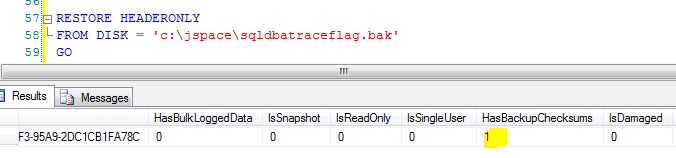
    Let’s check if the 3023 trace flag applied the page checksum to above backup command or not. Execute below query for it.

    RESTORE HEADERONLY
    FROM DISK = 'c:\jspace\sqldbatraceflag.bak'
    GO  
    

    HasBackupCheckSums value is 1, it means that WITH CHECKSUM option applied to backup using 3023 trace flag.
    checksum

  • OpenDataSouce function – to query OLEDB Data Source

    OPENDATASOURCE
    OpenDataSouce function helps you to get ad hoc connection information as part of a four-part object name as an one time alternative of linked server. You don’t have to specify or create the linked server to query other data sources (i.e. MS Excel, MS Access, MSSQL Older version to newer version etc.) if you are querying it infrequently.

    You can use OPENDATASOURCE for the OLEDB data sources those are accessed infrequently, for several time use linked server as it provides more functionality.

    You can get more information about the arguments of OpenDataSource function on MSDN site.

    To use the OPENDATASOURCE you have to enable the ad hoc distributed queries. You required to have execute permission to use OPENDATASOURCE fucntion.

    Execute below query to enable it

    <br />
    EXEC sp_configure 'show advanced options', 1<br />
    RECONFIGURE WITH OVERRIDE<br />
    GO<br />
    EXEC sp_configure 'ad hoc distributed queries', 1<br />
    RECONFIGURE WITH OVERRIDE<br />
    GO<br />
    

    Make sure Provider AllowInProcess and DynamiceParameters value is checked. For example lets enable it for SQLNCLI10 provider.

    <br />
    USE [master]<br />
    GO<br />
    EXEC master.dbo.sp_MSset_oledb_prop N'SQLNCLI10', N'AllowInProcess', 1<br />
    EXEC master.dbo.sp_MSset_oledb_prop N'SQLNCLI10', N'DynamicParameters', 1<br />
    GO<br />
    

    OpenDataSource Examples

    <br />
    -- SQL Server 2000/2005/2008<br />
    -- You can use SQLNCLI10 provider for SQL Server 2008 as well<br />
    SELECT<br />
        * FROM<br />
    OPENDATASOURCE (<br />
       'SQLNCLI',<br />
       'Data Source=SQLInstanceName;Catalog=DBName;User ID=SQLLogin;Password=Password;').DBName.SchemaName.TableName</p>
    <p>SELECT *<br />
    FROM OPENROWSET('SQLNCLI',<br />
       'DRIVER={SQL Server};SERVER=SQLInstanceName;UID=SQLLogin;PWD=Password',<br />
       'select * from DBName..TableName')  </p>
    <p>-- SQL Server 2012<br />
    SELECT<br />
        * FROM<br />
    OPENDATASOURCE (<br />
       'SQLNCLI11',<br />
       'Data Source=SQLInstanceName;Catalog=DBName;User ID=SQLLogin;Password=Password;').DBName.SchemaName.TableName</p>
    <p>SELECT *<br />
    FROM OPENROWSET('SQLNCLI11',<br />
       'DRIVER={SQL Server};SERVER=SQLInstanceName;UID=SQLLogin;PWD=Password',<br />
       'select * from DBName..TableName')  </p>
    <p>--Access DB<br />
    SELECT * FROM OPENDATASOURCE ('Microsoft.ACE.OLEDB.12.0',<br />
                                  'Data Source=D:\MyDB\MyAccessDB.accdb')...TableName<br />
    

    Common Errors
    Error 1#
    Msg 7403, Level 16, State 1, Line 1
    The OLE DB provider “SQLNCLI11” has not been registered.
    Solution: You will get above error if you have mentioned SQLNCLI11 while running OPENDATASOURCE query on SQL Server 2008 or lower version, it will work fine on SQL Server 2011. You can check list of registered provider by browsing Server Objects -> Linked Servers -> Provider in SSMS
    Error 2#
    Msg 15281, Level 16, State 1, Line 2
    SQL Server blocked access to STATEMENT ‘OpenRowset/OpenDatasource’ of component ‘Ad Hoc Distributed Queries’ because this component is turned off as part of the security configuration for this server. A system administrator can enable the use of ‘Ad Hoc Distributed Queries’ by using sp_configure. For more information about enabling ‘Ad Hoc Distributed Queries’, see “Surface Area Configuration” in SQL Server Books Online.

    Solution: Enable the ad hoc distributed queries by executing above SP_CONFIGURE query.

    In the AI era, treat this like an agent tool

    Ad hoc distributed queries are a superpower and a risk — one statement opens a door to another data source. In 2026 I think about OPENDATASOURCE the way I think about tools I hand to AI agents: explicit allowlist, least-privilege credentials, and disabled by default. Keep sp_configure ‘ad hoc distributed queries’ off unless something actually needs it. That is the Control and Keep-control thinking from my risk framework: R-I-S-K-S: The 5-Dimension Framework for AI Risk Management