cluster group “SQL Server Group” /move: Physical_Name_Of_Node1
cluster group “SQL Server Group INST2” /move: Physical_Name_Of_Node2
cluster group “SQL Server Group” /move: Physical_Name_Of_Node1
cluster group “SQL Server Group INST2” /move: Physical_Name_Of_Node2
Problem Symtomps
The operation could not be performed because the OLE DB provider ‘SQLOLEDB’ was unable to begin a distributed transaction. OLE/DB provider returned message: New transaction cannot enlist in the specified transaction coordinator.
Cause
The problem occurs because Microsoft Distributed Transaction Coordinator (MS DTC) is not configured for network access. By default, the network access settings of MS DTC are disabled on new installations of SQL Server 2000 on computers that are running Windows Server 2003.
Resolution
Step 1: Open Component Services Wizard using below steps
Go to -> Start -> All Programs -> Administrative Tools -> Component Services
Step 2: Expand the Componenet Service and Double Click on Computers
Step 3: Right Click on MyCompute and select properties
Step 4: Click on MSDTC Tab and then click on Security Configuration
Step 5: In the Security Configuration dialog box, check the Network DTC Access check box
Step 6: Under Network DTC Access, click on New transaction
Please find the below images for the same.
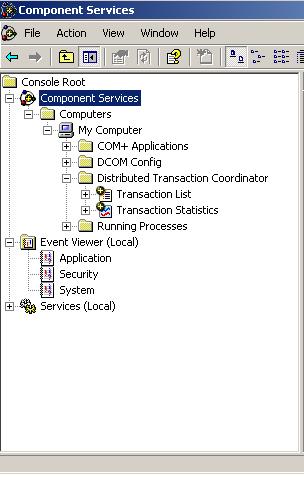
Figure 2
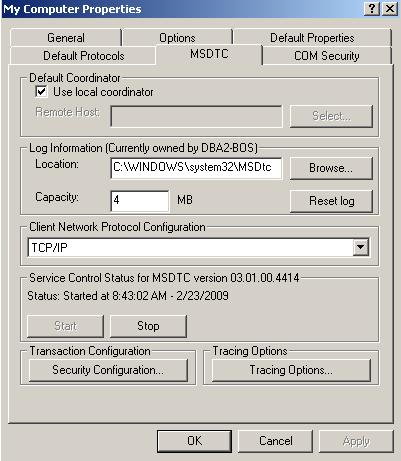
Figure 3
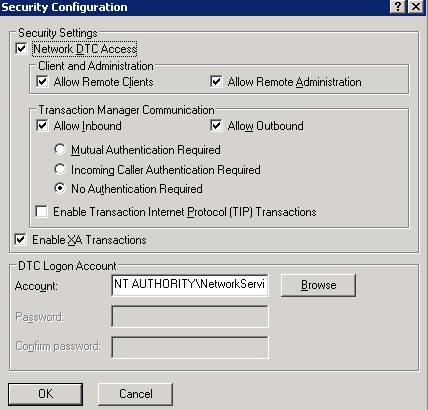
Problem: OSQL utility uses ODBC to communicate with the server. User’s problem is that the ODBC driver he is using to connect to the database is performing translations on the character data in the T-SQL script. Extended characters, which are not in the standard ASCII character set, are translated by the driver based on drive settings. The character translation option is ON by default when SQL Server executes scripts through the OSQL utility.
Below query is inserting garbage data in the table.
CREATE TABLE #temp(col1 varchar(40) NOT NULL )
INSERT INTO #temp VALUES( ‘Tëst’ )
SELECT col1 FROM #temp
DROP TABLE #temp
Solution: By using Unicode script files and converting the column to Unicode, user can avoid the character translation. For that user needs to add N against the column, which is already added.
Save As below script file as UNICODE file
CREATE TABLE #temp(col1 varchar(40) NOT NULL )
INSERT INTO #temp VALUES( ‘Tëst’ )
SELECT col1 FROM #temp
DROP TABLE #temp
User needs to do the following with the ODBC DSN to execute the scripts successfully, without any translation:
1. Create an ODBC system data source called MyDSN on the machine where he is executing OSQL with the “Perform translation for character data” option cleared
2. Specify this data source name as a parameter to OSQL so that OSQL can read the DSN settings and use them upon connection to SQL Server.
osql -S. -itest.sql –DMyDSN
OR
User needs to develop a script which can pass the ASCII value
Select ASCII(‘ë’)
INSERT INTO #temp (Col1) Select ‘T’ + chr(233) + ‘st’
As DBA comes under the support industry, it is extremely important for DBAs to improve communication skills. As we are working production servers and backend, it is extremely important for us to communicate properly.