
Category: OS and SQL

  • T-SQL Script to identify the data, log and backup drive

    You can use the below script to identify the data, log and backup file drive.

    select 
    @@SERVERNAME as svrName,
    drivename, 
    drivedescription
    from
    (
    select distinct  SUBSTRING(filename,1,3) as drivename, 'data Drive' as drivedescription from master..sysaltfiles where filename like '%.mdf'
    union
    select distinct  SUBSTRING(filename,1,3) as drivename, 'Log Drive' as drivedescription from master..sysaltfiles where filename like '%.ldf'
    union 
    select distinct  SUBSTRING(physical_device_name,1,3) as drivename, 'Backup Drive' as drivedescription from msdb.dbo.backupmediafamily where physical_device_name like '%.bak'
    ) tab1
    
    
  • Powershell Script to get total and free disk space

    You can execute the below powershell script to get total & free disk space which includes the mount drive as well.

    Get-WmiObject -class Win32_volume -filter "drivetype = 3" | select name,
     @{Name="Capacity";Expression={$_.capacity / 1GB}},@{Name="freespace";Expression
    ={$_.freespace / 1GB}}
    
  • How to check Lock Pages In Memory is enabled?

    You can use below simple technique to check whether lock pages in memory is enabled or not. If lock pages in memory is enabled you can see the “Using locked pages for buffer pool” message in the SQL Server error log.

    exec xp_readerrorlog 0, 1, 'locked pages' 
    

    To check if it is disabled. You have to check for the “Address Windowing Extensions (AWE) requires the ‘lock pages in memory’ privilege which is not currently present in the access token of the process.” message.

    exec xp_readerrorlog 0, 1, 'lock pages in memory' 
    
  • T-SQL script to Identify the SQL Server version and edition

    Execute below T-SQL Script to get the SQL Server version details.

    SELECT SERVERPROPERTY ('productversion') as ProductVersion,
    SERVERPROPERTY ('productlevel') as Productlevel,
    SERVERPROPERTY ('edition') as Edition
    

    Output:
    -Product version (for example, 10.0.1600.22)
    -Product level (for example, SP3)
    -Edition (for example, Development)

    SQL Server 2012 version number examples
    11.0.2316 SQL Server 2012 CU1
    11.0.2100.6 SQL Server 2012 RTM

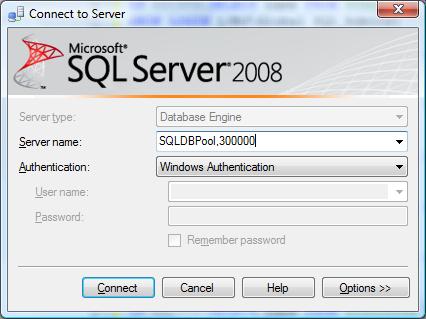
  • How to connect the SQL Server running on the different TCP/IP port?

    In case you have configured SQL Instance to use the static TCP/IP port number. You can connect SQL Server as below using SSMS.