Category: SQL Server 2008 R2

  • SQL Server 2005/2008 Standard Reports

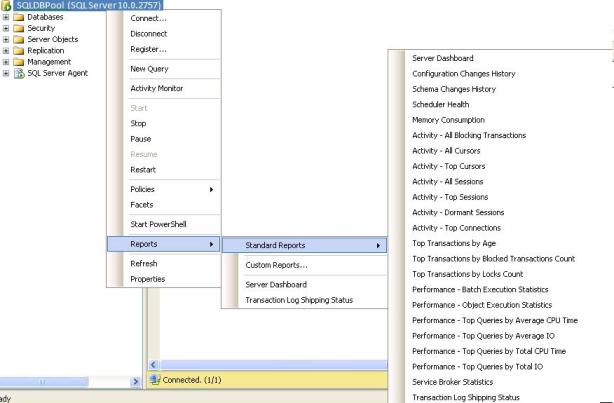
    In the new versions of SQL Server Microsoft has included very useful standard reports. We can use these different kind of report for performance-tuning, activity monitoring, Query tuning, troubleshooting IO bottlenecks.

    You can follow below steps to get the standard reports.
    Right Click On SQL Server -> Goto Reports -> Goto Standard Reports

  • How can we export and import registered servers using SSMS?

    In our organization we have number of SQL Server instances which are grouped by their Business Unit, Environment (PRD, DEV etc). For new joiners, it is hard to find out the list servers in absence of CMDB. As a solution, you can ask your team member to give you the list of registered servers by doing using server import/export option.

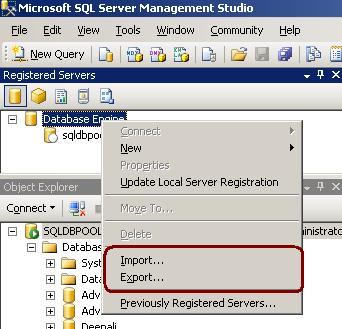
    1. In Registered Servers, right-click a server group, and then click Export.See below image for more information.

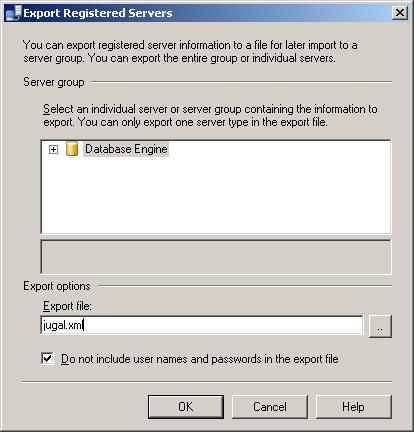
    2.In the Export Registered Servers dialog box, from the Server Group list select the location where you would like to save the registered server information, in the Export file box type a name for the exported file, and then click Save.

    SQL Server will create the file with .RegSvr extension which stores server info in XML format.

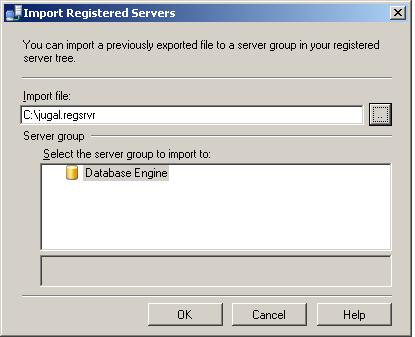
    In Registered Servers, right-click a server group, and then click Import and select the export file with .RegSvr extension. See below image for more information.

  • How to rename Column Name and Table Name?

    We can use sys.SP_Rename procedure to rename the column and table in SQL Server.

    CREATE TABLE empl
    (
    name VARCHAR(20),
    remarks VARCHAR(100)
    )

    –syntax to rename column
    EXEC sys.Sp_rename
    @objname = ‘table_name.old_column_name’,
    @newname = ‘new_column_name’,
    @objtype = ‘COLUMN’

    –rename column example
    EXEC sys.Sp_rename
    @objname = ’empl.name’,
    @newname = ’empname’,
    @objtype = ‘COLUMN’


    –rename table name Old Table Name and New Table Name
    EXEC sys.Sp_rename
    ’empl’,
    ’empInfo’
    EXEC sys.Sp_rename
  • Logical Joins and Physical Joins

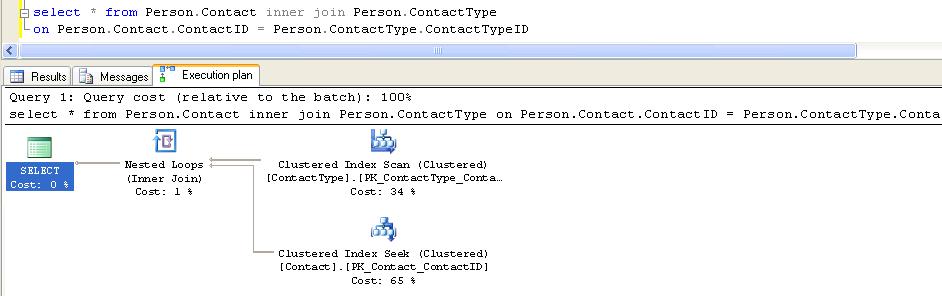
    Logical Joins: INNER JOIN, RIGHT/LEFT OUTER JOIN, CROSS JOIN, OUTER APPLY. This joins are written by the user.

    Physical Joins: Nested loop, merge join and hash join is common operators which we will see in execution plan as long as query contains any logical joins (inner join, outer join, cross join, semi join). These three joins are called Physical Joins.

    In below example I have executed query against AdventureWorks database with Inner Join. You can see the Nested Join in Execution Plan.

  • Date Time Functions

    CURRENT_TIMESTAMP()
    Returns the current database system timestamp as a datetime value without the database time zone offset.

    GETDATE ()
    Returns the current database system timestamp as a datetime value without the database time zone offset. This value is derived from the operating system of the computer on which the instance of SQL Server is running.

    GETUTCDATE()
    Returns the current database system timestamp as a datetime value. The database time zone offset is not included. This value represents the current UTC time (Coordinated Universal Time).

    SYSDATETIME()

    Returns a datetime2(7) value that contains the date and time of the computer on which the instance of SQL Server is running

    SYSDATETIMEOFFSET()
    Returns a datetimeoffset(7) value that contains the date and time of the computer on which the instance of SQL Server is running with timezone offset.

    SYSUTCDATETIME
    Returns a datetime2 value that contains the date and time of the computer on which the instance of SQL Server is running. The date and time is returned as UTC time (Coordinated Universal Time).

    SELECT SYSDATETIME()
    ———————-
    2011-01-10 06:38:25.05

    SELECT SYSDATETIMEOFFSET()
    ———————————-
    2011-01-10 06:38:25.0527369 -05:00

    SELECT SYSUTCDATETIME()
    ———————-
    2011-01-10 11:38:25.05

    SELECT CURRENT_TIMESTAMP
    ———————–
    2011-01-10 06:38:25.050

    SELECT GETDATE()
    ———————–

    2011-01-10 06:38:25.050

    SELECT GETUTCDATE()
    ———————–
    2011-01-10 11:38:25.050

    Note: Refer books online for more information.