Microsoft SQL Server Sample Database is moved to Microsoft’s Open Source site of CodePlex.
You can download it from the below link.
http://msftdbprodsamples.codeplex.com/
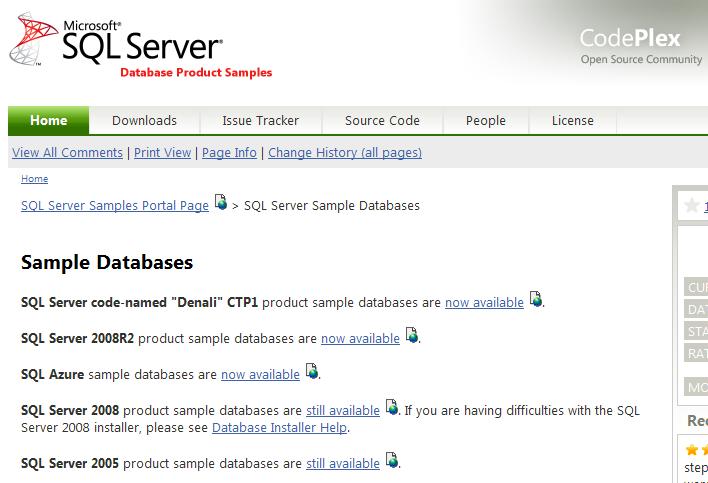
Microsoft SQL Server Sample Database is moved to Microsoft’s Open Source site of CodePlex.
You can download it from the below link.
http://msftdbprodsamples.codeplex.com/
What is Alias?
A SQL Server alias is the user friendly name. For example if there are many application databases hosted on same SQL Server. You can give the different alias name for each application. Simply Alias is an entry in a hosts file, a sort of hard coded DNS lookup a SQL Server instance.
You can create Alias from Configuration Manager.
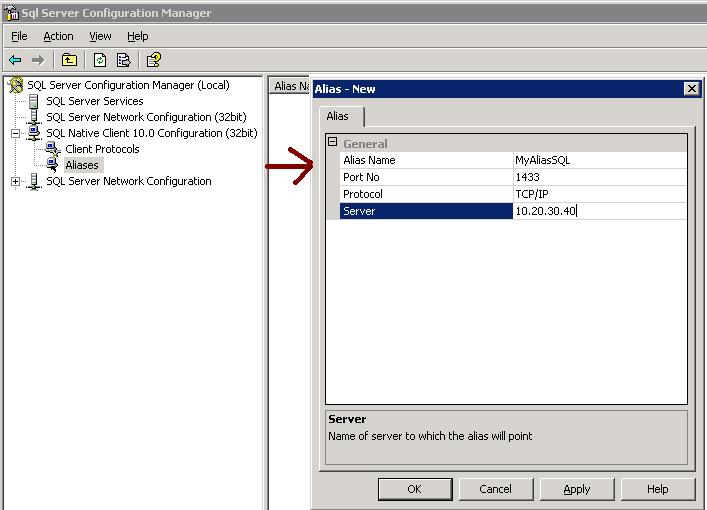
Go to SQL Server Configuration manager – Go to SQL Native Client -> Right Click and SELECT New Alias from the popup window.
Alias Name — Alernative name of SQL Server
Port No — Specify the Port No
Server – Mentioned the Server Name or IP address
Make sure On a 64-bit system, if you have both 32-bit and 64-bit clients, you will need to create an alias for BOTH 32-bit and 64-bit clients.
Today I received an email from my one of blog reader regarding identification of different objects using Sys.sysObjects.
You can query the sys.SysObjects to get all the objects created with in the database.
Example
SELECT *
FROM sys.sysobjects
WHERE TYPE = ‘u’
Below are the different kind of object you can retrieve from database.
Object Type Abbreviation
AF = Aggregate function (CLR)
C = CHECK constraint
D = Default or DEFAULT constraint
F = FOREIGN KEY constraint
L = Log
FN = Scalar function
FS = Assembly (CLR) scalar-function
FT = Assembly (CLR) table-valued function
IF = In-lined table-function
IT = Internal table
P = Stored procedure
PC = Assembly (CLR) stored-procedure
PK = PRIMARY KEY constraint (type is K)
RF = Replication filter stored procedure
S = System table
SN = Synonym
SQ = Service queue
TA = Assembly (CLR) DML trigger
TF = Table function
TR = SQL DML Trigger
TT = Table type
U = User table
UQ = UNIQUE constraint (type is K)
V = View
X = Extended stored procedure
You can insert the data from one table to another table using SELECT INTO and INSERT INTO with SELECT.. FROM clause.
— Below statement will create the temp table to insert records
select * INTO #tmpObjects from sys.sysobjects where type = ‘u’
— Below statement will create the user table to insert records.
— First will create the table and insert it details as well in new table
select * INTO tmpObjects from sys.sysobjects where type = ‘u’
–Below statement will insert new data into table
insert into tmpObjects SELECT * from sys.sysobjects where type = ‘s’
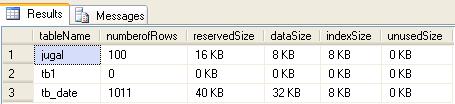
You can use sys.SP_SpaceUsed stored procedure to get the size of all the tables.
–Inserting into temp table
INSERT INTO #temptable
(tablename,
numberofrows,
reservedsize,
datasize,
indexsize,
unusedsize)
EXEC Sp_msforeachtable @command1=“EXEC sp_spaceused ‘?’”
SELECT *
FROM #temptable
— drop the temporary table
DROP TABLE #temptable