Category: SQL Server 2008

  • Identify Objects Type using sys.SysObjects

    Today I received an email from my one of blog reader regarding identification of different objects using Sys.sysObjects.

    You can query the sys.SysObjects to get all the objects created with in the database.
    Example

    SELECT *
    FROM   sys.sysobjects
    WHERE  TYPE = ‘u’ 

    Below are the different kind of object you can retrieve from database.

    Object Type Abbreviation
    AF = Aggregate function (CLR)
    C = CHECK constraint
    D = Default or DEFAULT constraint
    F = FOREIGN KEY constraint
    L = Log
    FN = Scalar function
    FS = Assembly (CLR) scalar-function
    FT = Assembly (CLR) table-valued function
    IF = In-lined table-function
    IT = Internal table
    P = Stored procedure
    PC = Assembly (CLR) stored-procedure
    PK = PRIMARY KEY constraint (type is K)
    RF = Replication filter stored procedure
    S = System table
    SN = Synonym
    SQ = Service queue
    TA = Assembly (CLR) DML trigger
    TF = Table function
    TR = SQL DML Trigger
    TT = Table type
    U = User table
    UQ = UNIQUE constraint (type is K)
    V = View
    X = Extended stored procedure
  • Insert data from one table to another table

    You can insert the data from one table to another table using SELECT INTO and INSERT INTO with SELECT.. FROM clause.


    — Below statement will create the temp table to insert records
    select * INTO #tmpObjects from sys.sysobjects where type = ‘u’

    — Below statement will create the user table to insert records.
    — First will create the table and insert it details as well in new table
    select * INTO tmpObjects from sys.sysobjects where type = ‘u’

    –Below statement will insert new data into table
    insert into tmpObjects SELECT * from sys.sysobjects where type = ‘s’

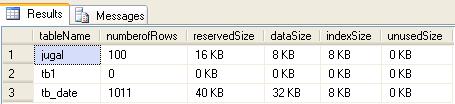
  • Display the size of all tables in Sql Server 2005

    You can use sys.SP_SpaceUsed stored procedure to get the size of all the tables.

    Below query will calulate the space of all the tables.
    –create temp table to store the result
    CREATE TABLE #temptable
      (
         tablename    VARCHAR(100),
         numberofrows VARCHAR(100),
         reservedsize VARCHAR(50),
         datasize     VARCHAR(50),
         indexsize    VARCHAR(50),
         unusedsize   VARCHAR(50)
      )

    –Inserting into temp table

    INSERT INTO #temptable
                (tablename,
                 numberofrows,
                 reservedsize,
                 datasize,
                 indexsize,
                 unusedsize)

    EXEC Sp_msforeachtable @command1=“EXEC sp_spaceused ‘?’”

    SELECT *
    FROM   #temptable

    — drop the temporary table
    DROP TABLE #temptable 


    Size of All the tables


  • Linked Server in SQL Server

    A linked server configuration enables SQL Server to execute commands/T-SQL statements against OLE DB data sources on remote servers. You can query heterogeneous databases using linked server.

    Advantage of Linked Server
    Remote server access
    You can execute distributed queries, updates, commands, and transactions on heterogeneous data sources using linked server
    The ability to address diverse data sources similarly.


    -- Below procedure will create linked server to communicate with access

    Sp_addlinkedserver ‘Lnk_AccessDB’, ‘Access’, ‘Microsoft.Jet.OLEDB.4.0’,

    ‘c:\db1.mdb’

    -- query the linked server

    SELECT *

    FROM   lnk_accessdb...tb1

    -- Below query will drop the linked server

    EXEC Sp_dropserver ‘Lnk_AccessDB’ 

  • GO Keyword with Integer Parameter

    In SQL Server the keyword GO tells SQL Server to execute the preceding code as one batch. From SQL Server 2005 onwards we can specify the integer parameter with GO keyword which will loop the preceding statement.

    Example

    create table jugal
    (
    name varchar(100) default ‘jugal shah’
    )
    — below command will insert the default value two times as we have specified 2 as parameter
    insert into jugal values(default)
    go 2

    — below command will print ‘Jugal Shah’ 100 times as we have specified 100 as parameter
    print ‘jugal shah’
    go 100