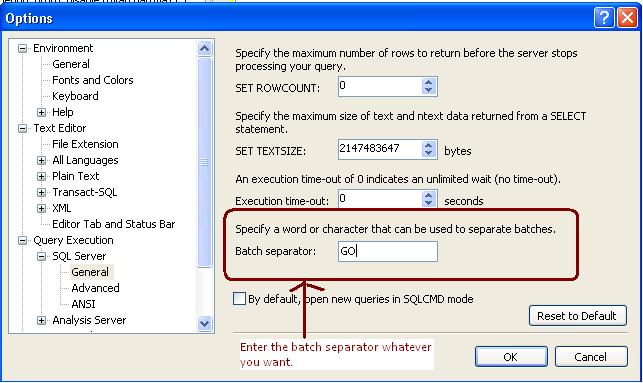
It is often asked by the people can we change the batch separator T-SQL. Answer is yes we can change the batch separator.
We can do it by Tools->Options->Query Execution->SQL Server->General->Batch separator
It is often asked by the people can we change the batch separator T-SQL. Answer is yes we can change the batch separator.
We can do it by Tools->Options->Query Execution->SQL Server->General->Batch separator
As best practice it is recommended that you have to backup date time with the backup file name so anyone can get the idea of Backup creation.
Sometimes due some issue we took backup without specifying the datetime with the backup file name so during restore we are unsure that how much data backed up in the backup file, type of backup, Is it Copy only and more.
SQL Server stores the Backup Metadata into backup header. You can restore header only command to get the required information.
RESTORE headeronly FROM disk = ‘c:\jshah.bak’
| Column Name | Values | Description |
| BackupName | NULL | |
| BackupDescription | NULL | |
| BackupType | 1 | Backup type: 1 = Database 2 = Transaction log 4 = File 5 = Differential database 6 = Differential file 7 = Partial 8 = Differential partial |
| ExpirationDate | NULL | |
| Compressed | 0 | 0 = Un-Compressed Backup 1 = Compressed Backup |
| Position | 1 | |
| DeviceType | 2 | |
| UserName | JShah | |
| ServerName | SQLDBPool | |
| DatabaseName | jshah | |
| DatabaseVersion | 655 | |
| DatabaseCreationDate | 12/31/10 9:55 AM | |
| BackupSize | 1453056 | |
| FirstLSN | 28000000006000100 | |
| LastLSN | 28000000013000000 | |
| CheckpointLSN | 28000000006000100 | |
| DatabaseBackupLSN | 0 | |
| BackupStartDate | 12/31/10 10:06 AM | |
| BackupFinishDate | 12/31/10 10:06 AM | |
| SortOrder | 52 | |
| CodePage | 0 | |
| UnicodeLocaleId | 1033 | |
| UnicodeComparisonStyle | 196609 | |
| CompatibilityLevel | 100 | |
| SoftwareVendorId | 4608 | |
| SoftwareVersionMajor | 10 | |
| SoftwareVersionMinor | 0 | |
| SoftwareVersionBuild | 2757 | |
| MachineName | SQLDBPool | |
| Flags | 512 | 1 = Log backup contains bulk-logged operations. 2 = Snapshot backup. 4 = Database was read-only when backed up. 8 = Database was in single-user mode when backed up. 16 = Backup contains backup checksums. 32 = Database was damaged when backed up, but the backup operation was requested to continue despite errors. 64 = Tail log backup. 128 = Tail log backup with incomplete metadata. 256 = Tail log backup with NORECOVERY. |
| BindingID | 85A5505D-ADB1-4B33-A181-549DC520A0F8 | |
| RecoveryForkID | 03DE5437-1E27-4885-9011-91CFED12338A | |
| Collation | SQL_Latin1_General_CP1_CI_AS | |
| FamilyGUID | 03DE5437-1E27-4885-9011-91CFED12338A | |
| HasBulkLoggedData | 0 | 1 = Yes 0 = No |
| IsSnapshot | 0 | 1 = Yes 0 = No |
| IsReadOnly | 0 | 1 = Yes 0 = No |
| IsSingleUser | 0 | 1 = Yes 0 = No |
| HasBackupChecksums | 0 | 1 = Yes 0 = No |
| IsDamaged | 0 | 1 = Yes 0 = No |
| BeginsLogChain | 0 | 1 = Yes 0 = No |
| HasIncompleteMetaData | 0 | 1 = Yes 0 = No |
| IsForceOffline | 0 | 1 = Yes 0 = No |
| IsCopyOnly | 0 | 1 = Yes 0 = No |
| FirstRecoveryForkID | 03DE5437-1E27-4885-9011-91CFED12338A | |
| ForkPointLSN | NULL | |
| RecoveryModel | FULL | |
| DifferentialBaseLSN | NULL | |
| DifferentialBaseGUID | NULL | |
| BackupTypeDescription | Database | |
| BackupSetGUID | 62EB4399-C119-42C2-91F1-BF0FF19CB896 | |
| CompressedBackupSize | 1453056 |
It is frequently asked by the DBAs or SystemAdmins or Customer that how many databases can be mirrored on a single instance of Microsoft SQL Server?
Answer of the above question is you can configure 10 databases for 32-bit operating system.On a 32-bit system, database mirroring can support a maximum of about 10 databases per server instance because of the numbers of worker threads that are consumed by each database mirroring session.
For 64-Bit Operating system you can mirror more than 10 databases depending on the number of processors and worker threads. Many company has deployed more that 10 Databases as mirrored.
You can follow the below steps to enter error log records into temporary table and query it.
-- Command will create the temporary table in tempdb CREATE TABLE [dbo].[#TmpErrorLog] ([LogDate] DATETIME NULL, [ProcessInfo] VARCHAR(20) NULL, [Text] VARCHAR(MAX) NULL ) ; -- Command will insert the errorlog data into temporary table INSERT INTO #TmpErrorLog ([LogDate], [ProcessInfo], [Text]) EXEC [master].[dbo].[xp_readerrorlog] 0 ; -- retrieves the data from temporary table SELECT * FROM #TmpErrorLog |
Whenever backup peformed on SQL Server, it records the backup entry in the SQL Server. Because of that error log file grows and sometimes we are missing important information from there.
For example,
use master backup database jshah to disk = 'c:\jshah.bak' |
Above command will log the below message in the SQL Server error log.
Backup Message:
Database backed up. Database: jshah, creation date(time): 2010/12/31(09:55:22), pages dumped: 178, first LSN: 28:60:170, last LSN: 28:130:1, number of dump devices: 1, device information: (FILE=1, TYPE=DISK: {‘c:\jshah.bak’}). This is an informational message only. No user action is required.
Solution
As a solution we can turn on the trace flag 3226 to stop loging of sucessfull backup message.
You can turn it on either using SQL Server Service Starup Parameter (-T 3226) or using DBCC TRACEON command.
-- To turn on the trace flag at global level DBCC TRACEON (3226,-1) -- To turn off the trace flag at global level DBCC TRACEOFF (3226,-1) |

