Category Archives: SQL Server

T-SQL Script to identify the data, log and backup drive

You can use the below script to identify the data, log and backup file drive.

select 
@@SERVERNAME as svrName,
drivename, 
drivedescription
from
(
select distinct  SUBSTRING(filename,1,3) as drivename, 'data Drive' as drivedescription from master..sysaltfiles where filename like '%.mdf'
union
select distinct  SUBSTRING(filename,1,3) as drivename, 'Log Drive' as drivedescription from master..sysaltfiles where filename like '%.ldf'
union 
select distinct  SUBSTRING(physical_device_name,1,3) as drivename, 'Backup Drive' as drivedescription from msdb.dbo.backupmediafamily where physical_device_name like '%.bak'
) tab1

Script to find out the database file size, log file size on SQL Server 2000/2005/2008

Recently I encountered a situation where i have to find out the database file size on SQL Server 2000. Here is the script which you can use to run on SQL Server 2000. Below script will on SQL Server 2005 or SQL Server 2008 as well.

You can use sys.master_files instead of sysAltfiles in SQL Server 2005 and SQL Server 2008. Please find all the different scripts below.

--SQL Server 2000

select 
fileID 
,name
,filename
,(size*8)/1024 SizeMB
,((size*8)/1024)/1024 SizeGB
,db_name(dbid) as DBName
from sysaltfiles
where db_name(dbid) = 'master'

--SQL Server 2000

select 
fileID 
,name
,filename
,(size*8)/1024 SizeMB
,((size*8)/1024)/1024 SizeGB
,db_name(dbid) as DBName
from sysaltfiles
where filename like '%.ldf%'

--SQL Server 2005/2008
SELECT DB_NAME(database_id) AS DBName,
Name AS LogicalName,
Physical_Name, (size*8)/1024 SizeMB
Physical_Name, ((size*8)/1024)/1024 SizeGB
FROM sys.master_files
WHERE DB_NAME(database_id) = 'Master'
GO

Saving changes is not permitted while modifying table design

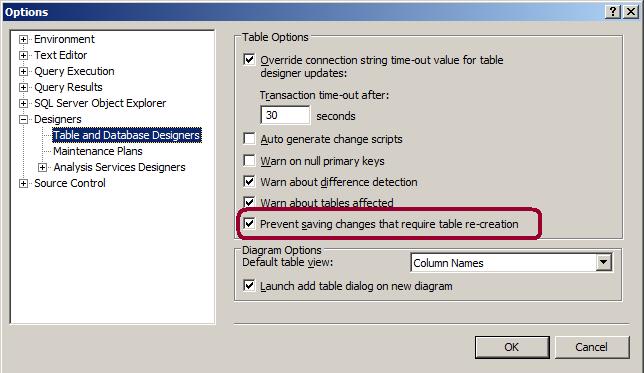
Problem: There may be scenario while modifying the table design which needs to re-create the table. Even with the full permission while modifying it from SSMS, you get the below message and your table changes will be rolled back.

Saving changes is not permitted. The changes you have made require the following tables to be dropped and re-created. You have either made changes to a table that can’t be re-created or enabled the option Prevent saving changes that require the table to be re-created.

Solution:
Below are the few scenarios where changes in table design will re-create the table.

Changing the column data type
Changing the NULL property
Changing the order of the columns
Adding column before the last column
Changing the identity column property
Changing the computed column expression

Let’s see how can we fix the “Saving Changes is not permitted …”

Go to SSMS – Select Tools menu -> click on Options -> Go to Designers tab page -> Click on “table and database designers” page -> Un-check “Prevent Saving changes that require table re-creation” check box.

PowerShell script to find files that are consuming the most disk space

Problem

As you know, SQL Server databases and backup files can take up a lot of disk space.  When disk is running low and you need to troubleshoot disk space issues, the first thing to do is to find large files that are consuming disk space.  In this article I will show you a PowerShell script that you can use to find large files on your disks.

Solution

http://www.mssqltips.com/sqlservertip/2774/powershell-script-to-find-files-that-are-consuming-the-most-disk-space/

Local System, Network Service and Local Service

You have often seen the above default service accounts while configuring the SQL Services. Let’s see what the difference between these accounts is.


Local System: Completely trusted account, more than the Administrator account. There is nothing on a single box that this account cannot do and it has the right to access the network as the machine. However local system account might restrict the SQL Server interaction with the other server. The actual name of the account is “NT AUTHORITY\SYSTEM


Take example of “Lock Pages in Memory“, it will default granted to this account. No need to explicitly specify it.


Network Service: has more access to resources and objects than members of the Users group. Services that run as the Network Service account access network resources by using the credentials of the computer account. The actual name of the account is “NT AUTHORITY\NETWORK SERVICE“. This account is far more limited than the Limited than Local System account.


Local Service: A limited service account that is very similar to Network Service and meant to run standard least-privileged services. However unlike Network Service it has no ability to access the network as the machine.
This limited access helps safeguard the system if individual services or processes are compromised.
Services that run as the Local Service account access network resources as a null session without credentials.
The actual name of the account is “NT AUTHORITY\LOCAL SERVICE“. Local Service account is not supported for the SQL Server or SQL Server Agent services.