Category Archives: SQL Server

Different types of SQL Server Database Access mode

Different types of SQL Server Database Access mode, you can allow access to different users by setting database into below three modes.

Syntax
ALTER DATABASE DBNAME SET ACCESS MODE WITH ROLLBACK

OPTIONS
DB Access Modes
SINGLE_USER – Single user connection to the database
RESTRICTED_USER – Any number of users with db_owner or db creator or logins with sys admin rights can connect to the database
MULTI_USER – Any number of users with rights to the database can connect to the database

As you are changing the database access, you first need to take the exclusive connection database by dropping / rollback the existing connections.

You can specify below options to rollback the existing connections.

WITH ROLLBACK Options – Determines how the exclusive access to the database will take place
ROLLBACK AFTER integer [SECONDS] – Rollback the SPIDs after a particular number of seconds
ROLLBACK IMMEDIATE – Rollback the SPIDs immediately
NO_WAIT – If all of the SPIDs do not commit or rollback immediately the request to put the database in an exclusive state will fail

Examples

ALTER DATABASE DBName
SET RESTRICTED_USER WITH ROLLBACK AFTER 60 SECONDS

ALTER DATABASE DBName
SET RESTRICTED_USER WITH ROLLBACK IMMEDIATE

ALTER DATABASE DBName
SET SINGLE_USER WITH ROLLBACK IMMEDIATE

ALTER DATABASE DBName SET MULTI_USER
Run a Stored Procedure when SQL Server starts

Steps to Run a Stored Procedure when SQL Server starts

As you all know, when SQL Server starts, it will first scan the registry to get the startup parameter values. By scaning registry it will find the master database files first and then make the master database online.

So if you want a procedure to execute when SQL Server starts automatically, you have to create that procedure in Master database only.

Step 1: Create a procedure in master database

Step 2: We have to use sp_procoption to set the stored procedure to execute when SQL Server service starts. Please see the example below.

EXEC sp_procoption 'procedure name', 'startup', 'true'

Step 3: Restart the SQL Service, to check the procedure output.

How turn off startup procedure?
You can turn-off the procedrue execution using below query.
EXEC sp_procoption 'procedure name', 'startup', 'false'

Master..spt_values system table

SPT_Values is un-documented table. It seems it is available from Sybase days and it is used in system stored procedures to translate codes into readable strings.
It stores the specific number of each SQL Server Property. If you execute below query, you can get the diffrent kind of result and you can use it as per the need.

select min(number) FROM master..spt_values
–Output
-32768

select min(number) FROM master..spt_values where number > 0
— Output
1
select max(number) FROM master..spt_values
— Output
1469283328

You can use to generate number from 1 to 2048 as well.

SELECT distinct number
FROM master..spt_values
WHERE number BETWEEN 10 AND 15

Unable to change autogrowth properties of SQL Server of log file

Problem
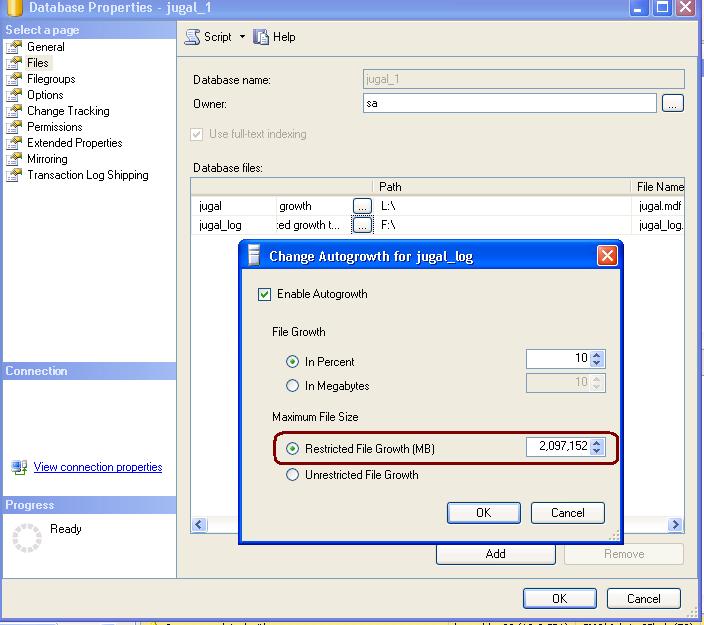
People often complains that they are unable to change the Log File Growth to un-restricted.

Solution
Whenever we are chaging max size as unlimited for log file, SQL Server reset the Max Size avalue to 2TB and this is the max size supported for log file. This is by design only.

Please check the below image for more detail.