Category: SQL Server 2014

  • How to restart an Interrupted Database Restore in SQL Server?

    Steps to restart an Interrupted Database Restore in SQL Server

    There may scenario when you are restoring VLDB database backup and the restore database command interrupted due network failure, power failure, SQL Server Service restart or cluster failover. In this kind of scenario you can easily start the interrupted restore from the point of failure using WITH RESTART command.

    Before you start restoring the database using WITH RESTART option check database is in Restoring State not in any other state.

    You can check the database state either from SSMS object explorer or by executing below T-SQL command

    select name,state_desc from sys.databases
    

    Once confirmed that database is in restoring state execute the backup command WITH RESTART clause

    RESTORE DATABASE [AdventureWorks]
    FROM DISK ='D:\Backup\AdventureWorks.bak'
    WITH RESTART, STATS = 20
    GO
    
  • Database Backup WITH CHECKSUM

    Backup WITH CHECKSUM

    When WITH CHECKSUM option is used while taking backup, the backup process will verify each page for checksums and torn page. In case bad page checksum found, the backup will stop. Using backup checksums may affect workload and backup throughput.

    If you want to continue the backup, you have to write CONTINUE_AFTER_ERROR in backup WITH clause.
    In case backup completes successfully it means no bad checksums.

    Example

    backup database sqldba to disk = 'c:\jspace\sqldba1.bak'
    with checksum
    

    You can also use the 3023 trace flag for the check sum option, when 3023 trace flag is on WITH CHECKSUM option will be applied all the backups by default.

    DBCC TRACEON(3023)
    GO                              
    
    backup database sqldba to disk = 'c:\jspace\sqldbatraceflag.bak'
    
    DBCC TRACEOFF(3023)
    GO                              
    

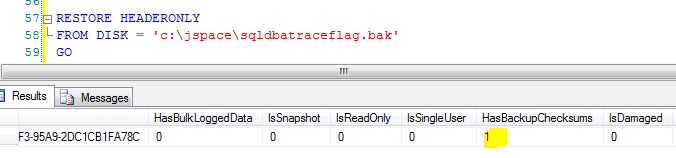
    Let’s check if the 3023 trace flag applied the page checksum to above backup command or not. Execute below query for it.

    RESTORE HEADERONLY
    FROM DISK = 'c:\jspace\sqldbatraceflag.bak'
    GO  
    

    HasBackupCheckSums value is 1, it means that WITH CHECKSUM option applied to backup using 3023 trace flag.
    checksum

  • T-SQL Script to Check the Native Compressed backup file size and Backup Compression Ratio

    First of all make sure backup compression is enabled on the SQL Server. You can execute below query to check the backup compression.

    select name,[description],value_in_use from sys.configurations where name like '%backup%'
    

    Execute below script to check the compressed backup file size and backup compression ratio.

    Declare @FromDate as datetime
    -- Specify the from date value
    set @FromDate = GETDATE() -1
    
    SELECT  
       CONVERT(CHAR(100), SERVERPROPERTY('Servername')) AS SQLServerName, 
       msdb.dbo.backupset.database_name,  
       CASE msdb..backupset.type  
           WHEN 'D' THEN 'Database'  
           WHEN 'L' THEN 'Log'  
           WHEN 'I' THEN 'Differential'  
       END AS backup_type,  
       msdb.dbo.backupset.backup_start_date,  
       msdb.dbo.backupset.backup_finish_date, 
       msdb.dbo.backupset.expiration_date, 
       DATEDIFF (SECOND, msdb.dbo.backupset.backup_start_date, msdb.dbo.backupset.backup_finish_date) 'Backup Elapsed Time (sec)',
       msdb.dbo.backupset.compressed_backup_size AS 'Compressed Backup Size in KB',
      (msdb.dbo.backupset.compressed_backup_size/1024/1024) AS 'Compress Backup Size in MB',
       CONVERT (NUMERIC (20,3), (CONVERT (FLOAT, msdb.dbo.backupset.backup_size) /CONVERT (FLOAT, msdb.dbo.backupset.compressed_backup_size))) 'Compression Ratio',
       CASE msdb..backupset.type  
           WHEN 'D' THEN 'Database'  
           WHEN 'L' THEN 'Log'  
       END AS backup_type,  
       msdb.dbo.backupset.backup_size,  
       msdb.dbo.backupmediafamily.logical_device_name,  
       msdb.dbo.backupmediafamily.physical_device_name,   
       msdb.dbo.backupset.name AS backupset_name, 
       msdb.dbo.backupset.description 
    FROM   msdb.dbo.backupmediafamily  
       INNER JOIN msdb.dbo.backupset ON msdb.dbo.backupmediafamily.media_set_id = msdb.dbo.backupset.media_set_id 
    WHERE 
    CONVERT(datetime, msdb.dbo.backupset.backup_start_date, 102) >= @FromDate
    AND msdb.dbo.backupset.backup_size > 0 
    ORDER BY  
       msdb.dbo.backupset.database_name, 
       msdb.dbo.backupset.backup_finish_date
    
    
  • SQL Server – Backup Verification Script – Based on conditions

    Problem: There are scenarios where you have to verify the multiple SQL Server instances backup within limited time frame whether it meet your organization backup criteria standards or not.

    Solution:
    You can execute below T-SQL script to check the backup status as per your organization standard by assigning backup conditions value to backup criteria variable. You can execute below script either by connecting each SQL Server Instance or execute it by registering all the SQL Server Instances in Central Management Server (CMS).

    Below T-SQL Script work with all the versions of MSSQL Server and verify FULL, Differential and Transaction Log Backup. It will check the max backup date and evaluate result based on condition as backup is Passed or Not.

    Backup Verification Script will return below values. Column names are self-explanatory.
    • SQLInstanceName
    • DatabaseName
    • db_create_ddate
    • DB_Recovery_Model
    • dbstatus
    • windowsservername
    • productversion
    • productlevel
    • edition
    • current_datetime
    • last_full_backup_date
    • last_diff_backup_date
    • last_tran_backup_date
    • days_since_last_full_backup
    • days_since_last_diff_backup
    • hours_since_last_tranlog_backup
    • Full_Backup_Stauts
    • Diff_Backup_Stauts
    • Log_Backup_Stauts
    • full_backup_location
    • diff_backup_location
    • tlog_backup_location

    You have to specify the backup condition based on your organization standard by assigning values to below variables.

    <br />
    declare @full_backup_criteria_in_days int<br />
    declare @diff_backup_criteria_in_days int<br />
    declare @log_backup_criteria_in_hours int</p>
    <p>-- specify the backup criteria<br />
    set @full_backup_criteria_in_days = 7 -- 7 day older Full Backup is Pass<br />
    set @diff_backup_criteria_in_days = 1 -- 1 day older Diff Backup is Pass<br />
    set @log_backup_criteria_in_hours = 2 -- 2 hours older Log Backup is Pass<br />
    

    Complete Backup Verification Script

    <br />
    declare @full_backup_criteria_in_days int<br />
    declare @diff_backup_criteria_in_days int<br />
    declare @log_backup_criteria_in_hours int</p>
    <p>-- specify the backup criteria<br />
    set @full_backup_criteria_in_days = 7 -- 7 day older Full Backup is Pass<br />
    set @diff_backup_criteria_in_days = 1 -- 1 day older Diff Backup is Pass<br />
    set @log_backup_criteria_in_hours = 2 -- 2 hours older Log Backup is Pass</p>
    <p>select<br />
               serverproperty('servername') as SQLInstanceName,<br />
               quotename(bkup_full.[database_name]) as DatabaseName,<br />
                ( select    sdb.crdate<br />
                  from      [master]..[sysdatabases] sdb<br />
                  where     sdb.name = bkup_full.[database_name]<br />
                ) as [db_create_ddate],<br />
               databasepropertyex(bkup_full.[database_name],'recovery')  as DB_Recovery_Model,<br />
               databasepropertyex(bkup_full.[database_name],'status')  as dbstatus,<br />
               case serverproperty('isclustered')<br />
                            when 1 then cast(serverproperty('computernamephysicalnetbios') as varchar)<br />
                            when 0 then cast(serverproperty('machinename') as varchar)<br />
               end as windowsservername,<br />
               serverproperty('productversion') as productversion,<br />
               serverproperty('productlevel') as productlevel,<br />
               serverproperty('edition') as edition,</p>
    <p>           current_timestamp as current_datetime,</p>
    <p>		   bkup_full.[backup_finish_date] as [last_full_backup_date],<br />
    		   bkup_diff.[backup_finish_date] as [last_diff_backup_date] ,<br />
    		   bkup_log.[backup_finish_date] as [last_tran_backup_date] ,</p>
    <p>           datediff(dd, bkup_full.[backup_finish_date], current_timestamp) as [days_since_last_full_backup] ,<br />
               datediff(dd, bkup_diff.[backup_finish_date], current_timestamp) as [days_since_last_diff_backup] ,<br />
               datediff(hh, bkup_log.[backup_finish_date], current_timestamp) as [hours_since_last_tranlog_backup] ,</p>
    <p>           case<br />
                            when datediff(dd, bkup_full.[backup_finish_date], current_timestamp) &lt;= @full_backup_criteria_in_days<br />
                            then 'Pass'<br />
                            else 'Fail'<br />
                            end as Full_Backup_Stauts,</p>
    <p>            case<br />
                            when datediff(dd, bkup_diff.[backup_finish_date], current_timestamp) &lt;= @diff_backup_criteria_in_days  then 'Pass'<br />
                            else case when quotename(bkup_full.[database_name]) IN ('[master]') then 'N/A' else 'Fail' end<br />
                            end as Diff_Backup_Stauts,</p>
    <p>            case<br />
                            when datediff(hh, bkup_log.[backup_finish_date], current_timestamp) &lt;= @log_backup_criteria_in_hours  then 'Pass'<br />
                            else case when databasepropertyex(bkup_full.[database_name],'recovery') = 'SIMPLE' then 'N/A' else 'Fail' end<br />
                end as Log_Backup_Stauts,            </p>
    <p>            ( select top 1 [physical_device_name]<br />
                  from      [msdb]..[backupmediafamily] bkup_media_family<br />
                  where     bkup_media_family.[media_set_id] = bkup_full.[media_set_id]<br />
                ) as [full_backup_location] ,<br />
                ( select top 1  [physical_device_name]<br />
                  from      [msdb]..[backupmediafamily] bkup_media_family<br />
                  where     bkup_media_family.[media_set_id] = bkup_diff.[media_set_id]<br />
                ) as [diff_backup_location] ,<br />
                ( select top 1  [physical_device_name]<br />
                  from      [msdb]..[backupmediafamily] bkup_media_family<br />
                  where     bkup_media_family.[media_set_id] = bkup_log.[media_set_id]<br />
                ) as [tlog_backup_location]</p>
    <p>    from    [msdb]..[backupset] as bkup_full<br />
                left join [msdb]..[backupset] as bkup_log on bkup_log.[database_name] = bkup_full.[database_name]<br />
                                                           and bkup_log.[server_name] = bkup_full.[server_name]<br />
                                                           and bkup_log.[type] = N'L'<br />
                                                           and bkup_log.[backup_finish_date] = ( (select  max([backup_finish_date])<br />
                                                                                                from    [msdb]..[backupset] b2<br />
                                                                                                where   b2.[database_name] = bkup_full.[database_name]<br />
                                                                                                        and b2.[server_name] = bkup_full.[server_name]<br />
                                                                                                        and b2.[type] = N'L') )<br />
                left join [msdb]..[backupset] as bkup_diff on bkup_diff.[database_name] = bkup_full.[database_name]<br />
                                                           and bkup_diff.[server_name] = bkup_full.[server_name]<br />
                                                           and bkup_diff.[type] = N'I'<br />
                                                           and bkup_diff.[backup_finish_date] = ( (select max([backup_finish_date])<br />
                                                                                                from    [msdb]..[backupset] b2<br />
                                                                                                where   b2.[database_name] = bkup_full.[database_name]<br />
                                                                                                        and b2.[server_name] = bkup_full.[server_name]<br />
                                                                                                         and b2.[type] = N'I') )<br />
        where   bkup_full.[type] = N'D'<br />
                and bkup_full.[backup_finish_date] = ( (select  max([backup_finish_date])<br />
                                                     from   [msdb]..[backupset] b2<br />
                                                     where  b2.[database_name] = bkup_full.[database_name]<br />
                                                            and b2.[server_name] = bkup_full.[server_name]<br />
                                                            and b2.[type] = N'D') )<br />
                and exists ( select [name]<br />
                             from   [master]..[sysdatabases]<br />
                             where  [name] = bkup_full.[database_name] )<br />
                and bkup_full.[database_name] &lt;&gt; N'tempdb'<br />
    

    This script is the “Sustain” dimension

    A backup you haven’t verified is a hope, not a plan — and this script is exactly the kind of continuous, boring verification that keeps a data platform honest. In my AI risk framework, this is Sustain: monitor and govern, so the other controls hold up in production. The framework: R-I-S-K-S: The 5-Dimension Framework for AI Risk Management

  • RESOURCE_SEMAPHORE WAIT – Performance Troubleshooting

    Recently I was involved in troubleshooting the performance issue. All the queries were running slow on SQL instance. Most of the queries usually complete in seconds and that day it was running more than 15 minutes and not return any output.

    I have followed below approach to fix this issue.
    Step 1: Checked for the blocking if there is any on the SQL instace but didn’t find any.

    select * from sys.sysprocesses where blocked <> 0
    

    Step 2: Checked for the active sessions on the server. To find out if there is any session which in KILLED/Rollback state but didn’t find out any. Sessions in KILLED/Rollback states are resource incentive sessions based on different conditions.

    sp_who2 active
    

    Step 3: Checked for the overall wait types on the SQL Server and found RESOURCE_SEMAPHORE and Page IO related waits.

    SELECT TOP 10
            wait_type ,
            max_wait_time_ms wait_time_ms ,
            signal_wait_time_ms ,
            wait_time_ms - signal_wait_time_ms AS resource_wait_time_ms ,
            100.0 * wait_time_ms / SUM(wait_time_ms) OVER ( )
                                        AS percent_total_waits ,
            100.0 * signal_wait_time_ms / SUM(signal_wait_time_ms) OVER ( )
                                        AS percent_total_signal_waits ,
            100.0 * ( wait_time_ms - signal_wait_time_ms )
            / SUM(wait_time_ms) OVER ( ) AS percent_total_resource_waits
    FROM    sys.dm_os_wait_stats
    WHERE   wait_time_ms > 0
            AND wait_type NOT IN 
    ( 'SLEEP_TASK', 'BROKER_TASK_STOP', 'BROKER_TO_FLUSH',
      'SQLTRACE_BUFFER_FLUSH','CLR_AUTO_EVENT', 'CLR_MANUAL_EVENT', 
      'LAZYWRITER_SLEEP', 'SLEEP_SYSTEMTASK', 'SLEEP_BPOOL_FLUSH',
      'BROKER_EVENTHANDLER', 'XE_DISPATCHER_WAIT', 'FT_IFTSHC_MUTEX',
      'CHECKPOINT_QUEUE', 'FT_IFTS_SCHEDULER_IDLE_WAIT', 
      'BROKER_TRANSMITTER', 'FT_IFTSHC_MUTEX', 'KSOURCE_WAKEUP',
      'LAZYWRITER_SLEEP', 'LOGMGR_QUEUE', 'ONDEMAND_TASK_QUEUE',
      'REQUEST_FOR_DEADLOCK_SEARCH', 'XE_TIMER_EVENT', 'BAD_PAGE_PROCESS',
      'DBMIRROR_EVENTS_QUEUE', 'BROKER_RECEIVE_WAITFOR',
      'PREEMPTIVE_OS_GETPROCADDRESS', 'PREEMPTIVE_OS_AUTHENTICATIONOPS',
      'WAITFOR', 'DISPATCHER_QUEUE_SEMAPHORE', 'XE_DISPATCHER_JOIN',
      'RESOURCE_QUEUE' )
    ORDER BY wait_time_ms DESC
    

    Step 4: Analyzed the wait types, while analyzing the wait types I found the RESOURCE_SEMAPHORE wait type. Let’s see what is RESOURCE_SEMAPHORE wait type and what does it indicate.

    RESOURCE SEMAPHORE SQL wait type “Occurs when a memory request for query cannot be granted immediately due to other concurrent queries or memory pressure, Resource Semaphore high waits and wait times may indicate excessive number of concurrent queries, or excessive memory request amounts”

    Let’s query DMV to get more idea on Resource Semaphore wait. In the output of the below query output you have to check grantee_count and waiter_count column values, grantee_count is the number of queries which have their memory granted and the waiter_count is the number of queries which are waiting in queue to get memory

    SELECT * FROM sys.dm_exec_query_resource_semaphores
    

    Now let’s check queries waiting for memory using “sys.dm_exec_query_memory_grants” DMV. Columns grant_time and granted_memory_kb will be NULL for those queries which are waiting to get their requested memory

    SELECT * FROM sys.dm_exec_query_memory_grants  where grant_time is null
    

    I have also checked the “Memory Grants Pending” performance counter to get more idea. If Memory Grants Pending values is great than 0, than there is a problem.

    SELECT OBJECT_NAME,cntr_value AS [Memory Grants Pending]
    FROM sys.dm_os_performance_counters
    WHERE OBJECT_NAME = 'MSSQL$MyInstance:Memory Manager'
    AND counter_name = 'Memory Grants Pending'
    

    Step 5 To resolve the issue immediately, as it was active-active cluster and there was memory available to allocate to SQL Server, I have increased the memory.

    Long term fix
    Find out the memory consuming queries and tune them
    Schedule BULK Processing Jobs during off business hours
    Make sure stats and indexes are up to date
    If the server load increase, plan to add more memory