Today I got a comment, how to check the wait statistics in SQL Server 2000. You can query sysprocesses table and use the DBCC SQLPERF to get the wait statistics in SQL Server 2000.
select top 5* from sysprocesses
dbcc sqlperf(‘waitstats’)
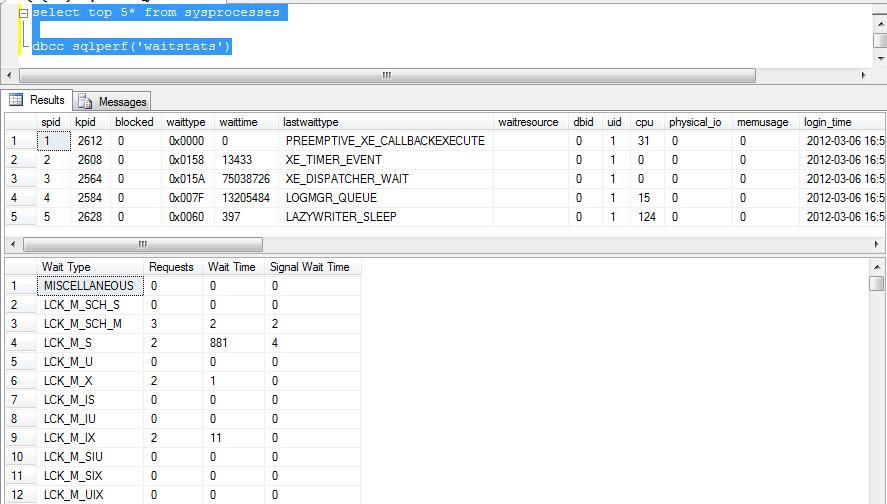
Today I got a comment, how to check the wait statistics in SQL Server 2000. You can query sysprocesses table and use the DBCC SQLPERF to get the wait statistics in SQL Server 2000.
select top 5* from sysprocesses
dbcc sqlperf(‘waitstats’)
You can use the below scripts to store/save the file into SQL Server database table. Please note it is not recommended to store file into database. You can store the file on file system and path in the database.
use sqlDBPool
--documents table will store files into varbinary field
--drop table documents
create table documents
(
	documentID int identity(1,1),
	doctype char(5),
	document varbinary(max)
)


--script to store/save document into table
insert into documents
 Select 'xls', (SELECT * FROM OPENROWSET(BULK N'C:\JSpace\book1.xls', SINGLE_BLOB) AS document) document
go

select * from documents
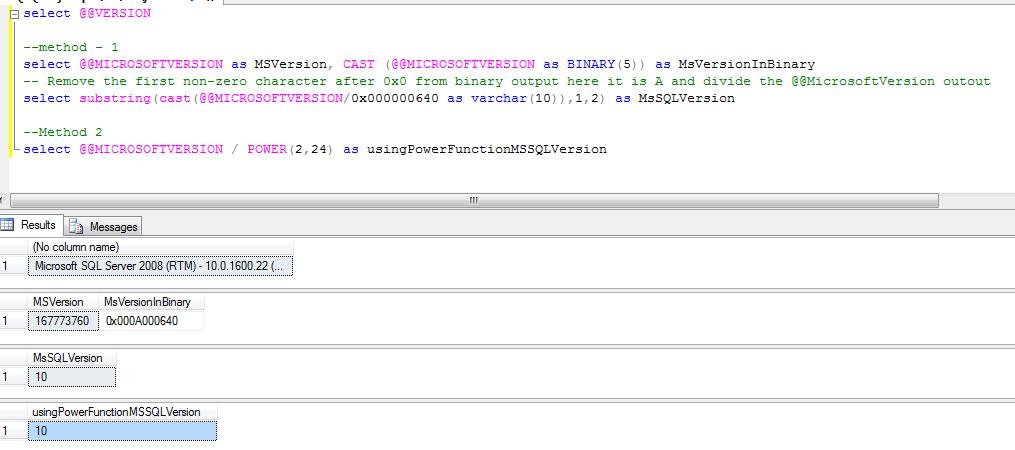
Problem: Take an example you are writing a script which is going to be deployed on the all the versions of SQL Servers and you want to check the SQL Server version details using T-SQL code. Below solution will guide you how to check the SQL Server version in stored procedure/t-sql batch.
Solution: You can use the @@MICROSOFTVERSION to get the SQL Server version information. If the output of the below script is 9 than its SQL 2005, if 10 than SQL Server 2008 and if 11 than SQL Server 2011
select @@VERSION

--method - 1
select @@MICROSOFTVERSION as MSVersion, CAST (@@MICROSOFTVERSION as BINARY(5)) as MsVersionInBinary
-- Remove the first non-zero character after 0x0 from binary output here it is A and divide the @@MicrosoftVersion outout
select substring(cast(@@MICROSOFTVERSION/0x000000640 as varchar(10)),1,2) as MsSQLVersion

--Method 2
select @@MICROSOFTVERSION / POWER(2,24) as usingPowerFunctionMSSQLVersion
A deadlock occurs when two or more processes permanently block each other by each process having a lock on a resource which the other process are trying to lock.
Please execute the below queries as per the mentioned comments to produce a deadlock.
--turning on the traceflag to record deadlock info into error log
dbcc traceon(1204,-1)
dbcc tracestatus(1204)

--creating test database
create database sqlDBPool
--Connecting to SQLDBPool database
use sqldbpool
--table creation
create table tb1 (col1 int)
create table tb2 (col1 int)
--inserting dummy records
insert into tb1 values(1),(2),(3)
insert into tb2 values(1),(2),(3)

--Open first connection to update table explicit transaction
begin transaction
  update tb1 set col1 = 5

--Open second connection to update table explicit transaction
use sqlDBPool
begin transaction
  update tb2 set col1 = 6
  update tb1 set col1 = 6

--Open first connection to update table explicit transaction
  update tb2 set col1 = 5
You can see the one of the transaction will fail with the below error message.
Msg 1205, Level 13, State 45, Line 3

Transaction (Process ID 55) was deadlocked on lock resources with another process and has been chosen as the deadlock victim. Rerun the transaction.
As we have turned on the deadlock trace flag, you can see the below information in the SQL Server error log.
Starting up database 'sqlDBPool'.
Deadlock encountered .... Printing deadlock information
Wait-for graph
NULL
Node:1
RID: 9:1:153:0                 CleanCnt:2 Mode:X Flags: 0x3
 Grant List 1:
   Owner:0x05684480 Mode: X        Flg:0x40 Ref:0 Life:02000000 SPID:52 ECID:0 XactLockInfo: 0x065F82A8
   SPID: 52 ECID: 0 Statement Type: UPDATE Line #: 1
   Input Buf: Language Event: update tb2 set col1 = 5
Requested by:
  ResType:LockOwner Stype:'OR'Xdes:0x05A8CC10 Mode: U SPID:55 BatchID:0 ECID:0 TaskProxy:(0x05A70354) Value:0x6767b20 Cost:(0/432)
NULL
Node:2
RID: 9:1:155:0                 CleanCnt:2 Mode:X Flags: 0x3
 Grant List 2:
   Owner:0x067679A0 Mode: X        Flg:0x40 Ref:0 Life:02000000 SPID:55 ECID:0 XactLockInfo: 0x05A8CC38
   SPID: 55 ECID: 0 Statement Type: UPDATE Line #: 3
   Input Buf: Language Event: begin transaction    update tb2 set col1 = 6    update tb1 set col1 = 6
Requested by:
  ResType:LockOwner Stype:'OR'Xdes:0x065F8280 Mode: U SPID:52 BatchID:0 ECID:0 TaskProxy:(0x0941A354) Value:0x6a943a0 Cost:(0/432)
NULL
Victim Resource Owner:
 ResType:LockOwner Stype:'OR'Xdes:0x05A8CC10 Mode: U SPID:55 BatchID:0 ECID:0 TaskProxy:(0x05A70354) Value:0x6767b20 Cost:(0/432)
Sp_Configure procedure is used to display or change the SQL Server setting. Once you execute the SP_Configure procedure it will display the below columns in the output.
name – Name of the configuration parameter
minimum – Minimum value setting that is allowed
maximum – Maximum value that is allowed
config_value – value which currently configured
run_value – value which currently running
How to update the configuration value?
Here I will show you how to enable the XP_CmdShell using SP_Configure. Please note don’t update configuration values until you are sure, otherwise it will affect the your SQL Server performance and behavioral.
--XP_Cmdshell is an andvanced option, enbale the advanced option
EXEC sp_configure 'show advanced options', 1
GO
--Enable the advance option
RECONFIGURE
GO
--enable the xp_cmdshell
EXEC sp_configure 'xp_cmdshell', 1
GO
--Reconfigure the xp_cmdshell value
RECONFIGURE
GO
What is the difference between Config_Value and Run_Value?
When we change the Configuration Parameter value as above it will update the Config_Value filed only, but wouldn’t be in effect until you run reconfigure command. Once the reconfigure command execute or SQL Server restarted, SQL Server will run as per the new configured value.
You can get the description of the configuration parameters from books online or you can query sys.configurations and check for the description column.
select
*
from
sys.configurations
Output of the Sp_Configure
|
Name |
Minimum | Maximum | Value | Run Value |
|
access check cache bucket count |
0 |
16384 |
0 |
0 |
|
access check cache quota |
0 |
2147483647 |
0 |
0 |
|
Ad Hoc Distributed Queries |
0 |
1 |
0 |
0 |
|
affinity I/O mask |
-2147483648 |
2147483647 |
0 |
0 |
|
affinity mask |
-2147483648 |
2147483647 |
0 |
0 |
|
Agent XPs |
0 |
1 |
1 |
1 |
|
allow updates |
0 |
1 |
0 |
0 |
|
awe enabled |
0 |
1 |
0 |
0 |
|
backup compression default |
0 |
1 |
0 |
0 |
|
blocked process threshold (s) |
0 |
86400 |
0 |
0 |
|
c2 audit mode |
0 |
1 |
0 |
0 |
|
clr enabled |
0 |
1 |
0 |
0 |
|
common criteria compliance enabled |
0 |
1 |
0 |
0 |
|
cost threshold for parallelism |
0 |
32767 |
5 |
5 |
|
cross db ownership chaining |
0 |
1 |
0 |
0 |
|
cursor threshold |
-1 |
2147483647 |
-1 |
-1 |
|
Database Mail XPs |
0 |
1 |
0 |
0 |
|
default full-text language |
0 |
2147483647 |
1033 |
1033 |
|
default language |
0 |
9999 |
0 |
0 |
|
default trace enabled |
0 |
1 |
1 |
1 |
|
disallow results from triggers |
0 |
1 |
0 |
0 |
|
EKM provider enabled |
0 |
1 |
0 |
0 |
|
filestream access level |
0 |
2 |
0 |
0 |
|
fill factor (%) |
0 |
100 |
0 |
0 |
|
ft crawl bandwidth (max) |
0 |
32767 |
100 |
100 |
|
ft crawl bandwidth (min) |
0 |
32767 |
0 |
0 |
|
ft notify bandwidth (max) |
0 |
32767 |
100 |
100 |
|
ft notify bandwidth (min) |
0 |
32767 |
0 |
0 |
|
index create memory (KB) |
704 |
2147483647 |
0 |
0 |
|
in-doubt xact resolution |
0 |
2 |
0 |
0 |
|
lightweight pooling |
0 |
1 |
0 |
0 |
|
locks |
5000 |
2147483647 |
0 |
0 |
|
max degree of parallelism |
0 |
64 |
0 |
0 |
|
max full-text crawl range |
0 |
256 |
4 |
4 |
|
max server memory (MB) |
16 |
2147483647 |
2147483647 |
2147483647 |
|
max text repl size (B) |
-1 |
2147483647 |
65536 |
65536 |
|
max worker threads |
128 |
32767 |
0 |
0 |
|
media retention |
0 |
365 |
0 |
0 |
|
min memory per query (KB) |
512 |
2147483647 |
1024 |
1024 |
|
min server memory (MB) |
0 |
2147483647 |
0 |
0 |
|
nested triggers |
0 |
1 |
1 |
1 |
|
network packet size (B) |
512 |
32767 |
4096 |
4096 |
|
Ole Automation Procedures |
0 |
1 |
0 |
0 |
|
open objects |
0 |
2147483647 |
0 |
0 |
|
optimize for ad hoc workloads |
0 |
1 |
0 |
0 |
|
PH timeout (s) |
1 |
3600 |
60 |
60 |
|
precompute rank |
0 |
1 |
0 |
0 |
|
priority boost |
0 |
1 |
0 |
0 |
|
query governor cost limit |
0 |
2147483647 |
0 |
0 |
|
query wait (s) |
-1 |
2147483647 |
-1 |
-1 |
|
recovery interval (min) |
0 |
32767 |
0 |
0 |
|
remote access |
0 |
1 |
1 |
1 |
|
remote admin connections |
0 |
1 |
0 |
0 |
|
remote login timeout (s) |
0 |
2147483647 |
20 |
20 |
|
remote proc trans |
0 |
1 |
0 |
0 |
|
remote query timeout (s) |
0 |
2147483647 |
600 |
600 |
|
Replication XPs |
0 |
1 |
0 |
0 |
|
scan for startup procs |
0 |
1 |
0 |
0 |
|
server trigger recursion |
0 |
1 |
1 |
1 |
|
set working set size |
0 |
1 |
0 |
0 |
|
show advanced options |
0 |
1 |
1 |
1 |
|
SMO and DMO XPs |
0 |
1 |
1 |
1 |
|
SQL Mail XPs |
0 |
1 |
0 |
0 |
|
transform noise words |
0 |
1 |
0 |
0 |
|
two digit year cutoff |
1753 |
9999 |
2049 |
2049 |
|
user connections |
0 |
32767 |
0 |
0 |
|
user options |
0 |
32767 |
0 |
0 |
|
xp_cmdshell |
0 |
1 |
1 |
1 |

