Author: Jugal Shah

  • Important Trace Flags for DBA

    A trace flag is used to set specific server characteristics or to switch off a particular behavior of the SQL Server.

    You can enable the trace flag from Startup Parameters, Session and Global Session level.

    DBCC TraceON(Flag Number) – at session level
    DBCC TraceON(Flag Number, -1) -- Global
    

    Trace Flag 610 : Minimally logged DML operations into Indexed tables, transaction log and allow bulk loading
    Trace Flag 4199 : enable query optimizer fixes
    Trace Flag 1222 : writes the deadlock information in XML format into error log
    Trace flag 835 : Enable the Lock Pages in memory for standard edition
    Trace flag 1118 : Directs SQL Server to allocate full extents to each tempDB objects
    Trace flag 1204 : Write information about the deadlock in text format
    Trace flag 1211 : Disable the lock escalation based on the memory pressure
    Trace flag 3226 : Prevents successful backup operation being logged
    Trace flag 3014 : Returns more information to error log about backup operation
    Trace flag 3502 : Write information about the checkpoint in the error log
    Trace flag 3505 : Disables automatic checkpoint
    Trace flag 3004 : Returns more information about the instant file initialization
    Trace flag 1806 : Disables the instant file initialization
  • How to monitor SQL Server Services of multiple instances?

    Problem:
    I have a need to monitor the SQL Server Services in my environment. Are there any programmatic options to do so? Check out this tip to learn more.

    Solution:
    http://www.mssqltips.com/sqlservertip/2867/steps-to-monitor-the-sql-server-services/

  • Get the List Of DBCC Commands & Syntax

    If you don’t remember all the DBCC commands “NO Issue” execute the DBCC HELP command to get the list of all the DBCC.

    DBCC HELP('?')
    

    checkalloc
    checkcatalog
    checkconstraints
    checkdb
    checkfilegroup
    checkident
    checktable
    cleantable
    dbreindex
    dropcleanbuffers
    free
    freeproccache
    freesessioncache
    freesystemcache
    help
    indexdefrag
    inputbuffer
    opentran
    outputbuffer
    pintable
    proccache
    show_statistics
    showcontig
    shrinkdatabase
    shrinkfile
    sqlperf
    traceoff
    traceon
    tracestatus
    unpintable
    updateusage
    useroptions

    DBCC execution completed. If DBCC printed error messages, contact your system administrator.

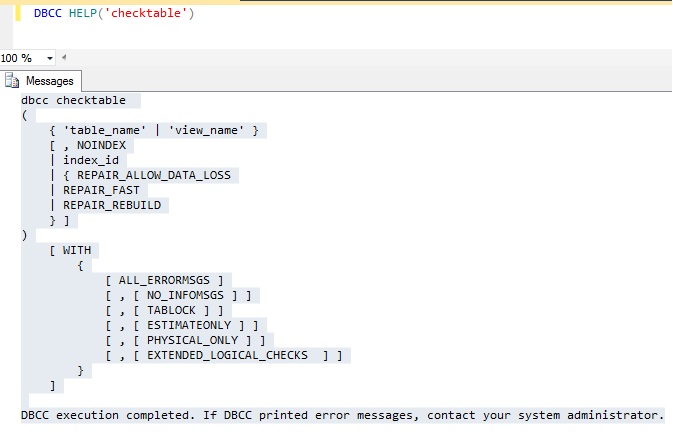
    Don’t remember syntax, execute below command to get the syntax.

    DBCC HELP('checktable')
    

    DBCC

  • Script to get the SQL Agent Properties

    You can use the sp_get_sqlagent_properties undocumented stored procedure to retrieve the SQL Agent properties of a SQL Instance. It is available in SQL Server MSDB database. This procedure only works if the SQL Agetn Service is started.

    SQLAgent

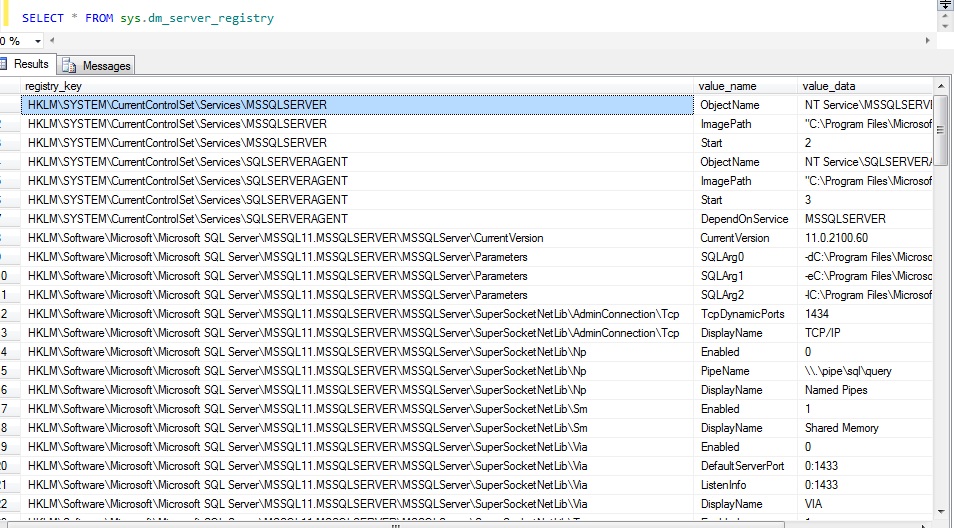
  • sys.dm_server_registry

    sys.dm_server_registry DMV gives information about installation and configuration data that is stored in the windows registry for the current instance of SQL server.

    You can use to check the start up parameters, protocols, error log configuration, agent log configuration and IP Addresses.

    SQLReg