Author: Jugal Shah

  • Script to find out Stored Procedures which are Using most resources

    While doing the stored procedure performance tuning, you can use sys.dm_exec_procedure_stats DMV to get resource intensive procedures.

    You can use the below script for it.

    SELECT DB_NAME(database_id) AS DatabaseName
          ,OBJECT_SCHEMA_NAME(object_id,database_id) AS [SCHEMA_NAME] 
          ,OBJECT_NAME(object_id,database_id)AS [OBJECT_NAME]
          ,cached_time
          ,last_execution_time
          ,execution_count
          ,total_worker_time / execution_count AS Average_CPU
          ,total_elapsed_time / execution_count AS Average_Elapsed_Time
          ,total_logical_reads / execution_count AS Average_Logical_Reads
          ,total_logical_writes / execution_count AS Average_Logical_Writes
          ,total_physical_reads  / execution_count AS Average_Physical_Reads
    FROM sys.dm_exec_procedure_stats 
    where database_id <> 32767
    ORDER BY Average_Logical_Reads DESC
    
  • SQL Server 2014 – Public CTP Now Available

    You can download SQL Server 2014 CTP version from – http://technet.microsoft.com/en-US/evalcenter/dn205290.aspx

    You can get the more information on SQL Server 2014 from http://blogs.technet.com/b/dataplatforminsider/archive/2013/06/25/sql-server-2014-public-ctp-now-available.aspx link

    SQL Server 2014 only support x64 bit architecture.

  • SQL Server 2008: SQL Mail does not work with the 64-bit version of SQL Server (Microsoft SQL Server, Error: 17938)

    Recently I got email from one of the blog reader that he is getting below error while setting up SQL MAIL as legacy feature in SQL Server 2008.

    Error:
    SQL Mail does not work with the 64-bit version of SQL Server (Microsoft SQL Server, Error: 17938)

    Solution:
    SQL Mail is not supported on 64-bit versions of SQL Server. SQL Mail stored procedures cannot be installed on 64-bit versions. If you want to still use it you have to go with the 32-bit edition or start using database mail, which is more easy.

    Follow below article link to start converting your SQLMAIL to DB Mail.
    http://msdn.microsoft.com/en-us/library/ms187891.aspx

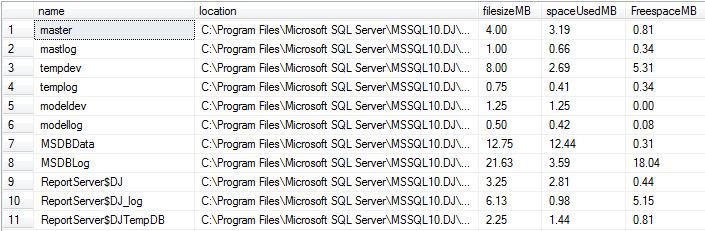
  • T-SQL Script to find out the database file size, space used and available free space

    While troubleshooting disk space issue, it is essential to know about the database file size statistics. You can execute below script to get database file size information.

    set nocount on
    
    create table #dbfileInfo(
    name varchar(300),
    location varchar(300),
    filesizeMB decimal(9,2),
    spaceUsedMB decimal(9,2),
    FreespaceMB decimal(9,2))
    
    declare @mySQL nvarchar(2000)
    DECLARE @dbName varchar(MAX)
    DECLARE @cur_DBName CURSOR
    
    SET @cur_DBName = CURSOR FOR
    select name from sys.databases
    
    OPEN @cur_DBName
    FETCH NEXT
    FROM @cur_DBName INTO @dbName
    WHILE @@FETCH_STATUS = 0
    BEGIN
    PRINT @dbName
    if DATABASEPROPERTYEX(@dbName, 'status') = 'ONLINE'
    begin
    select @mySQL = 
        '
            use ' + @dbname + '
            INSERT INTO #dbfileInfo
            select
          name
        , filename
        , convert(decimal(12,2),round(a.size/128.000,2)) as FileSizeMB
        , convert(decimal(12,2),round(fileproperty(a.name,''SpaceUsed'')/128.000,2)) as SpaceUsedMB
        , convert(decimal(12,2),round((a.size-fileproperty(a.name,''SpaceUsed''))/128.000,2)) as FreeSpaceMB
        from dbo.sysfiles a
        '
        exec sp_executesql @mySQL
    end
    FETCH NEXT
    FROM @cur_DBName INTO @dbName
    
    END
    CLOSE @cur_DBName
    DEALLOCATE @cur_DBName
    GO
    
    select * from #dbfileInfo
    drop table #dbfileInfo
    

    FileOutput

  • How to make Lite Speed Central database and Local repository in sync?

    If you have configured the LiteSpeed in your environment using the Lite Speed Central repository option, there will be a scenario when Lite Speed Central repository misses some data. To make the data available in central repository you can use the LiteSpeed local database and execute the below procedure to ensure that cenral repository comes in sync with the local repository.

    exec dbo.xp_replicate_activity_statistics