
Category: Archive
Engineering notes from 2008–2014: SQL Server scripts, DBA quick-tips, and field notes from the trenches. Preserved as written — the foundation everything since was built on.
-
Script to Identify Optimal MaxDop Setting
You can execute the below script to identify the optimal MAX DOP setting and set the MAX DOP as using SP_Configure procedure.
select case when cpu_count / hyperthread_ratio > 8 then 8 else cpu_count / hyperthread_ratio end as optimal_maxdop_setting from sys.dm_os_sys_info; -- Script to set the maxDOP sp_configure 'show advanced options', 1; GO RECONFIGURE WITH OVERRIDE; GO sp_configure 'max degree of parallelism', <OutPut of the above script>; GO RECONFIGURE WITH OVERRIDE; GO -
Links to Create MS-DTC group on Cluster
Follow below links to create the MS-DTC group on the cluster server.
-
How to check the IIS Version?
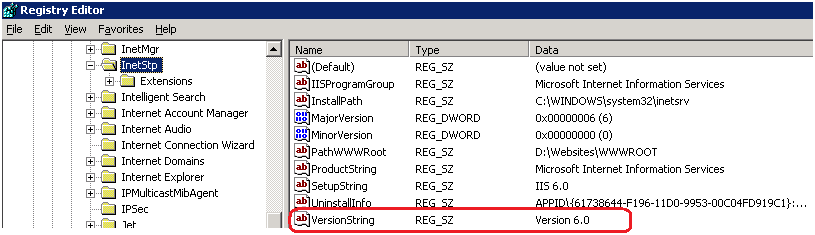
You can check IIS version by simply typing http://localhost into Internet Explorer, or you can browse the registry path HKEY_LOCAL_MACHINE\SOFTWARE\Microsoft\InetStp\ and check for the VersionString registry value.
-
How to give password to the excel file?
Most of us know, how to give the password to the excel file. But we are not giving it J, As best practice if you are exporting data to excel file and sharing with the client, never forget it to make it password protected.
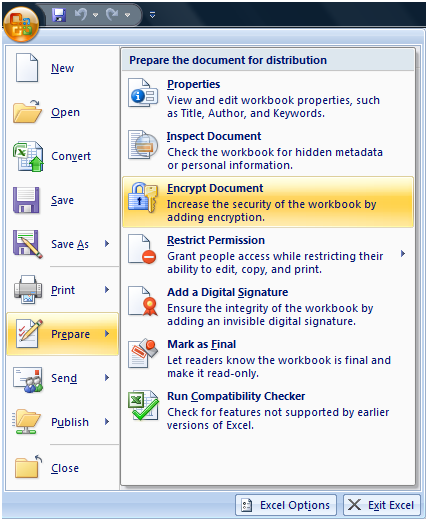
To make the excel file password protected follow below steps.
Step 1: File -> Prepare -> Encrypt Document
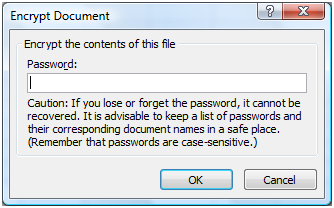
Step 2: Enter and Re-enter the password.
Step 3: Save the file.

