You can follow the below steps to change the password of the logged in account using RDP.
Step 1: Go to Start -> Windows Security
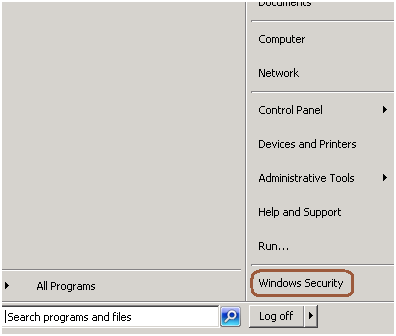
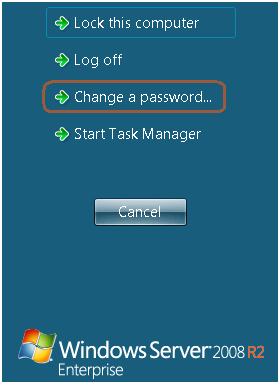
Step 2: Click on change password
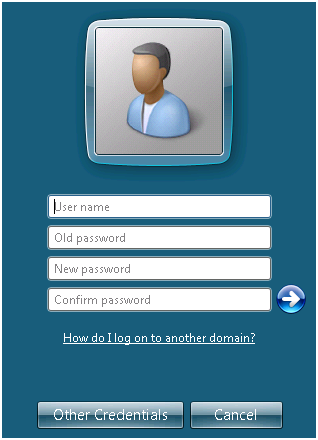
Step 3: Change the password as mentioned in the below screen.
Engineering notes from 2008–2014: SQL Server scripts, DBA quick-tips, and field notes from the trenches. Preserved as written — the foundation everything since was built on.
You can follow the below steps to change the password of the logged in account using RDP.
Step 1: Go to Start -> Windows Security
Step 2: Click on change password
Step 3: Change the password as mentioned in the below screen.
Problem
Recently I moved PowerShell script files to a production environment and when executing it from the command prompt, I got this error: “File cannot be loaded because the execution of scripts is disabled on this system. Please see “get-help about_signing” for more details”. In this tip we cover what needs to be done to resolve this issue.
Solution
http://www.mssqltips.com/sqlservertip/2702/setting-the-powershell-execution-policy/
Compound Primary key is a primary key which is created on more than one column. Now the questions is how to create the foreign key for the compound primary key where it references more than one column.
Check the below example.
create table employee
(
	empID int not null,
	SSN int not null,
	name varchar(20)
)


ALTER TABLE [employee]
ADD CONSTRAINT pk_employee PRIMARY KEY (empID, SSN)


create table EmpDetail
(
		empID int,
		SSN int,
		address varchar(20),
		city varchar(20),
		pin varchar(20)
)

ALTER TABLE dbo.empDetail
   ADD CONSTRAINT FK_Employee
   FOREIGN KEY(empID, SSN)
   REFERENCES dbo.employee(empID, SSN)


SELECT
    tc.TABLE_NAME,
    tc.CONSTRAINT_NAME,
    ccu.COLUMN_NAME
FROM
    INFORMATION_SCHEMA.TABLE_CONSTRAINTS tc
INNER JOIN
    INFORMATION_SCHEMA.CONSTRAINT_COLUMN_USAGE ccu
      ON ccu.TABLE_NAME = tc.TABLE_NAME AND ccu.CONSTRAINT_NAME = tc.CONSTRAINT_NAME
WHERE
    tc.TABLE_NAME IN ('employee','employeeDetail')