Blogger has introduced a dynamic look of the blog. I copied all the articles from SQLDBPool.com to http://sqldbguru.blogspot.com/
FlipCard Look
http://sqldbguru.blogspot.com/view/flipcard

FlipCard Look
http://sqldbguru.blogspot.com/view/classic
Engineering notes from 2008–2014: SQL Server scripts, DBA quick-tips, and field notes from the trenches. Preserved as written — the foundation everything since was built on.
Blogger has introduced a dynamic look of the blog. I copied all the articles from SQLDBPool.com to http://sqldbguru.blogspot.com/
FlipCard Look
http://sqldbguru.blogspot.com/view/flipcard
FlipCard Look
http://sqldbguru.blogspot.com/view/classic
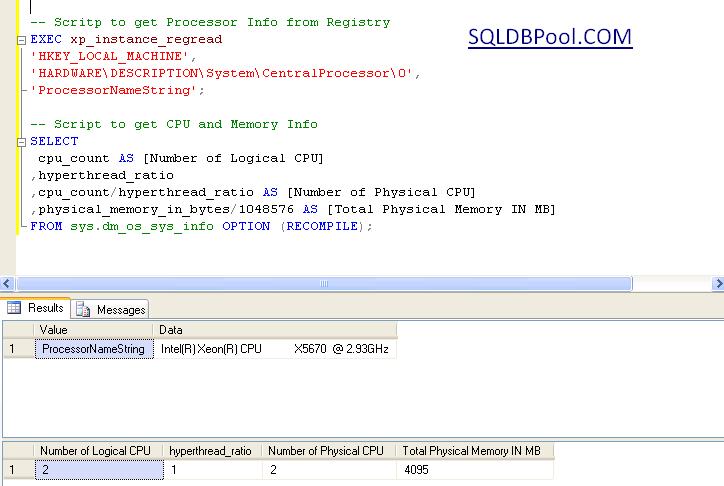
You can execute the below script to get the processor and memory information.
-- Scritp to get Processor Info from Registry
EXEC xp_instance_regread
'HKEY_LOCAL_MACHINE',
'HARDWARE\DESCRIPTION\System\CentralProcessor\0',
'ProcessorNameString';

-- Script to get CPU and Memory Info
SELECT
 cpu_count AS [Number of Logical CPU]
,hyperthread_ratio
,cpu_count/hyperthread_ratio AS [Number of Physical CPU]
,physical_memory_in_bytes/1048576 AS [Total Physical Memory IN MB]
FROM sys.dm_os_sys_info OPTION (RECOMPILE);
Problem
Often we face the situation where we need to check the total disk space and available disk space for both physical and LUN/Mount drives. The extended stored procedure XP_FixedDrives is unable to help us in this scenario, so we have to log into the machine to check the total and free disk space for each physical/LUN/mount drive. In this tip, I show how this can be done using PowerShell.