Category: Backup & Recovery

  • PowerShell script to find files that are consuming the most disk space

    Problem

    As you know, SQL Server databases and backup files can take up a lot of disk space.  When disk is running low and you need to troubleshoot disk space issues, the first thing to do is to find large files that are consuming disk space.  In this article I will show you a PowerShell script that you can use to find large files on your disks.

    Solution

    http://www.mssqltips.com/sqlservertip/2774/powershell-script-to-find-files-that-are-consuming-the-most-disk-space/

  • DBCC Config

    Dbcc Config is an undocumented DBCC command which returns SQL server configuration. Configuration details are stored in Master database file 1 and on page 10.You have to enable the trace flag 3604 to get the result.

    dbcc traceon(3604)
    dbcc config
    dbcc page(master,1,10, 3) 
    
    CONFIG:
    
    
    DS_CONFIG @0x032D6060
    
    cconfsz = 8                          cmajor = 8                           cminor = 0
    crevision = 10                       cbootsource = 2                      crecinterval = 0
    ccatalogupdates = 0                  cmbSrvMemMin = 8                     cmbSrvMemMax = 2147483647
    cusrconnections = 0                  cnetworkpcksize = 4096               ckbIndexMem = 0
    cfillfactor = 0                      ctapreten = 0                        cwritestatus = 0
    cfgpriorityboost = 0x0               cfgexposeadvparm = 0x1               cfglogintime = 20
    cfgpss = 0                           cfgpad = 4096                        cfgxdes = 16
    cfgaffinitymask = 0                  cfgIOAffinityMask = 0                cfgbuf = 4362
    cfgdes = 0                           cfglocks = 0                         cfgquerytime = 600
    cfgcursorthrsh = -1                  cfgrmttimeout = 10                   cfg_dtc_rpcs = 0
    cclkrate = 31250                     cfg_max_text_repl_size = 65536       cfgupddate = 40947
    cfgupdtime = 22332689                fRemoteAccess = 1                    cfgbufminfree = 331
    cnestedtriggers = 0x1                cdeflang = 0                         cfgTransformNoiseWords = 0x0
    cfgPrecomputeRank = 0x0              crossdbownchain = 0                  cidCfg = 0x3400d008
    cidCfgOld = 0x3400d008               cfgCutoffYear = 2049                 cfgLangNeutralFT = 1033
    maxworkthreads = 0                   minworkthreads = 32                  minnetworkthreads = 32
    threadtimeout = 15                   connectsperthread = 0                cusroptions = 0
    exchcostthreshold = 5                maxdop = 0                           cpwdpolicyupgrade = 0x1
    cfServerTriggerRecursion = 1         cfDisableResultsetsFromTriggers = 0  cfgPHConnectTimeout = 60
    CLREnabled = 0                       cfgmaxcrawlrange = 4                 ftSmallBufMin = 0
    ftSmallBufMax = 100                  ftLargeBufMin = 0                    ftLargeBufMax = 100
    RemoteDacEnabled = 0                 CommCritComplianceEnabled = 0        EkmEnabled = 0
    cUserInstanceTimeout = 0x3c          cfgEnableUserInstances = 0x1         m_BackupCompressionDefault = 0x0
    FilestreamAccessLevel = 0            OptimizeForAdhocWorkloads = 0        cchecksum = 1787
    DBCC execution completed. If DBCC printed error messages, contact your system administrator.


    PAGE: (1:10)
    
    
    BUFFER:
    
    
    BUF @0x043659F8
    
    bpage = 0x069A4000                   bhash = 0x00000000                   bpageno = (1:10)
    bdbid = 1                            breferences = 0                      bUse1 = 45452
    bstat = 0x2c00009                    blog = 0x43212159                    bnext = 0x00000000
    
    PAGE HEADER:
    
    
    Page @0x069A4000
    
    m_pageId = (1:10)                    m_headerVersion = 1                  m_type = 14
    m_typeFlagBits = 0x0                 m_level = 0                          m_flagBits = 0x200
    m_objId (AllocUnitId.idObj) = 99     m_indexId (AllocUnitId.idInd) = 0    Metadata: AllocUnitId = 6488064
    Metadata: PartitionId = 0            Metadata: IndexId = 0                Metadata: ObjectId = 99
    m_prevPage = (0:0)                   m_nextPage = (0:0)                   pminlen = 0
    m_slotCnt = 1                        m_freeCnt = 0                        m_freeData = 8190
    m_reservedCnt = 0                    m_lsn = (0:0:1)                      m_xactReserved = 0
    m_xdesId = (0:0)                     m_ghostRecCnt = 0                    m_tornBits = -1715479820
    
    Allocation Status
    
    GAM (1:2) = ALLOCATED                SGAM (1:3) = NOT ALLOCATED           
    PFS (1:1) = 0x64 MIXED_EXT ALLOCATED 100_PCT_FULL                         DIFF (1:6) = CHANGED
    ML (1:7) = NOT MIN_LOGGED            
    
    Slot 0, Offset 0x60, Length 9, DumpStyle BYTE
    
    Record Type = PRIMARY_RECORD         Record Attributes =                  Record Size = 9
    
    Memory Dump @0x6300A060
    
    00000000:   00000800 fb060000 08†††††††††††††††††....û....                
    
    DS_CONFIG @0x6300A060
    
    cconfsz = 8                          cmajor = 8                           cminor = 0
    crevision = 10                       cbootsource = 2                      crecinterval = 0
    ccatalogupdates = 0                  cmbSrvMemMin = 0                     cmbSrvMemMax = 2147483647
    cusrconnections = 0                  cnetworkpcksize = 4096               ckbIndexMem = 0
    cfillfactor = 0                      ctapreten = 0                        cwritestatus = 0
    cfgpriorityboost = 0x0               cfgexposeadvparm = 0x1               cfglogintime = 20
    cfgpss = 0                           cfgpad = 4096                        cfgxdes = 16
    cfgaffinitymask = 0                  cfgIOAffinityMask = 0                cfgbuf = 4362
    cfgdes = 0                           cfglocks = 0                         cfgquerytime = 600
    cfgcursorthrsh = -1                  cfgrmttimeout = 10                   cfg_dtc_rpcs = 0
    cclkrate = 31250                     cfg_max_text_repl_size = 65536       cfgupddate = 40947
    cfgupdtime = 22332689                fRemoteAccess = 1                    cfgbufminfree = 331
    cnestedtriggers = 0x1                cdeflang = 0                         cfgTransformNoiseWords = 0x0
    cfgPrecomputeRank = 0x0              crossdbownchain = 0                  cidCfg = 0x3400d008
    cidCfgOld = 0x3400d008               cfgCutoffYear = 2049                 cfgLangNeutralFT = 1033
    maxworkthreads = 0                   minworkthreads = 32                  minnetworkthreads = 32
    threadtimeout = 15                   connectsperthread = 0                cusroptions = 0
    exchcostthreshold = 5                maxdop = 0                           cpwdpolicyupgrade = 0x1
    cfServerTriggerRecursion = 1         cfDisableResultsetsFromTriggers = 0  cfgPHConnectTimeout = 60
    CLREnabled = 0                       cfgmaxcrawlrange = 4                 ftSmallBufMin = 0
    ftSmallBufMax = 100                  ftLargeBufMin = 0                    ftLargeBufMax = 100
    RemoteDacEnabled = 0                 CommCritComplianceEnabled = 0        EkmEnabled = 0
    cUserInstanceTimeout = 0x3c          cfgEnableUserInstances = 0x1         m_BackupCompressionDefault = 0x0
    FilestreamAccessLevel = 0            OptimizeForAdhocWorkloads = 0        cchecksum = 1787
    
    
    DBCC execution completed. If DBCC printed error messages, contact your system administrator.
    
    
  • Database is 100 percent restored but restore command still running and DB is in restoring mode

    100 percent restored. [SQLSTATE 01000]

    Processed 52345768 pages for database ‘SQLDBPool’, file ‘SQLDBPool_Data’ on file 1. [SQLSTATE 01000]

    Processed 3045777 pages for database ‘SQLDBPool’, file ‘SQLDBPool_Log’ on file 1. [SQLSTATE 01000]

    Many times you came across a situation where the Database restore is completed but you can see the restore command is running for a long time and your database status is restoring. We always want to know why database restore is taking so long time.

    Let’s first check out what restore is doing internally. Restore session performs below three tasks while you execute the restore command.

    • Data Copy Phase
    • Redo phase
    • Undo phase

    The data copy phase involves copying all the data, log, and index pages from the backup of a database to the database files. After the completion of this phase SQL Server reports restore completes 100 percent.

    In the Redo phase, all the committed transactions present in the transaction log when the database was backed up are rolled forward. It means all the committed transaction changes applied to the database. Still the database has un-committed transaction so database will be in unusable state.

    In the Undo phase, all the uncommitted transactions in the transaction log while the database was backed up are rolled back. If the database is being restored with NORECOVERY, the Undo phase is skipped.

    From the above explanation you can understand why the restore command is taking longer time after 100 percent completes.
  • How to move job to different SQL Instance?

    You can move the job using one of the below technique.

    Using SSIS

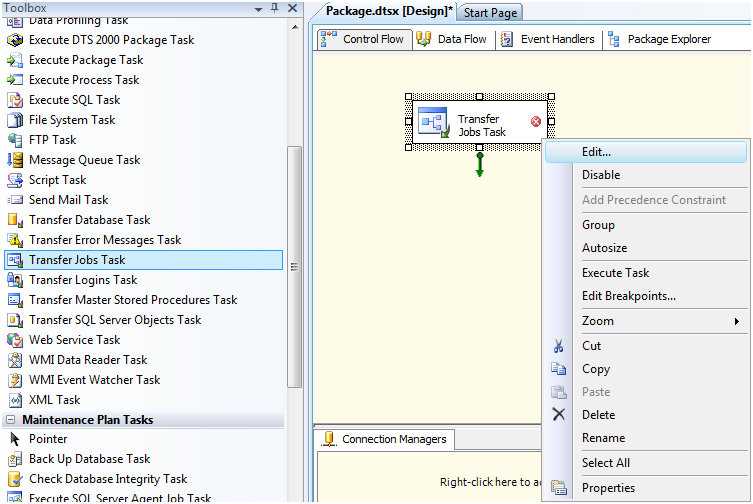
    You can use the transfer Jobs Task in SSIS to move the job to different SQL Instance. Right Click on Transfer Jobs task and click on Edit…

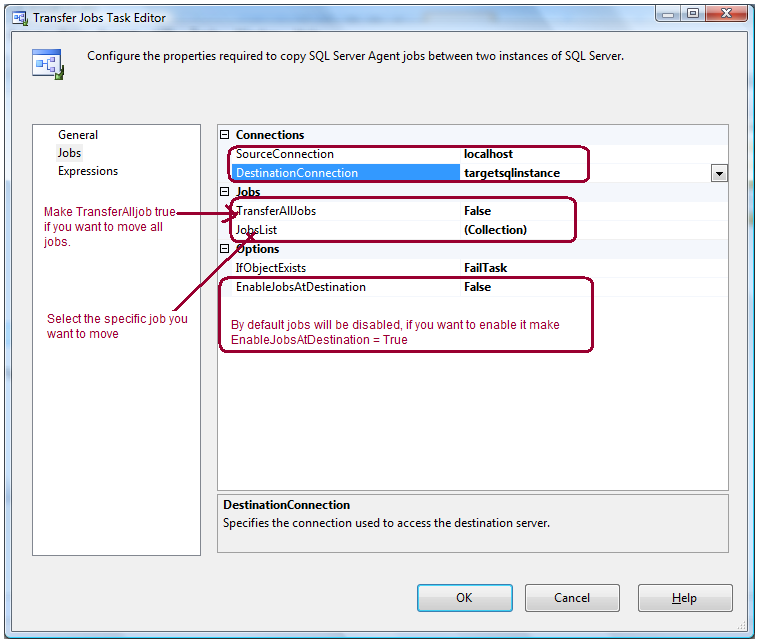
    Specify the Source Connection and Destination Connection in Jobs page. Here you have options, you can either transfer all jobs or select the specific job from the job list drop down.

    By Scripting Out Job

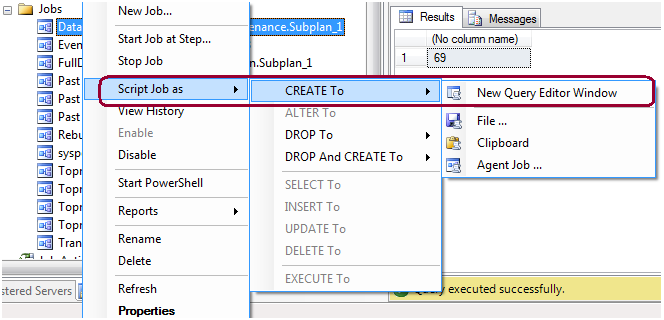
    You can also move the job by scripting it out.

    You can also restore the MSDB database on target SQL Box if it is the same SQL version and there is no other jobs exist there.

  • Using a PowerShell Script to delete old files for SQL Server

    Problem

    Many clients are using custom stored procedures or third party tools to backup databases in production environments instead of using database maintenance plans. One of the things that you need to do is to maintain the number of backup files that exist on disk, so you don’t run out of disk space.  There are several techniques for deleting old files, but in this tip I show how this can be done using PowerShell.

    Solution

    http://www.mssqltips.com/sqlservertip/2726/using-a-powershell-script-to-delete-old-files-for-sql-server/