Category: Backup & Recovery

  • SP_Configure

    Sp_Configure procedure is used to display or change the SQL Server setting. Once you execute the SP_Configure procedure it will display the below columns in the output.

    name – Name of the configuration parameter
    minimum – Minimum value setting that is allowed
    maximum – Maximum value that is allowed
    config_value – value which currently configured
    run_value – value which currently running

    How to update the configuration value?
    Here I will show you how to enable the XP_CmdShell using SP_Configure. Please note don’t update configuration values until you are sure, otherwise it will affect the your SQL Server performance and behavioral.

    --XP_Cmdshell is an andvanced option, enbale the advanced option
    EXEC sp_configure 'show advanced options', 1
    GO
    --Enable the advance option
    RECONFIGURE
    GO
    --enable the xp_cmdshell
    EXEC sp_configure 'xp_cmdshell', 1
    GO
    --Reconfigure the xp_cmdshell value
    RECONFIGURE
    GO
    

    What is the difference between Config_Value and Run_Value?

    When we change the Configuration Parameter value as above it will update the Config_Value filed only, but wouldn’t be in effect until you run reconfigure command. Once the reconfigure command execute or SQL Server restarted, SQL Server will run as per the new configured value.

    You can get the description of the configuration parameters from books online or you can query sys.configurations and check for the description column.

    select
    *
    from
    sys.configurations

    Output of the Sp_Configure

    Name

    Minimum Maximum Value Run Value

    access check cache bucket count

    0

    16384

    0

    0

    access check cache quota

    0

    2147483647

    0

    0

    Ad Hoc Distributed Queries

    0

    1

    0

    0

    affinity I/O mask

    -2147483648

    2147483647

    0

    0

    affinity mask

    -2147483648

    2147483647

    0

    0

    Agent XPs

    0

    1

    1

    1

    allow updates

    0

    1

    0

    0

    awe enabled

    0

    1

    0

    0

    backup compression default

    0

    1

    0

    0

    blocked process threshold (s)

    0

    86400

    0

    0

    c2 audit mode

    0

    1

    0

    0

    clr enabled

    0

    1

    0

    0

    common criteria compliance enabled

    0

    1

    0

    0

    cost threshold for parallelism

    0

    32767

    5

    5

    cross db ownership chaining

    0

    1

    0

    0

    cursor threshold

    -1

    2147483647

    -1

    -1

    Database Mail XPs

    0

    1

    0

    0

    default full-text language

    0

    2147483647

    1033

    1033

    default language

    0

    9999

    0

    0

    default trace enabled

    0

    1

    1

    1

    disallow results from triggers

    0

    1

    0

    0

    EKM provider enabled

    0

    1

    0

    0

    filestream access level

    0

    2

    0

    0

    fill factor (%)

    0

    100

    0

    0

    ft crawl bandwidth (max)

    0

    32767

    100

    100

    ft crawl bandwidth (min)

    0

    32767

    0

    0

    ft notify bandwidth (max)

    0

    32767

    100

    100

    ft notify bandwidth (min)

    0

    32767

    0

    0

    index create memory (KB)

    704

    2147483647

    0

    0

    in-doubt xact resolution

    0

    2

    0

    0

    lightweight pooling

    0

    1

    0

    0

    locks

    5000

    2147483647

    0

    0

    max degree of parallelism

    0

    64

    0

    0

    max full-text crawl range

    0

    256

    4

    4

    max server memory (MB)

    16

    2147483647

    2147483647

    2147483647

    max text repl size (B)

    -1

    2147483647

    65536

    65536

    max worker threads

    128

    32767

    0

    0

    media retention

    0

    365

    0

    0

    min memory per query (KB)

    512

    2147483647

    1024

    1024

    min server memory (MB)

    0

    2147483647

    0

    0

    nested triggers

    0

    1

    1

    1

    network packet size (B)

    512

    32767

    4096

    4096

    Ole Automation Procedures

    0

    1

    0

    0

    open objects

    0

    2147483647

    0

    0

    optimize for ad hoc workloads

    0

    1

    0

    0

    PH timeout (s)

    1

    3600

    60

    60

    precompute rank

    0

    1

    0

    0

    priority boost

    0

    1

    0

    0

    query governor cost limit

    0

    2147483647

    0

    0

    query wait (s)

    -1

    2147483647

    -1

    -1

    recovery interval (min)

    0

    32767

    0

    0

    remote access

    0

    1

    1

    1

    remote admin connections

    0

    1

    0

    0

    remote login timeout (s)

    0

    2147483647

    20

    20

    remote proc trans

    0

    1

    0

    0

    remote query timeout (s)

    0

    2147483647

    600

    600

    Replication XPs

    0

    1

    0

    0

    scan for startup procs

    0

    1

    0

    0

    server trigger recursion

    0

    1

    1

    1

    set working set size

    0

    1

    0

    0

    show advanced options

    0

    1

    1

    1

    SMO and DMO XPs

    0

    1

    1

    1

    SQL Mail XPs

    0

    1

    0

    0

    transform noise words

    0

    1

    0

    0

    two digit year cutoff

    1753

    9999

    2049

    2049

    user connections

    0

    32767

    0

    0

    user options

    0

    32767

    0

    0

    xp_cmdshell

    0

    1

    1

    1

  • Script to Enable/Disable Database for Replication

    You can enable the database for replication using below script.

    use master
    exec sp_replicationdboption @dbname = 'sqldbpool',
    @optname = 'publish',
    @value = 'true'
    go
    

    If you have restore the database on test environment and you are getting the error that “Database is part of Replication”, you can clear/disable it by executing below query.

    use master
    exec sp_replicationdboption @dbname = 'sqldbpool',
    @optname = 'publish',
    @value = 'false'
    go
    
  • Transparent Data Encryption

    Question: Recently I got a question regarding Transparent Data Encryption (TDE) and how it works.
    Answer:Microsoft has introduced a new feature TDE (Transparent Data Encryption) from SQL Server 2008. TDE provides real time encryption of data and log files. Data is encrypted before it is written to disk; data is decrypted when it is read from disk.

    Main benefit of TDE is that it does not require any changes into existing application. TDE encrypt data using AES and 3DES encryption algorithms without having to change the applications that will be connecting to the database.

    With TDE backup files and database files are encrypted and no one can access it without key.

    Follow below 4 steps to implement the TDE on the particular database.
    • Create a master key
    • Create or obtain a certificate protected by the master key
    • Create a database encryption key and protect it by the certificate
    • Set the database to use encryption

    Create a Master Key A master key is a symmetric key that is used to create certificates and asymmetric keys. You can create the Master Key using below script

    --create a master key
    USE master 
    GO 
    CREATE MASTER KEY ENCRYPTION BY PASSWORD = 'P@ssw0rd' 
    

    Now next step is you have to create the server-based certificate which will be used to encrypt the database. You can create the certificate using below query.

    --create a ceritificate
    USE master;
    CREATE CERTIFICATE sql_tdeDBcert 
    WITH SUBJECT = 'TDE Certificate for SQL_tde database'
    GO 
    

    Here, I am creating sample database using below script, if you have already any test database you can use it.

    --script to create a database
    create database sql_tde
    
    use sql_tde
    go
    
    --script to create sample table
    create table fnInfo
    (
    	Id int primary key identity(1,1),
    	CCNo varchar(16) constraint UK1 Unique,
    	Name varchar(20)
    )
    
    --enter the sample data
    insert into fnInfo values ('456333125','Jugal')
    insert into fnInfo values ('1234568484','Sunil')
    insert into fnInfo values ('1234789254','Chintan')
    
    select * from fnInfo
    

    Create a Database Encryption Key A database encryption key is required for TDE. Here we will set the encryption for the database by creating a database encryption key and password using the certificate we created in the above step.

    use sql_tde
    GO 
    create database encryption key
    with algorithm = AES_128
    encryption by server certificate sql_tdeDBcert
    

    Now we will check for the backup scenario, whether we are able to restore it without key or not. I have executed below backup script to take the database backup.

    ----backup database
    backup database sql_tde to disk = 'c:\sql_tde.bak'
    

    Now I am restoring the database backup on the different machine without key and certificate.

    ----backup database
    restore database sql_tde from disk = 'c:\sql_tde.bak'
    

    Restore command is failed with the below error on the differnet machine.

    Starting up database 'sql_tde'.
    Error: 3283, Severity: 16, State: 1.
    The file "sql_tde_log" failed to initialize correctly. Examine the error logs for more details.  
    

    To restore the encrypted database backup on different SQL Server instance we have to export the certificate created on the SQL instance on which the encrypted database backup was created.
    You can export or transfer the certificate to a file. Use the below query for it.

    USE master 
    GO 
    BACKUP CERTIFICATE sql_tdeDBcert  
    TO FILE = 'C:\sql_tdeDBcert_cert.cer' 
    WITH PRIVATE KEY (FILE = 'C:\sql_tdeDBcert_key.pvk' , 
    ENCRYPTION BY PASSWORD = 'P@ssw0rd' ) 
    GO 
    

    Now move the files to destination server and import the certificate using below command. Please note that the password specified here in the DECRYPTION BY PASSWORD parameter is the same as that which used to export the certificate to a file.

    CREATE CERTIFICATE sql_tdeDBcert 
    FROM FILE = 'C:\sql_tdeDBcert_cert.cer' 
    WITH PRIVATE KEY (FILE = 'C:\sql_tdeDBcert_key.pvk',  
    DECRYPTION BY PASSWORD = 'P@ssw0rd'); 
    GO  
    

    You can restore the database now using below query.

    ----backup database
    restore database sql_tde from disk = 'c:\sql_tde.bak'
    
  • Estimating the size of the Database backup file

    Problem: Often we would like to check how much size backup file will take on the disk? You can follow below simple steps to estimate the backup file size?

    Solution:
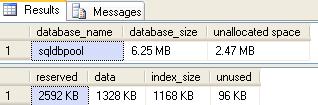
    Execute the SP_SPACEUSED procedure to get the database size statistics.
    USE [sqldbpool]
    GO
    EXEC sp_spaceused @updateusage = ‘true’

    Now you have to subtract the ununsed pages from reserved pages and divided by 1024 to get the output in MB.

    In our scenario we have 2592 (KB) – 96 (KB) = 2496/1024 = 2.4374(MB) will be the backup size.

  • Steps to restore Database using Database Snapshot

    Problem: Take a scenario where vendor wants you to up-grade the vendor databae using the SQL scripts. In case if something goes wrong you can either recover database by restoring all backup or by creating database snapshot.

    Solution:
    Database snapshots feature is available from the SQL Server 2005. Snapshot will be used to create a read-only copy of a database at a given point in time. Any transactions which are uncommitted at the time you create a snapshot will not be included in the database snapshot. You can create multiple snapshots of a source database, but those snapshots must reside on the same instance as the source database.

    You must have SQL Server enterprise edition to create the snapshot. A database snapshot only contains the data pages that have changed in the source database since the snapshot was created. It contains the original copies of those pages in order to give the effect of a read-only view. The file that is created to hold the changed data pages when the snapshot is created is known as a sparse file.

    A source database that contains a snapshot cannot be dropped, detached, or restored until all of the snapshots have been dropped.

    Check below queries to restore the database using snapshot
    Before you start restoring using database snapshot
    — Make sure the source database does not contain read-only or compressed filegroups.
    –Make sure all the files are online that were online when the snapshot was created.
    –Delete all snapshots of the source database, except the one you are reverting to.

    create database db_pool
    use db_pool
    
    create table tb1
    (
    	id int,
    	name varchar(10)
    )
    
    insert into tb1 values(10,'Jugal')
    go 50;
    
    --select the database and execute the below query to get logical name
    SELECT name FROM sys.database_files WHERE type <> 1
    
    --execute below command to create the database snapshot
    CREATE DATABASE db_pool_Snapshot
     ON
    (Name = db_pool,
     FileName = 'C:\db_pool_Data.ss')
     AS SNAPSHOT OF db_pool
     
    --select the original database and drop the rows
    use db_pool
    delete from tb1
    
    --use the snapshot and query tb1, we can see the data evenif it is deleted 
     use db_pool_Snapshot
     select * from tb1
     
     --now restore database using below script from snapshot
    USE master
    GO
    RESTORE DATABASE db_pool FROM DATABASE_SNAPSHOT = 'db_pool_Snapshot'
     
     --query the database to check changes
     use db_pool
     select * from tb1