Category: SQL Server 2008

  • Ranking Function – NTITLE()

    NTITLE() function is used to break up a record set into a specific number of groups.

    SELECT NTILE(3) OVER (ORDER BY Age) AS [Group by Age],
    EmpName,
    Age
    FROM Emp

    Group by Age EmpName Age
    -------------------- --------- -----------
    1 Bill 11
    1 Dhvani 20
    1 Nehal 20
    2 R 30
    2 Abhinav 40
    2 Suvrendu 40
    3 Nirmal 50
    3 Sunil 95
    3 Ram 100

    (9 row(s) affected)

  • Ranking Function – Dense_Rank()

    Dense_Rank() :- The DENSE_RANK function is similar to the RANK function, although this function doesn’t produce gaps in the ranking numbers. Instead this function sequentially ranks each unique ORDER BY value. With the DENSE_RANK function each row either has the same ranking as the preceeding row, or has a ranking 1 greater then the prior row.

    CREATE TABLE Emp(
    EmpName VARCHAR(9),
    Age INT,
    MaritalStatus char(1))

    INSERT INTO Emp VALUES ('Abhinav',40,'S')
    INSERT INTO Emp VALUES ('Dhvani',20,'M')
    INSERT INTO Emp VALUES ('Nehal',20,'M')
    INSERT INTO Emp VALUES ('Sunil',95,'M')
    INSERT INTO Emp VALUES ('Suvrendu',40,'M')
    INSERT INTO Emp VALUES ('Bill',11,'S')
    INSERT INTO Emp VALUES ('Ram',100,'S')
    INSERT INTO Emp VALUES ('Nirmal',50,'S')
    INSERT INTO Emp VALUES ('R',30,'S')

    SELECT Dense_RANK() OVER (ORDER BY Age) AS [Rank by Age],
    EmpName,
    Age
    FROM Emp

    Rank by Age EmpName Age
    -------------------- --------- -----------
    1 Bill 11
    2 Dhvani 20
    2 Nehal 20
    3 R 30
    4 Abhinav 40
    4 Suvrendu 40
    5 Nirmal 50
    6 Sunil 95
    7 Ram 100

    (9 row(s) affected)

    SELECT Dense_RANK() OVER (PARTITION BY MaritalStatus ORDER BY Age) AS [Partition by MaritalStatus],
    EmpName,
    Age,
    MaritalStatus
    FROM emp

    Partition by MaritalStatus EmpName Age MaritalStatus
    -------------------------- --------- ----------- -------------
    1 Dhvani 20 M
    1 Nehal 20 M
    2 Suvrendu 40 M
    3 Sunil 95 M
    1 Bill 11 S
    2 R 30 S
    3 Abhinav 40 S
    4 Nirmal 50 S
    5 Ram 100 S

    (9 row(s) affected)

  • Ranking Function – Rank()

    Rank()
    The RANK function sequentially numbers a record set, but when two rows have the same order by value then they get the same ranking. Ranking value will be incremented by 1 for next un-matched row.

    Syntax
    RANK ( ) OVER ( [ ] )

    Examples
    CREATE TABLE Emp(
    EmpName VARCHAR(9),
    Age INT,
    MaritalStatus char(1))

    INSERT INTO Emp VALUES (‘Abhinav’,40,’S’)
    INSERT INTO Emp VALUES (‘Dhvani’,20,’M’)
    INSERT INTO Emp VALUES (‘Nehal’,20,’M’)
    INSERT INTO Emp VALUES (‘Sunil’,95,’M’)
    INSERT INTO Emp VALUES (‘Suvrendu’,40,’M’)
    INSERT INTO Emp VALUES (‘Bill’,11,’S’)
    INSERT INTO Emp VALUES (‘Ram’,100,’S’)
    INSERT INTO Emp VALUES (‘Nirmal’,50,’S’)
    INSERT INTO Emp VALUES (‘R’,30,’S’)

    Query – I

    SELECT RANK() OVER (ORDER BY Age) AS [Rank by Age],
    EmpName,
    Age
    FROM Emp

    Rank by Age EmpName Age
    -------------------- --------- -----------
    1 Bill 11
    2 Dhvani 20
    2 Nehal 20
    4 R 30
    5 Abhinav 40
    5 Suvrendu 40
    7 Nirmal 50
    8 Sunil 95
    9 Ram 100

    (9 row(s) affected)


    SELECT RANK() OVER (PARTITION BY MaritalStatus ORDER BY Age) AS [Partition by MaritalStatus],
    EmpName,
    Age,
    MaritalStatus
    FROM emp

    Partition by MaritalStatus EmpName Age MaritalStatus
    -------------------------- --------- ----------- -------------
    1 Dhvani 20 M
    1 Nehal 20 M
    3 Suvrendu 40 M
    4 Sunil 95 M
    1 Bill 11 S
    2 R 30 S
    3 Abhinav 40 S
    4 Nirmal 50 S
    5 Ram 100 S

  • Ranking Function – Row_Number

    Ranking functions are functions that allow you to sequentially number your result set.

    Syntax

    ROW_NUMBER ( ) OVER ([ ] )

    partition_by_clause is a column or set of columns used to determine the grouping in which the ROW_NUMBER function applies sequential numbering.

    order_by_clause is a column or set of columns used to order the result set within the grouping.

    Examples

    CREATE TABLE Emp(
    EmpName VARCHAR(9),
    Age INT,
    MaritalStatus char(1))

    INSERT INTO Emp VALUES ('Abhinav',40,'S')
    INSERT INTO Emp VALUES ('Dhvani',20,'M')
    INSERT INTO Emp VALUES ('Nehal',20,'M')
    INSERT INTO Emp VALUES ('Sunil',95,'M')
    INSERT INTO Emp VALUES ('Bill',11,'S')
    INSERT INTO Emp VALUES ('Ram',100,'S')
    INSERT INTO Emp VALUES ('Nirmal',50,'S')


    Sample - 1
    SELECT ROW_NUMBER() OVER (ORDER BY Age) AS [Row Number by Age],
    EmpName,
    Age
    FROM Emp
    Sample - 2
    SELECT ROW_NUMBER() OVER (ORDER BY Age desc) AS [Row Number by Age],
    EmpName,
    Age
    FROM Emp

    Row Number by Age EmpName Age
    ——————– ——— ———–
    1 Bill 11
    2 Dhvani 20
    3 Nehal 20
    4 Abhinav 40
    5 Nirmal 50
    6 Sunil 95
    7 Ram 100

    (7 row(s) affected)

    Sample - 3
    SELECT ROW_NUMBER() OVER (PARTITION BY MaritalStatus ORDER BY Age) AS [Partition by MaritalStatus],
    EmpName,
    Age,
    MaritalStatus
    FROM Emp

    Partition by MaritalStatus EmpName Age MaritalStatus
    -------------------------- --------- ----------- -------------
    1 Dhvani 20 M
    2 Nehal 20 M
    3 Sunil 95 M
    1 Bill 11 S
    2 Abhinav 40 S
    3 Nirmal 50 S
    4 Ram 100 S

    (7 row(s) affected)

  • xp_enumgroups Extended stored procedure

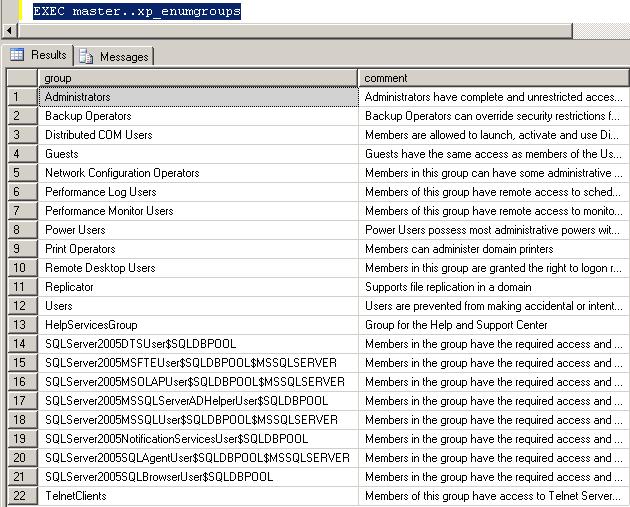
    xp_enumgroups Extended stored procedure returns the list of Windows NT groups and their description. To get the list of the Windows NT groups, run:

    Sample
    EXEC master..xp_enumgroups