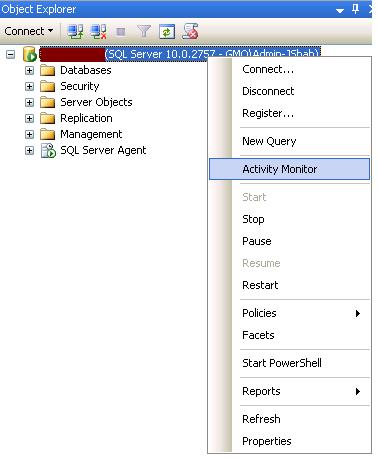
To start Activity Monitor in SQL Server 2008 SSMS, right-click on the SQL Server name you want to monitor.

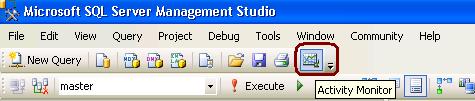
From SQL Server 2008 Management Studio’s toolbar, click Activity Monitor as shown in the snippet below.
To start Activity Monitor in SQL Server 2008 SSMS, right-click on the SQL Server name you want to monitor.
From SQL Server 2008 Management Studio’s toolbar, click Activity Monitor as shown in the snippet below.
Option 1
EXEC master..sp_MSgetversion
Output
Character_Value
——————– ———– ———–
10.0.2789.0 1 3
Option 2
select @@version
Output
Microsoft SQL Server 2008 (SP1) – 10.0.2789.0 (X64)
Jul 12 2010 19:21:29
Copyright (c) 1988-2008 Microsoft Corporation
Enterprise Edition (64-bit) on Windows NT 5.2 (Build 3790: Service Pack 2)
Option 3
SELECT SERVERPROPERTY('productversion')
Output Build Version
10.0.2789.0
Option 5
SELECT SERVERPROPERTY ('productlevel')
Output-Service Pack
SP1
Option 6
SELECT SERVERPROPERTY ('edition')
Output-Edition
Enterprise Edition (64-bit)
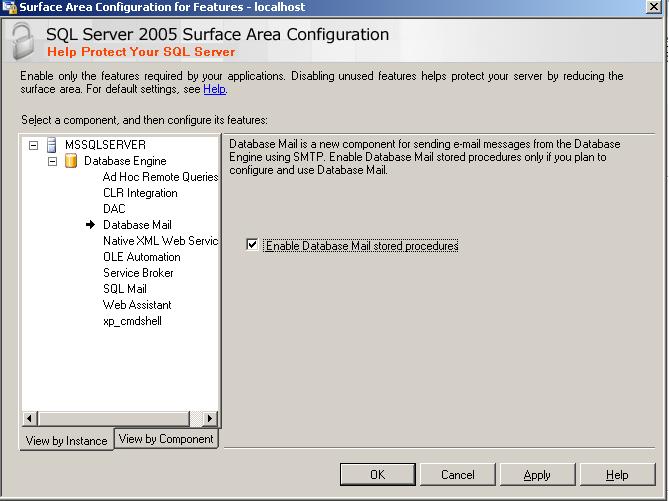
You can enable database mail feature using Surface area configuration tool or using SP_Configure procedure.
use master

go

sp_configure 'show advanced options',1

go

reconfigure with override

go

sp_configure 'Database Mail XPs',1

--go

--sp_configure 'SQL Mail XPs',0

go

reconfigure

go
Using Surface Area Configuration
1. Select Surface area configuration for features

2. Go to database page and click on check box.