Category: Security

  • Types of Modern World Database Administrators

    1. System DBA

    • Responsibilities:
      • Focus on the physical and technical aspects of database management.
      • Install, configure, and upgrade database software.
      • Manage the operating system and hardware that the database runs on.
      • Monitor system performance and manage system resources.
      • Implement and manage database security.
    • Technologies:
      • Database Systems: Oracle, SQL Server, MySQL, PostgreSQL, DB2
      • Operating Systems: Linux, Windows, Unix
      • Virtualization: VMware, Hyper-V
      • Cloud Platforms: AWS, Azure, Google Cloud Platform (GCP)
      • Cloud Databases: Amazon RDS, Azure SQL Database, Google Cloud SQL, Amazon Aurora
      • Cloud Storage: Amazon S3, Azure Blob Storage, Google Cloud Storage
      • Monitoring Tools: Amazon CloudWatch, Azure Monitor, Google Stackdriver
      • Backup Solutions: AWS Backup, Azure Backup, Google Cloud Backup and DR

    2. Database Architect

    • Responsibilities:
      • Design the overall database structure and architecture.
      • Develop and maintain database models and standards.
      • Plan for scalability and performance improvements.
      • Work with application developers to design and optimize queries.
      • Ensure data integrity and normalization.
    • Technologies:
      • Database Systems: Oracle, SQL Server, MySQL, PostgreSQL, MongoDB
      • Modeling Tools: ERwin, Microsoft Visio, Lucidchart
      • Data Warehousing: Amazon Redshift, Snowflake, Google BigQuery
      • ETL Tools: AWS Glue, Azure Data Factory, Google Dataflow
      • Cloud Platforms: AWS, Azure, Google Cloud Platform (GCP)
      • Infrastructure as Code (IaC): AWS CloudFormation, Azure Resource Manager (ARM) templates, Google Deployment Manager

    3. Application DBA

    • Responsibilities:
      • Focus on managing and optimizing the database from the application’s perspective.
      • Work closely with developers to understand the database needs of applications.
      • Tune SQL queries and database performance for applications.
      • Ensure database changes and deployments are aligned with application requirements.
      • Manage database objects such as tables, indexes, and views used by applications.
    • Technologies:
      • Database Systems: Oracle, SQL Server, MySQL, PostgreSQL
      • Application Servers: AWS Elastic Beanstalk, Azure App Service, Google App Engine
      • ORM Tools: Hibernate, Entity Framework, Sequelize
      • Performance Tuning: AWS RDS Performance Insights, Azure SQL Database Advisor, Google Cloud SQL Insights
      • Version Control: AWS CodeCommit, Azure Repos, Google Cloud Source Repositories

    4. Development DBA

    • Responsibilities:
      • Support development projects by creating and managing development databases.
      • Collaborate with development teams to design database schemas.
      • Develop and optimize stored procedures, functions, and triggers.
      • Participate in code reviews and ensure best practices for database programming.
      • Assist in testing and deploying database changes.
    • Technologies:
      • Database Systems: Oracle, SQL Server, MySQL, PostgreSQL
      • Development Languages: PL/SQL, T-SQL, Python, Java, C#
      • Version Control: Git (GitHub, GitLab, Bitbucket)
      • CI/CD Tools: AWS CodePipeline, Azure DevOps, Google Cloud Build
      • Testing Tools: JUnit, pytest, SQL Unit Test

    5. Data Warehouse DBA

    • Responsibilities:
      • Manage data warehouse environments.
      • Design and implement ETL (Extract, Transform, Load) processes.
      • Optimize the performance of data warehouse queries and reports.
      • Ensure data quality and integrity within the data warehouse.
      • Work with BI (Business Intelligence) tools and support data analytics needs.
    • Technologies:
      • Data Warehousing: Amazon Redshift, Snowflake, Google BigQuery, Azure Synapse Analytics
      • ETL Tools: AWS Glue, Azure Data Factory, Google Dataflow
      • BI Tools: AWS QuickSight, Microsoft Power BI, Google Data Studio
      • SQL: Advanced SQL, Window Functions, Analytical SQL
      • Cloud Platforms: AWS, Azure, Google Cloud Platform (GCP)

    6. Operational DBA

    • Responsibilities:
      • Focus on the day-to-day operation and maintenance of databases.
      • Monitor database performance and troubleshoot issues.
      • Perform regular backups and ensure data recovery processes.
      • Manage database user accounts and permissions.
      • Implement and manage database security policies.
    • Technologies:
      • Database Systems: Oracle, SQL Server, MySQL, PostgreSQL, DB2
      • Backup Solutions: AWS Backup, Azure Backup, Google Cloud Backup and DR
      • Monitoring Tools: Amazon CloudWatch, Azure Monitor, Google Stackdriver
      • Automation Scripts: Shell scripting, PowerShell, AWS Lambda, Azure Functions
      • Cloud Platforms: AWS, Azure, Google Cloud Platform (GCP)
      • Security Tools: AWS IAM, Azure AD, Google Cloud IAM

    7. Cloud DBA

    • Responsibilities:
      • Manage databases hosted in cloud environments (e.g., AWS, Azure, Google Cloud).
      • Ensure optimal configuration and performance of cloud-based databases.
      • Manage cloud-specific database services like Amazon RDS, Azure SQL Database, etc.
      • Implement cloud-specific security and compliance measures.
      • Monitor and manage cloud resource usage and costs.
    • Technologies:
      • Cloud Platforms: AWS, Azure, Google Cloud Platform (GCP)
      • Cloud Databases: Amazon RDS, Azure SQL Database, Google Cloud SQL, Amazon Aurora, Google BigQuery, Azure Cosmos DB
      • Infrastructure as Code (IaC): Terraform, AWS CloudFormation, Azure Resource Manager (ARM) templates
      • Monitoring Tools: AWS CloudWatch, Azure Monitor, Google Cloud Monitoring
      • Security Tools: AWS IAM, Azure AD, Google Cloud IAM

    8. DevOps DBA

    • Responsibilities:
      • Integrate database management with DevOps practices.
      • Automate database deployment and configuration using scripts and tools.
      • Collaborate with DevOps teams to ensure continuous integration and delivery (CI/CD) of database changes.
      • Implement monitoring and logging for databases as part of the DevOps pipeline.
      • Ensure database environments are consistent across development, testing, and production.
    • Technologies:
      • CI/CD Tools: AWS CodePipeline, Azure DevOps, Google Cloud Build, Jenkins
      • Configuration Management: Ansible, Puppet, Chef
      • Containerization: Docker, Kubernetes, AWS EKS, Azure AKS, Google Kubernetes Engine (GKE)
      • Scripting Languages: Bash, Python, PowerShell
      • Monitoring Tools: Prometheus, Grafana, AWS CloudWatch, Azure Monitor, Google Cloud Monitoring

    9. Performance Tuning DBA

    • Responsibilities:
      • Focus on optimizing database performance.
      • Analyze and tune SQL queries for efficiency.
      • Monitor and optimize database indexes and storage.
      • Identify and resolve performance bottlenecks.
      • Work with developers and other DBAs to implement performance improvements.
    • Technologies:
      • Database Systems: Oracle, SQL Server, MySQL, PostgreSQL
      • Performance Tools: Oracle AWR, SQL Server Profiler, EXPLAIN (PostgreSQL), MySQL Performance Schema
      • Indexing Tools: DBMS_STATS (Oracle), SQL Server Index Tuning Wizard
      • Monitoring Tools: AWS RDS Performance Insights, Azure SQL Database Advisor, Google Cloud SQL Insights

    10. Security DBA

    • Responsibilities:
      • Ensure databases are secure from internal and external threats.
      • Implement and manage database encryption, authentication, and authorization.
      • Conduct security audits and vulnerability assessments.
      • Develop and enforce database security policies and procedures.
      • Monitor for security breaches and respond to incidents.
    • Technologies:
      • Database Systems: Oracle, SQL Server, MySQL, PostgreSQL
      • Security Tools: AWS IAM, Azure AD, Google Cloud IAM, Oracle Data Vault, SQL Server TDE, pgcrypto (PostgreSQL)
      • Auditing Tools: AWS CloudTrail, Azure Security Center, Google Cloud Audit Logs
      • Encryption: SSL/TLS, TDE (Transparent Data Encryption)
      • Authentication: Kerberos, LDAP, Active Directory
  • Generative AI Basics

    Generative AI Basics: Understanding the Fundamentals

    Generative AI, a subset of artificial intelligence (AI), has garnered significant attention in recent years due to its ability to create new content that mimics human creativity. From generating realistic images to composing music and even writing text, generative AI algorithms have made remarkable strides. But how does generative AI work, and what are the basic principles behind it? Let’s delve into the fundamentals.

    What is Generative AI?

    Generative AI refers to algorithms and models designed to generate new content, whether it’s images, text, audio, or other types of data. Unlike traditional AI systems that are primarily focused on specific tasks like classification or prediction, generative AI aims to create entirely new data that resembles the input data it was trained on.

    Key Components of Generative AI:

    1. Generative Models: At the heart of generative AI are generative models. These models learn the underlying patterns and structures of the input data and use this knowledge to generate new content. Some of the popular generative models include Generative Adversarial Networks (GANs), Variational Autoencoders (VAEs), and Autoregressive Models.
    2. Training Data: Generative models require large datasets for training. These datasets can include images, text, audio, or any other type of data that the model aims to generate. The quality and diversity of the training data significantly impact the performance of the generative model.
    3. Loss Functions: Loss functions are used to quantify how well the generative model is performing. They measure the difference between the generated output and the real data. By minimizing this difference during training, the model learns to produce outputs that are more similar to the real data.
    4. Sampling Techniques: Once trained, generative models use sampling techniques to generate new data. These techniques can vary depending on the type of model and the nature of the data. For instance, in image generation, random noise may be fed into the model, while in text generation, the model may start with a prompt and generate the rest of the text.

    Common Generative AI Applications:

    1. Image Generation: Generative models like GANs have been incredibly successful in generating high-quality, realistic images. These models have applications in generating artwork, creating realistic avatars, and even generating photorealistic images of objects that don’t exist in the real world.
    2. Text Generation: Natural Language Processing (NLP) models such as GPT (Generative Pre-trained Transformer) are proficient in generating human-like text. They can be used for tasks like content generation, dialogue systems, and language translation.
    3. Music and Audio Generation: Generative models have also been used to create music and audio. These models can compose music in various styles, generate sound effects, and even synthesize human speech.
    4. Data Augmentation: Generative models can also be used for data augmentation, where new training samples are generated to increase the diversity of the dataset. This helps improve the performance of machine learning models trained on limited data.

    Challenges and Ethical Considerations:

    While generative AI has opened up exciting possibilities, it also presents several challenges and ethical considerations:

    1. Bias and Fairness: Generative models can inadvertently perpetuate biases present in the training data. Ensuring fairness and mitigating biases in generated outputs is a significant concern.
    2. Misuse and Manipulation: There’s a risk of generative AI being used for malicious purposes such as creating fake news, generating deepfake videos, or impersonating individuals.
    3. Quality Control: Assessing the quality and authenticity of generated content can be challenging, particularly in applications like image and video generation where the line between real and generated content may blur.
    4. Data Privacy: Generative models trained on sensitive data may raise concerns about data privacy and security, especially if the generated outputs contain identifiable information.

    Conclusion:

    Generative AI holds immense promise in various domains, revolutionizing how we create and interact with digital content. Understanding the basics of generative AI empowers us to harness its potential while also being mindful of its limitations and ethical implications. As research in this field progresses, we can expect even more innovative applications and advancements in generative AI technology.

  • OpenDataSouce function – to query OLEDB Data Source

    OPENDATASOURCE
    OpenDataSouce function helps you to get ad hoc connection information as part of a four-part object name as an one time alternative of linked server. You don’t have to specify or create the linked server to query other data sources (i.e. MS Excel, MS Access, MSSQL Older version to newer version etc.) if you are querying it infrequently.

    You can use OPENDATASOURCE for the OLEDB data sources those are accessed infrequently, for several time use linked server as it provides more functionality.

    You can get more information about the arguments of OpenDataSource function on MSDN site.

    To use the OPENDATASOURCE you have to enable the ad hoc distributed queries. You required to have execute permission to use OPENDATASOURCE fucntion.

    Execute below query to enable it

    EXEC sp_configure 'show advanced options', 1
    RECONFIGURE WITH OVERRIDE
    GO
    EXEC sp_configure 'ad hoc distributed queries', 1
    RECONFIGURE WITH OVERRIDE
    GO
    

    Make sure Provider AllowInProcess and DynamiceParameters value is checked. For example lets enable it for SQLNCLI10 provider.

    USE [master]
    GO
    EXEC master.dbo.sp_MSset_oledb_prop N'SQLNCLI10', N'AllowInProcess', 1
    EXEC master.dbo.sp_MSset_oledb_prop N'SQLNCLI10', N'DynamicParameters', 1
    GO
    

    OpenDataSource Examples

    -- SQL Server 2000/2005/2008
    -- You can use SQLNCLI10 provider for SQL Server 2008 as well
    SELECT
        * FROM
    OPENDATASOURCE (
       'SQLNCLI', 
       'Data Source=SQLInstanceName;Catalog=DBName;User ID=SQLLogin;Password=Password;').DBName.SchemaName.TableName
       
       
    SELECT *
    FROM OPENROWSET('SQLNCLI',
       'DRIVER={SQL Server};SERVER=SQLInstanceName;UID=SQLLogin;PWD=Password',
       'select * from DBName..TableName')  
       
    
    -- SQL Server 2012
    SELECT
        * FROM
    OPENDATASOURCE (
       'SQLNCLI11', 
       'Data Source=SQLInstanceName;Catalog=DBName;User ID=SQLLogin;Password=Password;').DBName.SchemaName.TableName
       
       
    SELECT *
    FROM OPENROWSET('SQLNCLI11',
       'DRIVER={SQL Server};SERVER=SQLInstanceName;UID=SQLLogin;PWD=Password',
       'select * from DBName..TableName')  
    
    --Access DB
    SELECT * FROM OPENDATASOURCE ('Microsoft.ACE.OLEDB.12.0', 
                                  'Data Source=D:\MyDB\MyAccessDB.accdb')...TableName   
    

    Common Errors
    Error 1#
    Msg 7403, Level 16, State 1, Line 1
    The OLE DB provider “SQLNCLI11” has not been registered.
    Solution: You will get above error if you have mentioned SQLNCLI11 while running OPENDATASOURCE query on SQL Server 2008 or lower version, it will work fine on SQL Server 2011. You can check list of registered provider by browsing Server Objects -> Linked Servers -> Provider in SSMS
    Error 2#
    Msg 15281, Level 16, State 1, Line 2
    SQL Server blocked access to STATEMENT ‘OpenRowset/OpenDatasource’ of component ‘Ad Hoc Distributed Queries’ because this component is turned off as part of the security configuration for this server. A system administrator can enable the use of ‘Ad Hoc Distributed Queries’ by using sp_configure. For more information about enabling ‘Ad Hoc Distributed Queries’, see “Surface Area Configuration” in SQL Server Books Online.

    Solution: Enable the ad hoc distributed queries by executing above SP_CONFIGURE query.

  • Error Fix: Microsoft SQL Server, Error: 14516

    Problem: Proxy (1) is not allowed for subsystem “SSIS” and user “Domain\UserName”. Grant permission by calling sp_grant_proxy_to_subsystem or sp_grant_login_to_proxy. (Microsoft SQL Server, Error: 14516)

    Solution:
    Above error occurs when the user with the minimum permission (i.e. SQLAgentReaderRole and SQLAgentUserRole) or the user is configured as job owner and trying to run the job which is running under the proxy account security context.

    You can execute below script to grant permission to the user and fix the error.

    
    EXEC dbo.sp_grant_login_to_proxy
        @login_name = 'Domain\UserName',
        @proxy_name = 'Proxy Name' ;
    GO
    
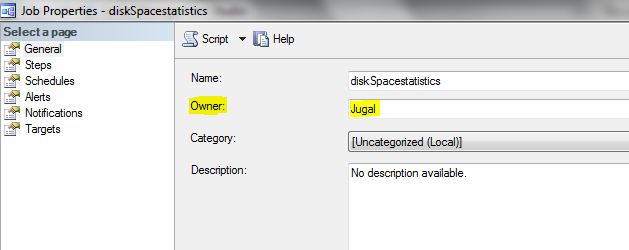
  • What is the role of job owner in SQL Server? How does it affect job?

    role of job owner account

    Capture

    When SQL Server Agent run the schedule job it will check for the permission of the job owner, if job owner is non-sysadmin account, SQL Server logs into job using its own credential and switches the context of the job to non-sysadmin job owner account.

    You can see the job history below message for the security context switch

    Message
    Executed as user: Jugal

    If the job owner is sysAdmin account SQL Agent will run the job under its own security context, for example job owner is SA which is SQL Server Sysadmin account. You can see in the job history, SQL Server service account.

    Executed as user: SQL Server Service account

    It is recommended that individual user accounts should not be set as the owner of the agent jobs because of the security issue and to avoid the important job failures, in case individual account deleted or required permission revoked due to role change or account disable in active directory.

    Instead of using individual user accounts as job owner dedicated account with the least privileges should be created to run SQL Server agent jobs.