Category: Security

  • Task Scheduler Error – specified logon session does not exist

    Recently I got a task to move windows server 2003 to windows server 2008. Task is designed to execute .CMD file which internally calling .BAT file. Task was designed to run using service account with store password on windows server 2003.

    First of all I was unable to import the task to windows server 2008 due to format issue so I have created new scheduled task and specify the location of .CMD file to execute when I configured the service account and try to store the password I got the below error.

    An error has occurred for the task MyProfileTask. Error message: The following error was reported: A specified logon session does not exist. It may have already been terminated.

    To resolve the above error follow the below steps.

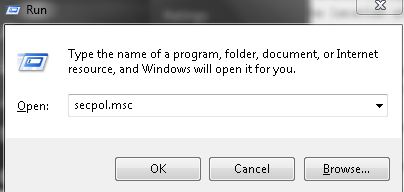
    Step 1: Go to run window and type SECPOL.msc and it will open Local Group Policy editor window
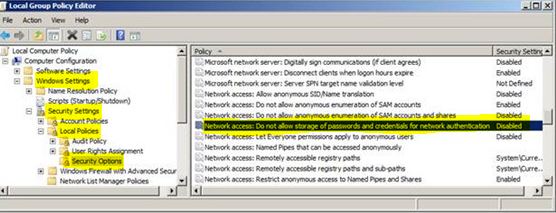
    Image1

    Step 2: Go to Security Settings –> Local Policies –> Security Options and disable the Network Access: Do not allow storage of passwords and credentials for network authentication option.
    Image2

  • Script to get the SQL Server Installation Date and Authentication Mode

    Recently I got a request where I have to check the SQL Server installation date and SQL Server authentication mode. I have write the below script and execute it against all the servers registered in CMS.

    Here is the script

    select createdate as InstallationDate ,
    CASE SERVERPROPERTY('IsIntegratedSecurityOnly')   
    WHEN 1 THEN 'Windows Authentication'   
    WHEN 0 THEN 'Windows and SQL Server Authentication'   
    END as [AuthenticationMode],
    SERVERPROPERTY('servername') as svrName 
    from master..syslogins where name like 'NT AUTHORITY\SYSTEM'
    
  • ORIGINAL_LOGIN() and SUSER_SNAME() functions

    ORIGINAL_LOGIN() function returns the name of the original login that connected to the instance of SQL Server and is used to identify original login in all sessions. Even though you will do the security context switch it will return the original login name.

    SUSER_SNAME returns the name of user in the current security context.

    --connect SQL Using LoginDEMO account
    SELECT ORIGINAL_LOGIN() Original_Login_func, SUSER_SNAME() Suser_Name_Login_Func
    
    --Executing query using LoginTest account
    execute as login = 'LoginTest'
    SELECT ORIGINAL_LOGIN() Original_Login_func, SUSER_SNAME() Suser_Name_Login_Func
    revert
    
    --Again executing query be reverting the change
    SELECT ORIGINAL_LOGIN() Original_Login_func, SUSER_SNAME() Suser_Name_Login_Func
    

    Check below output image for more information. I connected SQL Server using LoginDemo account.
    New

  • Monitoring and Troubleshooting using sys.dm_os_ring_buffers

    sys.dm_os_ring_buffers: You can use the undocumented Ring Buffer DMV to troubleshoot the below issues.

    • Security Exceptions
    • Exception raised at SQL Operating System level
    • Connection Dropped By the Server
    • System Resource Utilization
    • Memory Pressure
    • CLR Integration Scheduler State
    • Extended Events Subsystems State

    Execute the below query to get the distinct ring buffer type.

    select distinct ring_buffer_type from sys.dm_os_ring_buffers
    
    • RING_BUFFER_RESOURCE_MONITOR
    • RING_BUFFER_SCHEDULER_MONITOR
    • RING_BUFFER_MEMORY_BROKER
    • RING_BUFFER_SECURITY_ERROR
    • RING_BUFFER_XE_BUFFER_STATE
    • RING_BUFFER_SCHEDULER
    • RING_BUFFER_CONNECTIVITY
    • RING_BUFFER_EXCEPTION
    • RING_BUFFER_XE_LOG

    Check below script as example to troubleshoot the Security Issue using ring buffer. You can change the ring buffer type in below script to troubleshoot the different issues.

    -- Check the Ring Buffer in SQL Server 2008
    
    SET ANSI_NULLS ON
    SET QUOTED_IDENTIFIER ON
    SET ANSI_WARNINGS ON
    SET ANSI_PADDING ON
    
    SELECT CONVERT (varchar(30), GETDATE(), 121) as Run_Time,
    dateadd (ms, (ST.[RecordTime] - sys.ms_ticks), GETDATE()) as [Notification_Time],
    ST.* , sys.ms_ticks AS [Current Time]
    FROM
    (SELECT
    RBXML.value('(//Record/Error/ErrorCode)[1]', 'varchar(30)') AS [ErrorCode],
    RBXML.value('(//Record/Error/CallingAPIName)[1]', 'varchar(255)') AS [CallingAPIName],
    RBXML.value('(//Record/Error/APIName)[1]', 'varchar(255)') AS [APIName],
    RBXML.value('(//Record/Error/SPID)[1]', 'int') AS [SPID],
    RBXML.value('(//Record/@id)[1]', 'bigint') AS [Record Id],
    RBXML.value('(//Record/@type)[1]', 'varchar(30)') AS [Type],
    RBXML.value('(//Record/@time)[1]', 'bigint') AS [RecordTime]
    FROM (SELECT CAST (record as xml) FROM sys.dm_os_ring_buffers
    WHERE ring_buffer_type = 'RING_BUFFER_SECURITY_ERROR') AS RB(RBXML)) ST
    CROSS JOIN sys.dm_os_sys_info sys
    ORDER BY ST.[RecordTime] ASC

    
    -- Script to Check the Ring Buffer in SQL Server 2005
    
    SET ANSI_NULLS ON
    SET QUOTED_IDENTIFIER ON
    SET ANSI_WARNINGS ON
    SET ANSI_PADDING ON
    
    SELECT CONVERT (varchar(30), GETDATE(), 121) as runtime,
    DATEADD (ms, -1 * ((sys.cpu_ticks / sys.cpu_ticks_in_ms) - ST.[RecordTime]), GETDATE()) AS NotificationTime,
    ST.* , sys.ms_ticks AS [CurrentTime]
    FROM
    (SELECT
    RBXML.value('(//Record/Error/ErrorCode)[1]', 'varchar(30)') AS [ErrorCode],
    RBXML.value('(//Record/Error/CallingAPIName)[1]', 'varchar(255)') AS [CallingAPIName],
    RBXML.value('(//Record/Error/APIName)[1]', 'varchar(255)') AS [APIName],
    RBXML.value('(//Record/Error/SPID)[1]', 'int') AS [SPID],
    RBXML.value('(//Record/@id)[1]', 'bigint') AS [Record Id],
    RBXML.value('(//Record/@type)[1]', 'varchar(30)') AS [Type],
    RBXML.value('(//Record/@time)[1]', 'bigint') AS [RecordTime]
    FROM (SELECT CAST (record as xml) FROM sys.dm_os_ring_buffers
    WHERE ring_buffer_type = 'RING_BUFFER_SECURITY_ERROR') AS RB(RBXML)) ST
    CROSS JOIN sys.dm_os_sys_info sys
    ORDER BY ST.[RecordTime] ASC


    From the output we can see the hexadecimal error code 0x6FD. You have to convert these error code into decimal value, which will be 0x6FD = 1789

    Check the above decimal error codes using the NET HELPMSG command, which will give you more information on the issue.

  • SQL Server Management Studio Error 916

    Problem
    When connecting to SQL Server using Management Studio (SSMS), with the limited permissions, you do not see any user databases or receive Error 916 when expanding the database list from Object Explorer. The error message is “The server principal “Login Name” is not able to access the database “database name” under the current security context. (Microsoft SQL Server, Error: 916).” In this tip I will explain the root cause of the issue and how to fix it.

    Solution
    http://www.mssqltips.com/sqlservertip/2761/sql-server-management-studio-error-916/