Category: Security

  • Msg 7391, Level 16, State 2, Line 23 – Error while running Linked Server

    Error Description 

    OLE DB provider “SQLNCLI” for linked server “MYView” returned message “The transaction manager has disabled its support for remote/network transactions.”.

     Msg 7391, Level 16, State 2, Line 23

     The operation could not be performed because OLE DB provider “SQLNCLI” for linked server “MYView” was unable to begin a distributed transaction.

     Resolution:

    1. Check whether DTC is blocked by firewall, if it is blocked by firewall release it.

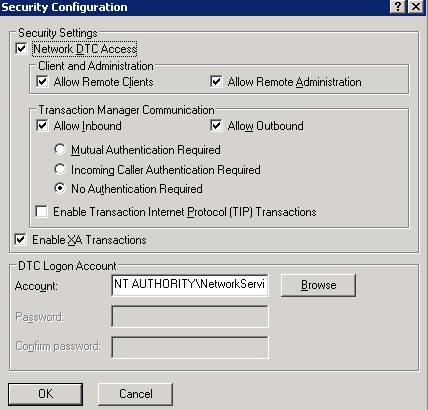
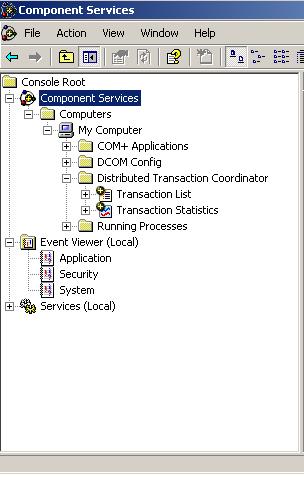
    2. Check or configure DTC to allow network connection as below.
     msdtc

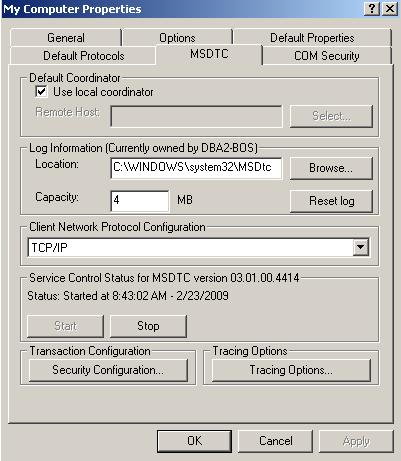
    Go to Control Panel ->Administrative Tools -> Component Services -> Expand the Computer Node -> Right click on My Computer) -> Click on Properties -> MS DTC Tab -> Security Configuration
     

  • SQL Server Security Interview Questions

    During the interview I always like to ask below security questions to DBA. I found that sometimes DBAs are not able to answer these questions.

    Question 1: What will you do if you lost rights of your SQL Server instance?

    We can use the below options

    1. Dedicated Administrator Connection
    2. BUILIN\Administrator Group (Incase its rights are not revoked)
    3. Final Option is to change the registry value
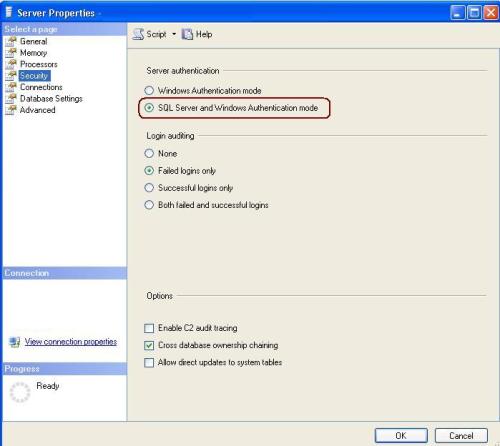
    4. You can change authentication mode via registry 

    Question 2: – What is SQL Injection?

    SQL Injection is developed where unhandled\unexpected SQL commands are passed to SQL Server in a malicious manner.  It is a problem because unknowingly data can be stolen, deleted, updated, inserted or corrupted. 

    Question 3: – What is the Guest user account in SQL Server?  What login is it mapped to it?   

    The Guest user account is created by default in all databases and is used when explicit permissions are not granted to access an object.  It is not mapped directly to any login, but can be used by any login.  Depending on your security needs, it may make sense to drop the Guest user account, in all databases except Master and TempDB 

    Question 4: – What is the use of BUILTIN\Administrators Group in SQL Server?

    Any Windows login in BUILTIN\Administrators group is by default a SQL Server system administrator. This single group can be used to manage administrators from a Windows and SQL Server perspective

  • Server: Msg 7391, Level 16, State 1, Line 2

    Problem Symtomps
    The operation could not be performed because the OLE DB provider ‘SQLOLEDB’ was unable to begin a distributed transaction. OLE/DB provider returned message: New transaction cannot enlist in the specified transaction coordinator.

    Cause
    The problem occurs because Microsoft Distributed Transaction Coordinator (MS DTC) is not configured for network access. By default, the network access settings of MS DTC are disabled on new installations of SQL Server 2000 on computers that are running Windows Server 2003.
    Resolution

    Step 1: Open Component Services Wizard using below steps
    Go to -> Start -> All Programs -> Administrative Tools -> Component Services

    Step 2: Expand the Componenet Service and Double Click on Computers

    Step 3: Right Click on MyCompute and select properties

    Step 4: Click on MSDTC Tab and then click on Security Configuration

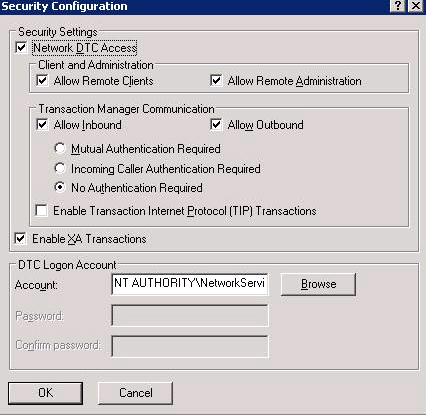
    Step 5: In the Security Configuration dialog box, check the Network DTC Access check box

    Step 6: Under  Network DTC Access, click on New transaction

     Please find the below images for the same.

    untitled1

    Figure 2

    Select Network Transaction

    Figure 3

    untitled3

  • Msg 15063, Level 16, State 1

    Error:
    Msg 15063, Level 16, State 1, Server DBServerName, Line 1
    The login already has an account under a different user name.

    Cause
    Login already has an account under a different user name on particular database.

    User is executing sp_GrantDBAccess.  sp_GrantDBAccess system stored procedure adds a security account in the current database for a Microsoft SQL Server login or Microsoft Windows NT user or group, and enables it to be granted permissions to perform activities in the database.
    But the login already has an account under a different user name on current database. That’s why the it is throwing an error.
     
    Solution
    Instead of using sp_GrantDBAccess user has to execute below query
    ALTER AUTHORIZATION ON SCHEMA::[db_accessadmin] TO [GMO\service-ueagle]