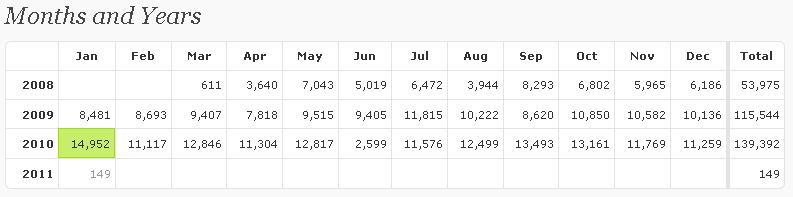
The Louvre Museum has 8.5 million visitors per year. This blog was viewed about 140,000 times in 2010. If it were an exhibit at The Louvre Museum, it would take 6 days for that many people to see it.
In 2010, there were 81 new posts, growing the total archive of this blog to 220 posts. There were 46 pictures uploaded, taking up a total of 5mb. That’s about 4 pictures per month.
The busiest day of the year was January 25th with 1709 views. The most popular post that day was Happy Republic Day.
Where did they come from?
The top referring sites in 2010 were google.co.in, google.com, en.wordpress.com, stackoverflow.com, and yandex.ru.
Some visitors came searching, mostly for sql server 2005 interview questions, republic day, dba responsibilities, error 18456, and system databases in sql server 2005.
Attractions in 2010
These are the posts and pages that got the most views in 2010.
Error
Msg 15291, Level 16, State 1, Procedure sp_change_users_login, Line 131
Terminating this procedure. The Login name ‘DJ’ is absent or invalid
What is Orphaned User?
An Orphaned User in SQL Server is a database user for which a valid SQL Server Login is not available or it is wrongly defined with the different SID in the SQL Server instance, thereby not allowing the user to get connect to the database to perform activities.
Below scenarios are mostly responsible for Orphan Users
1. A SQL Server Login was accidentally dropped
2. A database is restored with a copy of database from another SQL Server Instance
3. SID of the login is different in sys.server_principals and sys.sysusers
Steps to re-produce issue Step 1: Creating database SQLDBPool
USE [master]

GO
CREATE DATABASE [sqldbpool] ON PRIMARY
( NAME = N’sqldbpool’, FILENAME = N’C:\sqldbpool.mdf’ , SIZE = 2048KB , MAXSIZE = UNLIMITED, FILEGROWTH = 1024KB )
LOG ON
( NAME = N’sqldbpool_log’, FILENAME = N’C:\sqldbpool_log.ldf’ , SIZE = 1024KB , MAXSIZE = 2048GB , FILEGROWTH = 10%)
COLLATE SQL_Latin1_General_CP1_CI_AS
GO
Step 2:
In this example I am creating user DJ using below script. You can also create user from GUI as well Using GUI
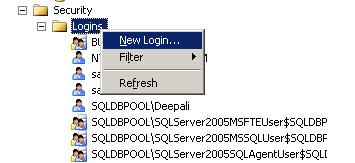
Right Click On Security Node and Select New Login
Using Script
USE [master]

GO

CREATE LOGIN [DJ] WITH PASSWORD=N'pune@123',

DEFAULT_DATABASE=[master],

CHECK_EXPIRATION=OFF,

CHECK_POLICY=OFF

GO
Step 3: I am assigning Data Reader and writer permission to Login DJ to database SQLDBPool
USE [sqldbpool]

GO

CREATE USER [DJ] FOR LOGIN [DJ]

GO

USE [sqldbpool]

GO

EXEC sp_addrolemember N'db_datawriter', N'DJ'

GO

USE [sqldbpool]

GO

EXEC sp_addrolemember N'db_denydatareader', N'DJ'

GO
Step 4: Dropping the login DJ and it will make the user DJ as orphan in SQLDBPool database
USE [master]

GO

DROP LOGIN [DJ]

GO
Steps to fix the issue Step 1: You can use SP_CHANGE_USERS_LOGIN stored procedure to fix the Orphan user issue, for that you need the Database Owner permission on that database.
Examples
EXEC sp_change_users_login 'Report' --Reports orphaned user

EXEC sp_change_users_login 'Auto_Fix', 'user' -- auto fix when SID mis-match issue

EXEC sp_change_users_login 'Auto_Fix', 'user', 'login', 'password'
The stored procedure SP_CHANGE_USERS_LOGIN accepts arguments AUTO_FIX, REPORT or UPDATE_ONE as @Action parameter.
AUTO_FIX: If this value is used for @Action parameter, it will create a SQL Server Login if it was not present earlier and will synchronize the SQL Server Login with that of the Database User.We have to also provide the password here.
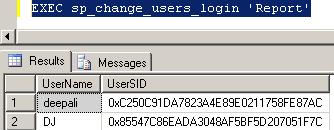
REPORT: It will display the list of all the Orphaned Users along with the SID (Security Identifiers) value within the current database which are not linked to a SQL Server Login.
UPDATE_ONE:will synchronize the specified database user with an existing SQL Server Login.
Step 2: As first step I am checking orphan user using Report parameter, it will show me the SID and orphan user name.
List of Orphaned User
Step 3: In this scenario we have dropped the SQL Login so it is required to create the login. We can create the login using below query specifying password and mapped it to orphan user
EXEC sp_change_users_login 'Auto_Fix', 'DJ', NULL, 'pune@123'
Step 4: Executing again the report query to list out orphan users. EXEC sp_change_users_login 'Report'
Use below link to list out and fix the Orphan User issue for all the databases.
First of thank you very much for reading this blog
I hope this blog will help you in clearing your interviews, daily database issues and will enhance your knowledge.
As you aware WORDPRESS is not supporting Google Ads until you purchase its domain rights due to security reasons.
To earn some money by using Google Ads I have started blogging on BLOGSPOT.COM and the URL of my new blog is as below. I believe I will get the same kind of support and traffic on this blog as well.