
Step 1: Launch SQL Server Management Studio.
Step 2: In the object explorer, right click on the database and select Reports -> Standard Reports -> Index Physical Statistics.
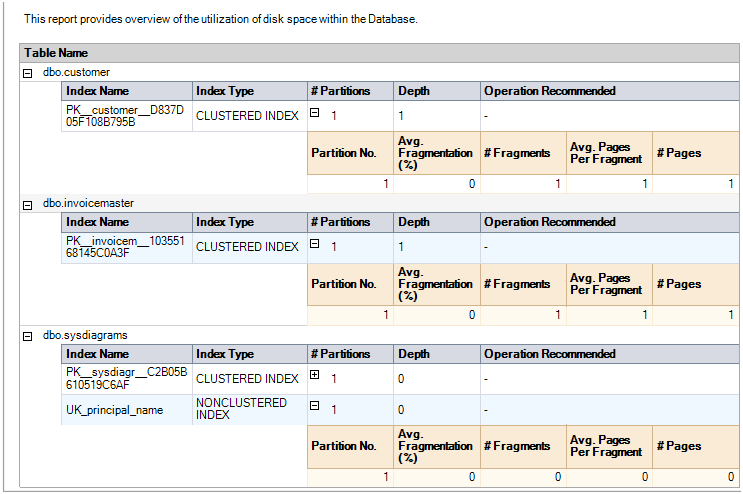
Step 3: SQL Server Management Studio will generate a report showing information about the Table Names, Index Names, Index Type, Number of Partitions and Operation Recommendations.
Step 4: Repeat the above steps to check the fragmentation of all user databases.
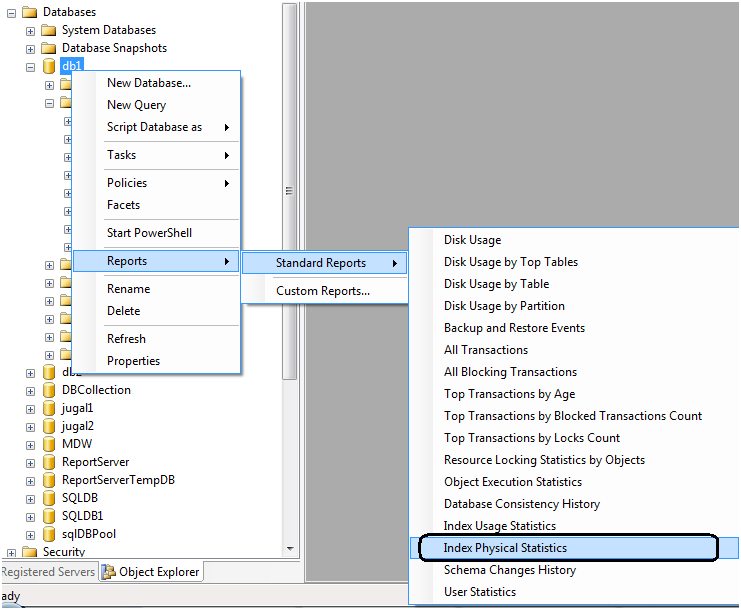
One key value that is provided in the report is the Operation Recommended field. Any value of Rebuild is an indication that the index is fragmented.
By expanding the # Partitions field, you can see the % of fragmentation for a given index.
Report looks like below.
Fragmentation in the AI era: vector indexes
The fragmentation thinking above now applies to a new index type. SQL Server 2025 added a native VECTOR data type (generally available) for storing embeddings alongside relational data, with DiskANN-based vector indexes for similarity search still in preview as of early 2026 — check the current docs before planning around them. The maintenance mindset does not change: whatever the index type, an unmaintained index is a slow query waiting to happen. For how those embeddings actually get retrieved: The 9 Types of RAG, Explained


Thanks for the comment, will get back to you soon… Jugal Shah