Step 1: Launch SQL Server Management Studio.
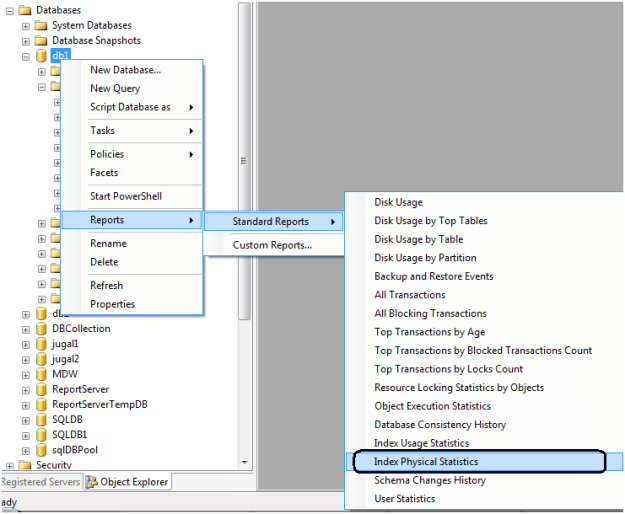
Step 2: In the object explorer, right click on the database and select Reports -> Standard Reports -> Index Physical Statistics.
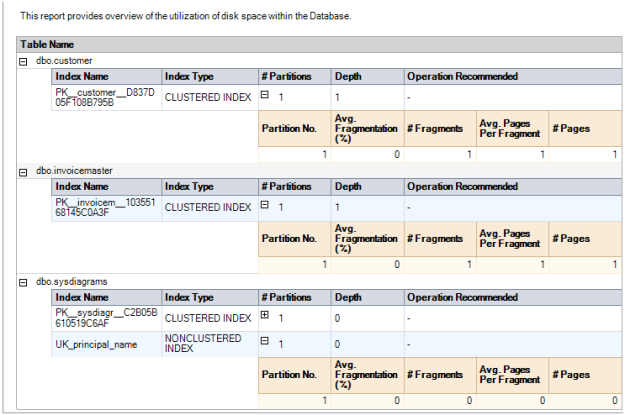
Step 3: SQL Server Management Studio will generate a report showing information about the Table Names, Index Names, Index Type, Number of Partitions and Operation Recommendations.
Step 4: Repeat the above steps to check the fragmentation of all user databases.
One key value that is provided in the report is the Operation Recommended field. Any value of Rebuild is an indication that the index is fragmented.
By expanding the # Partitions field, you can see the % of fragmentation for a given index.
Report looks like below.
 aiDeeva.com
Thanks for the help. The first three searches I did lead me to complex scripts. You pointed me straight at an answer.
Nice sir,
Thanks this was very easy to perform step wise. I got a brief description from this:
http://www.sqlserverlogexplorer.com/how-to-find-database-fragmentation/ for knowing actually what’s database fragmentation. Your article help me how to perform manually.