Today while configuring the Reporting Service I got the below error.
User ‘XXXXX’ does not have required permissions. Verify that sufficient permissions have been granted and Windows User Account Control (UAC) restrictions have been addressed.
You can change the UAC Restriction by following the below steps.
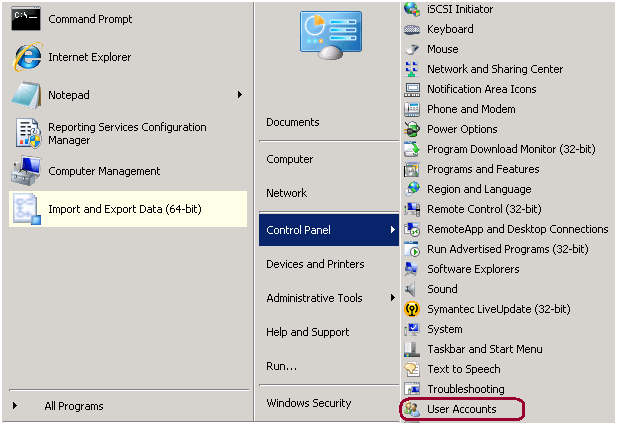
Step 1: Go to Start -> Control Panel -> User Accounts
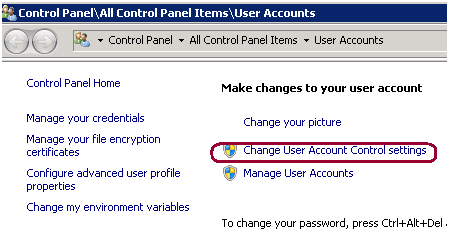
Step 2: Click on Change User Account Control settings.
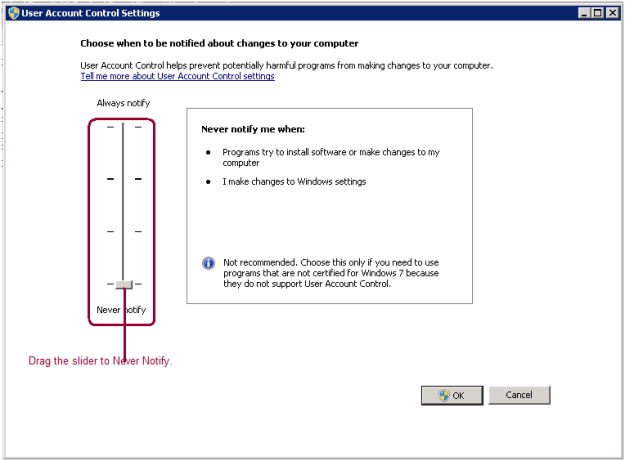
Step 3: Drag the slider to never notify and it will fix the issue.
Step 4: Reboot the box and issue will be fixed. To reboot you can use the shutdown –i dos command as well.
 aiDeeva.com
Thank you very much. This saved my day!