You can use system stored procedure sp_msloginmappings to list out the SQL logins and database user mappings.
Syntax
sp_msloginmappings @Loginname , @Flags
@Loginname – Optional argument, in case if you not specify the Login name procedure will return the result for all the SQL Server logins
@Flags – You can specify value 0 or 1, 0 value will show user mapping to all databases and 1 will show the user mapping to current database only. Default value is 0
use master
go
exec sp_msloginmappings 'sa', 0
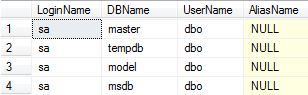
use master
go
exec sp_msloginmappings 'sa', 1

In case you want to run the sp_msloginmappings across multiple SQL Instance using either Central management server or powershell. You can use the below script.
 create table #loginmappings(
  LoginName  nvarchar(128) NULL,
  DBName     nvarchar(128) NULL,
  UserName   nvarchar(128) NULL,
  AliasName  nvarchar(128) NULL
 )

 insert into #loginmappings
 EXEC master..sp_msloginmappings

 select * from #loginmappings

 drop table #loginmappings
 aiDeeva.com
Pingback: Script to list out SQL Logins and Database User Mappings – SQLDBPool – SQL Server Online Help | DiggerSite
useful information
I’m trying to figure out how to see all logins mapped to a single database, Not sure which table maps a login user to a database user. I would like use this information to remove any orphaned users and to bulk unmap logins that I don’t want to have access to the db. Though I’m not sure how to unmap without deleting the db user.