You can execute below script to check whether SQL Server is case sensitive or not
SELECT
case when 'a' <> 'A'
then 'Case-Sensitive'
else 'case-insensitive' end  AS 'Case Sensitivity'

You can execute below script to check whether SQL Server is case sensitive or not
SELECT case when 'a' <> 'A' then 'Case-Sensitive' else 'case-insensitive' end AS 'Case Sensitivity'
Spinlocks are lightweight synchronization primitives which are used to protect access to data structures. Spinlocks are used to access data structures for a very short period of time. When a thread attempting to acquire a spinlock and if it is unable to obtain access it executes in a loop periodically checking to determine if the resource is available instead of immediately yielding.
After some period of time a thread waiting on a spinlock will yield before it is able to acquire the resource in order to allow other threads running on the same CPU to execute. This is known as a backoff.
When a large number of threads are contending for access to a single spinlock and it can lead to performance problems
You can use below DMV to get the SPIN LOCK information
select * from sys.dm_os_spinlock_stats
Examples
FGCP_PRP_FILL
OPT_IDX_STATS
BUF_FREE_LIST
While troubleshooting the disk space issue, you can use below script to check the data file size, used space and free size.
select
		DBName,
		name,
		[filename],
		size as 'Size(MB)',
		usedspace as 'UsedSpace(MB)',
		(size - usedspace) as 'AvailableFreeSpace(MB)'
from
(
SELECT
db_name(s.database_id) as DBName,
s.name AS [Name],
s.physical_name AS [FileName],
(s.size * CONVERT(float,8))/1024 AS [Size],
(CAST(CASE s.type WHEN 2 THEN 0 ELSE CAST(FILEPROPERTY(s.name, 'SpaceUsed') AS float)* CONVERT(float,8) END AS float))/1024 AS [UsedSpace],
s.file_id AS [ID]
FROM
sys.filegroups AS g
INNER JOIN sys.master_files AS s ON ((s.type = 2 or s.type = 0) and s.database_id = db_id() and (s.drop_lsn IS NULL)) AND (s.data_space_id=g.data_space_id)
) DBFileSizeInfo
Background
In SQL Server Database Recovery model will decide how the transaction log will be logged in transaction log file. Transaction log file extension is .LDF
Full – Transaction log is fully logged (Can take log backup)
Bulk Logged – Bulk transaction is minimally logged (Can take log backup)
Simple – Transaction log will be truncated on checkpoint
In transaction log file transactions are sequentially logged, every record in transaction log file is uniquely identified by log sequence number (LSN). LSN data type is Numeric (25,0)
You can follow below best practices for the transaction log file
1. Don’t create multiple log files : As transactions will be logged into log file sequential manner it would not help for data stripping across multiple files
2. Keep the transaction log file on the separate drive
3. Identify the RPO and RTO for the database and according to that choose the recovery model and correct log backup strategy
4. RAID 1 + 0 is high recommended for transaction log
5. AUTO SHRINK should be always off on the database
6. Pre-allocate the space to transaction log file, it will improve the performance. Don’t depend on the auto growth option.
7. Always set the values of Initial size, max size and growth property of the transaction log file
8. Always set auto growth value, don’t set in percentage
9. Transaction Log file internal fragmentation can also lead the performance and database recovery issue. Database should not have an excessive number of Virtual Log Files (VLFs) inside the Transaction Log. Having a large number of small VLFs can slow down the recovery process that a database goes through on startup or after restoring a backup. Make sure transaction log initial size and log growth defined well to avoid internal fragmentation
10. External fragmentation can be removed by using disk defragmentation utility
11. In case of Transaction log full, please use below query to check the cause of the log full and take the decision accordingly.
SELECT name ,
recovery_model_desc ,
log_reuse_wait_desc
FROM sys.databases
WHERE name = @DatabaseName
Recently I got a task to move windows server 2003 to windows server 2008. Task is designed to execute .CMD file which internally calling .BAT file. Task was designed to run using service account with store password on windows server 2003.
First of all I was unable to import the task to windows server 2008 due to format issue so I have created new scheduled task and specify the location of .CMD file to execute when I configured the service account and try to store the password I got the below error.
An error has occurred for the task MyProfileTask. Error message: The following error was reported: A specified logon session does not exist. It may have already been terminated.
To resolve the above error follow the below steps.
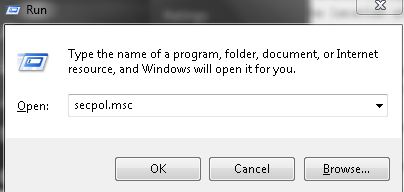
Step 1: Go to run window and type SECPOL.msc and it will open Local Group Policy editor window
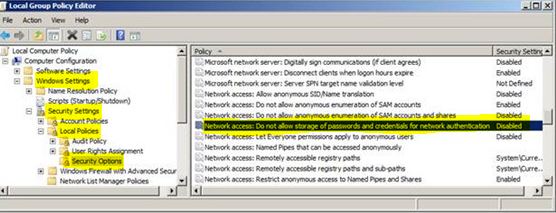
Step 2: Go to Security Settings –> Local Policies –> Security Options and disable the Network Access: Do not allow storage of passwords and credentials for network authentication option.
 aiDeeva.com