Author Archives: Jugal Shah

Unknown's avatar

About Jugal Shah

Jugal Shah has 19 plus years of experience in leading and managing the data and analytics practices. He has done the significant work in databases, analytics and generative AI projects. You can check his profile on http://sqldbpool.com/certificationawards/ URL.

Logical Joins and Physical Joins

Logical Joins: INNER JOIN, RIGHT/LEFT OUTER JOIN, CROSS JOIN, OUTER APPLY. This joins are written by the user.

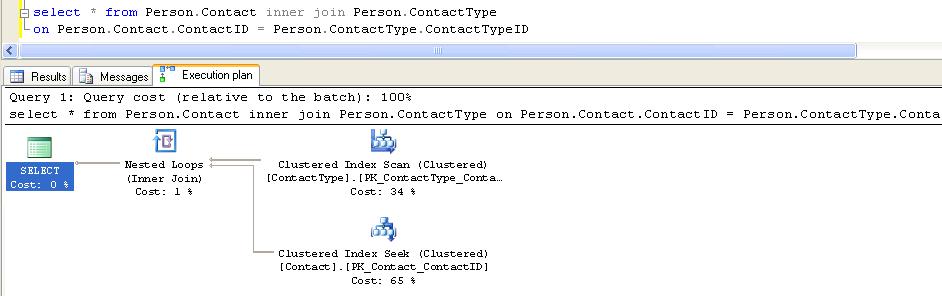
Physical Joins: Nested loop, merge join and hash join is common operators which we will see in execution plan as long as query contains any logical joins (inner join, outer join, cross join, semi join). These three joins are called Physical Joins.

In below example I have executed query against AdventureWorks database with Inner Join. You can see the Nested Join in Execution Plan.

Date Time Functions

CURRENT_TIMESTAMP()
Returns the current database system timestamp as a datetime value without the database time zone offset.

GETDATE ()
Returns the current database system timestamp as a datetime value without the database time zone offset. This value is derived from the operating system of the computer on which the instance of SQL Server is running.

GETUTCDATE()
Returns the current database system timestamp as a datetime value. The database time zone offset is not included. This value represents the current UTC time (Coordinated Universal Time).

SYSDATETIME()

Returns a datetime2(7) value that contains the date and time of the computer on which the instance of SQL Server is running

SYSDATETIMEOFFSET()
Returns a datetimeoffset(7) value that contains the date and time of the computer on which the instance of SQL Server is running with timezone offset.

SYSUTCDATETIME
Returns a datetime2 value that contains the date and time of the computer on which the instance of SQL Server is running. The date and time is returned as UTC time (Coordinated Universal Time).

SELECT SYSDATETIME()
———————-
2011-01-10 06:38:25.05

SELECT SYSDATETIMEOFFSET()
———————————-
2011-01-10 06:38:25.0527369 -05:00

SELECT SYSUTCDATETIME()
———————-
2011-01-10 11:38:25.05

SELECT CURRENT_TIMESTAMP
———————–
2011-01-10 06:38:25.050

SELECT GETDATE()
———————–

2011-01-10 06:38:25.050

SELECT GETUTCDATE()
———————–
2011-01-10 11:38:25.050

Note: Refer books online for more information.

How to Create Alias in SQL Server?

What is Alias?
A SQL Server alias is the user friendly name. For example if there are many application databases hosted on same SQL Server. You can give the different alias name for each application. Simply Alias is an entry in a hosts file, a sort of hard coded DNS lookup a SQL Server instance.

You can create Alias from Configuration Manager.

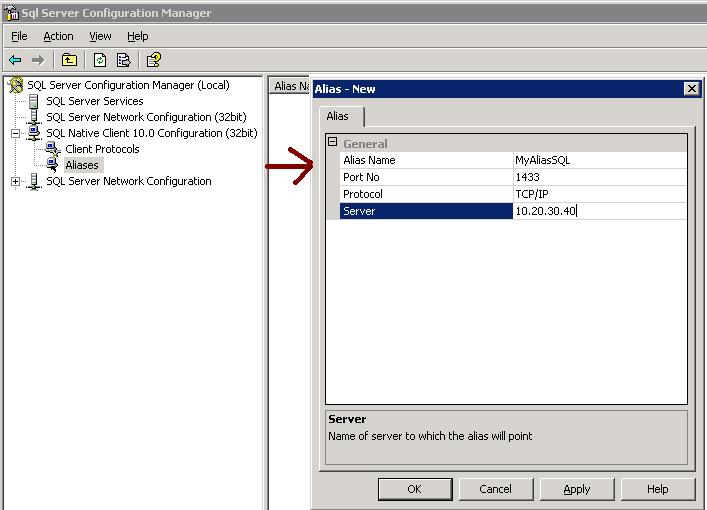
Go to SQL Server Configuration manager – Go to SQL Native Client -> Right Click and SELECT New Alias from the popup window.

Alias Name — Alernative name of SQL Server
Port No — Specify the Port No
Server – Mentioned the Server Name or IP address

Make sure On a 64-bit system, if you have both 32-bit and 64-bit clients, you will need to create an alias for BOTH 32-bit and 64-bit clients.

Identify Objects Type using sys.SysObjects

Today I received an email from my one of blog reader regarding identification of different objects using Sys.sysObjects.

You can query the sys.SysObjects to get all the objects created with in the database.
Example

SELECT *
FROM   sys.sysobjects
WHERE  TYPE = ‘u’ 

Below are the different kind of object you can retrieve from database.

Object Type Abbreviation
AF = Aggregate function (CLR)
C = CHECK constraint
D = Default or DEFAULT constraint
F = FOREIGN KEY constraint
L = Log
FN = Scalar function
FS = Assembly (CLR) scalar-function
FT = Assembly (CLR) table-valued function
IF = In-lined table-function
IT = Internal table
P = Stored procedure
PC = Assembly (CLR) stored-procedure
PK = PRIMARY KEY constraint (type is K)
RF = Replication filter stored procedure
S = System table
SN = Synonym
SQ = Service queue
TA = Assembly (CLR) DML trigger
TF = Table function
TR = SQL DML Trigger
TT = Table type
U = User table
UQ = UNIQUE constraint (type is K)
V = View
X = Extended stored procedure