Dear Reader,
I would like to share good Query formating link. Please check it.

Dear Reader,
I would like to share good Query formating link. Please check it.
Get the list of System Stored Procedure
SELECT * FROM SYS.ALL_OBJECTS WHERE type='P' and object_id < 0
You can get the list of CLR procedures using below query
SELECT NAME FROM SYS.ALL_OBJECTS WHERE type='PC'
Steps to Run a Stored Procedure when SQL Server starts
As you all know, when SQL Server starts, it will first scan the registry to get the startup parameter values. By scaning registry it will find the master database files first and then make the master database online.
So if you want a procedure to execute when SQL Server starts automatically, you have to create that procedure in Master database only.
Step 1: Create a procedure in master database
Step 2: We have to use sp_procoption to set the stored procedure to execute when SQL Server service starts. Please see the example below.
EXEC sp_procoption 'procedure name', 'startup', 'true'
Step 3: Restart the SQL Service, to check the procedure output.
How turn off startup procedure?
You can turn-off the procedrue execution using below query.
EXEC sp_procoption 'procedure name', 'startup', 'false'
SPT_Values is un-documented table. It seems it is available from Sybase days and it is used in system stored procedures to translate codes into readable strings.
It stores the specific number of each SQL Server Property. If you execute below query, you can get the diffrent kind of result and you can use it as per the need.
select min(number) FROM master..spt_values
–Output
-32768
select min(number) FROM master..spt_values where number > 0
— Output
1
select max(number) FROM master..spt_values
— Output
1469283328
You can use to generate number from 1 to 2048 as well.
SELECT distinct number

FROM master..spt_values

WHERE number BETWEEN 10 AND 15
Problem
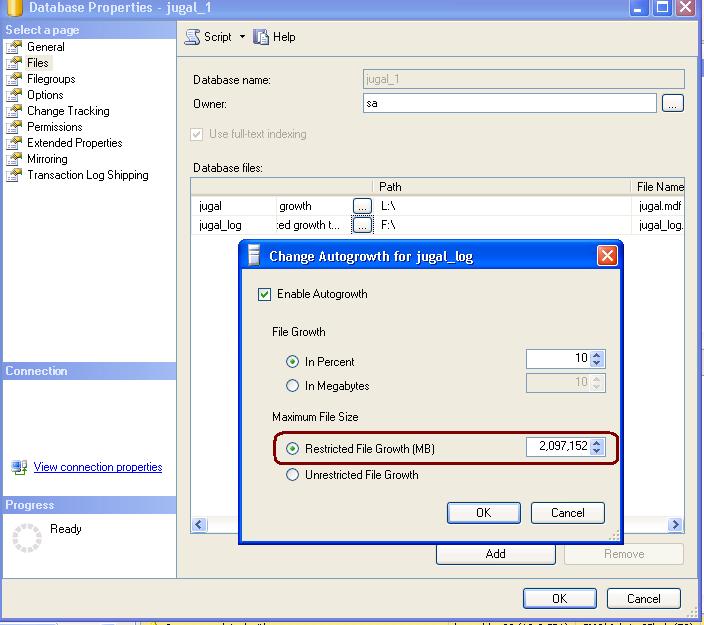
People often complains that they are unable to change the Log File Growth to un-restricted.
Solution
Whenever we are chaging max size as unlimited for log file, SQL Server reset the Max Size avalue to 2TB and this is the max size supported for log file. This is by design only.
Please check the below image for more detail.
 aiDeeva.com