Category Archives: Database

Ranking Function – Dense_Rank()

Dense_Rank() :- The DENSE_RANK function is similar to the RANK function, although this function doesn’t produce gaps in the ranking numbers. Instead this function sequentially ranks each unique ORDER BY value. With the DENSE_RANK function each row either has the same ranking as the preceeding row, or has a ranking 1 greater then the prior row.

CREATE TABLE Emp(
EmpName VARCHAR(9),
Age INT,
MaritalStatus char(1))

INSERT INTO Emp VALUES ('Abhinav',40,'S')
INSERT INTO Emp VALUES ('Dhvani',20,'M')
INSERT INTO Emp VALUES ('Nehal',20,'M')
INSERT INTO Emp VALUES ('Sunil',95,'M')
INSERT INTO Emp VALUES ('Suvrendu',40,'M')
INSERT INTO Emp VALUES ('Bill',11,'S')
INSERT INTO Emp VALUES ('Ram',100,'S')
INSERT INTO Emp VALUES ('Nirmal',50,'S')
INSERT INTO Emp VALUES ('R',30,'S')

SELECT Dense_RANK() OVER (ORDER BY Age) AS [Rank by Age],
EmpName,
Age
FROM Emp

Rank by Age EmpName Age
-------------------- --------- -----------
1 Bill 11
2 Dhvani 20
2 Nehal 20
3 R 30
4 Abhinav 40
4 Suvrendu 40
5 Nirmal 50
6 Sunil 95
7 Ram 100

(9 row(s) affected)

SELECT Dense_RANK() OVER (PARTITION BY MaritalStatus ORDER BY Age) AS [Partition by MaritalStatus],
EmpName,
Age,
MaritalStatus
FROM emp

Partition by MaritalStatus EmpName Age MaritalStatus
-------------------------- --------- ----------- -------------
1 Dhvani 20 M
1 Nehal 20 M
2 Suvrendu 40 M
3 Sunil 95 M
1 Bill 11 S
2 R 30 S
3 Abhinav 40 S
4 Nirmal 50 S
5 Ram 100 S

(9 row(s) affected)
Ranking Function – Rank()

Rank()
The RANK function sequentially numbers a record set, but when two rows have the same order by value then they get the same ranking. Ranking value will be incremented by 1 for next un-matched row.

Syntax
RANK ( ) OVER ( [ ] )

Examples
CREATE TABLE Emp(
EmpName VARCHAR(9),
Age INT,
MaritalStatus char(1))

INSERT INTO Emp VALUES (‘Abhinav’,40,’S’)
INSERT INTO Emp VALUES (‘Dhvani’,20,’M’)
INSERT INTO Emp VALUES (‘Nehal’,20,’M’)
INSERT INTO Emp VALUES (‘Sunil’,95,’M’)
INSERT INTO Emp VALUES (‘Suvrendu’,40,’M’)
INSERT INTO Emp VALUES (‘Bill’,11,’S’)
INSERT INTO Emp VALUES (‘Ram’,100,’S’)
INSERT INTO Emp VALUES (‘Nirmal’,50,’S’)
INSERT INTO Emp VALUES (‘R’,30,’S’)

Query – I

SELECT RANK() OVER (ORDER BY Age) AS [Rank by Age],
EmpName,
Age
FROM Emp

Rank by Age EmpName Age
-------------------- --------- -----------
1 Bill 11
2 Dhvani 20
2 Nehal 20
4 R 30
5 Abhinav 40
5 Suvrendu 40
7 Nirmal 50
8 Sunil 95
9 Ram 100

(9 row(s) affected)


SELECT RANK() OVER (PARTITION BY MaritalStatus ORDER BY Age) AS [Partition by MaritalStatus],
EmpName,
Age,
MaritalStatus
FROM emp

Partition by MaritalStatus EmpName Age MaritalStatus
-------------------------- --------- ----------- -------------
1 Dhvani 20 M
1 Nehal 20 M
3 Suvrendu 40 M
4 Sunil 95 M
1 Bill 11 S
2 R 30 S
3 Abhinav 40 S
4 Nirmal 50 S
5 Ram 100 S

Ranking Function – Row_Number

Ranking functions are functions that allow you to sequentially number your result set.

Syntax

ROW_NUMBER ( ) OVER ([ ] )

partition_by_clause is a column or set of columns used to determine the grouping in which the ROW_NUMBER function applies sequential numbering.

order_by_clause is a column or set of columns used to order the result set within the grouping.

Examples

CREATE TABLE Emp(
EmpName VARCHAR(9),
Age INT,
MaritalStatus char(1))

INSERT INTO Emp VALUES ('Abhinav',40,'S')
INSERT INTO Emp VALUES ('Dhvani',20,'M')
INSERT INTO Emp VALUES ('Nehal',20,'M')
INSERT INTO Emp VALUES ('Sunil',95,'M')
INSERT INTO Emp VALUES ('Bill',11,'S')
INSERT INTO Emp VALUES ('Ram',100,'S')
INSERT INTO Emp VALUES ('Nirmal',50,'S')


Sample - 1
SELECT ROW_NUMBER() OVER (ORDER BY Age) AS [Row Number by Age],
EmpName,
Age
FROM Emp
Sample - 2
SELECT ROW_NUMBER() OVER (ORDER BY Age desc) AS [Row Number by Age],
EmpName,
Age
FROM Emp

Row Number by Age EmpName Age
——————– ——— ———–
1 Bill 11
2 Dhvani 20
3 Nehal 20
4 Abhinav 40
5 Nirmal 50
6 Sunil 95
7 Ram 100

(7 row(s) affected)

Sample - 3
SELECT ROW_NUMBER() OVER (PARTITION BY MaritalStatus ORDER BY Age) AS [Partition by MaritalStatus],
EmpName,
Age,
MaritalStatus
FROM Emp

Partition by MaritalStatus EmpName Age MaritalStatus
-------------------------- --------- ----------- -------------
1 Dhvani 20 M
2 Nehal 20 M
3 Sunil 95 M
1 Bill 11 S
2 Abhinav 40 S
3 Nirmal 50 S
4 Ram 100 S

(7 row(s) affected)

How to read error log using T-SQL?

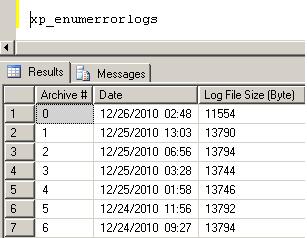
xp_enumerrorlogs
This extended stored procedure returns the list of all error logs with their last change date and size. To get the list of error logs, run:

XP_ReadErrorLog: You can execute below query to read the error log. You can read the archive file by giving the number as per the output of xp_enumerrorlogs command.  If you will not specify any file number it will open the current error log file.

EXEC sys.xp_readerrorlog @p1

@p1 = file number you want to read.