You can use Server Property errorlogfilename to get the error log file path.
SELECT SERVERPROPERTY(‘ErrorLogFileName’)
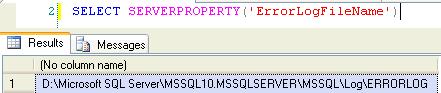
You can use Server Property errorlogfilename to get the error log file path.
SELECT SERVERPROPERTY(‘ErrorLogFileName’)
sys.dm_os_cluster_nodes
This view returns a row for each node in the failover cluster instance configuration. If the current instance is a failover clustered instance, it returns a list of nodes on which this failover cluster instance has been defined.
sys.dm_io_cluster_shared_drives
This view returns the drive name of each of the shared drives if the current server instance is a clustered server. If the current server instance is not a clustered instance it returns an empty rowset.
Permission
You must have VIEW SERVER STATE permission for the SQL Server instance.
–Shared Drives
SELECT *
FROM sys.dm_io_cluster_shared_drives
It is easy to find out the orphaned SQL logins by comparing the SID of SQL Login and User, but what in case of windows login.
Take an example if windows login is dropped and it is still exists in SQL Server. You can find out all the delete windows login which is orphaned in SQL Server, using below procedure.
Sp_validatelogins
Reports information about Windows users and groups that are mapped to SQL Server principals but no longer exist in the Windows environment.
CREATE TABLE #dropped_windows_logins
  (
     [sid]  VARBINARY(85),
     [name] SYSNAME
  )

INSERT #dropped_windows_logins
EXEC sys.Sp_validatelogins

SELECT *
FROM   #dropped_windows_logins

DROP TABLE #dropped_windows_logins
You can simply run one of the below query to check the SQL Server last restart time.
SELECT Dateadd(s, ( ( -1 ) * ( osd.[ms_ticks] / 1000 ) ), Getdate()) AS serverrestartdatetime,
       osd.sqlserver_start_time
FROM   sys.[dm_os_sys_info] osd;

OR

SELECT name,
       crdate
FROM   sys.sysdatabases
WHERE  name = 'tempdb'
sys.dm_os_schedulers is a useful DMV to find out the CPU pressure. It returns one row per scheduler in SQL Server where each scheduler is mapped to an individual processor.
We can use this DMV to monitor the condition of a scheduler or to identify runaway tasks. It will help us to identify if there is any CPU bottleneck in the SQL Server machine.
We have to check for “runnable_tasks_count” column value which indicates the count of workers that have tasks assigned to them that are just waiting for their share of time on the scheduler (logical CPU). The value of runnable_tasks_count should be as low as possible.
Permission
Requires VIEW SERVER STATE permission on the server
SELECT scheduler_id,
status,
cpu_id,
is_online,
current_tasks_count,
runnable_tasks_count,
current_workers_count,
active_workers_count,
work_queue_count,
pending_disk_io_count,
load_factor
FROM sys.dm_os_schedulers
GO
If you find the the avg(runnable_tasks_count) greater then 0 that means system is waiting for CPU time. If Pending_disk_io_count is greater then 0, that means system is bound by IO you need to get disks to perform better.
 aiDeeva.com